7
En
Set date and time
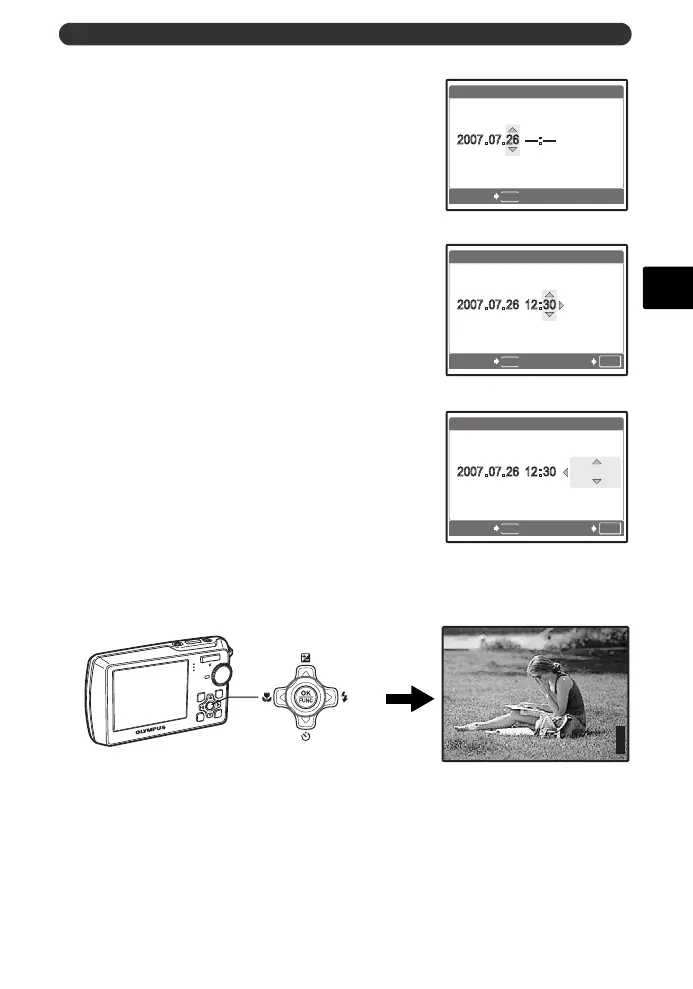
e. Press the 1F button and the 2Y
button to select [D].
f. Press the 3# button.
g. Press the 1F button and the 2Y
button to select the hours and minutes.
• The time is displayed in the 24-hour format.
h. Press the 3# button.
i. Press the 1F button and the 2Y
button to select [Y/M/D].
j. After all items have been set, press the o button.
• For precise time setting, press the o button as the time signal strikes 00 seconds.
MENU
X
CANCEL
Y/M/D
Y
M D
TIME
OK
MENU
X
CANCEL SET
Y/M/D
Y
M D
TIME
OK
MENU
X
CANCEL SET
Y/M/D
Y
M D
TIME
o Button
P
HQ
3072
×
2304
[
IN
]
44
[ ]
d4328_basic_e_00.book Page 7 Wednesday, December 13, 2006 10:29 AM






 To Next Page