SZ2-ILST
4
ASSEMBL Y
1
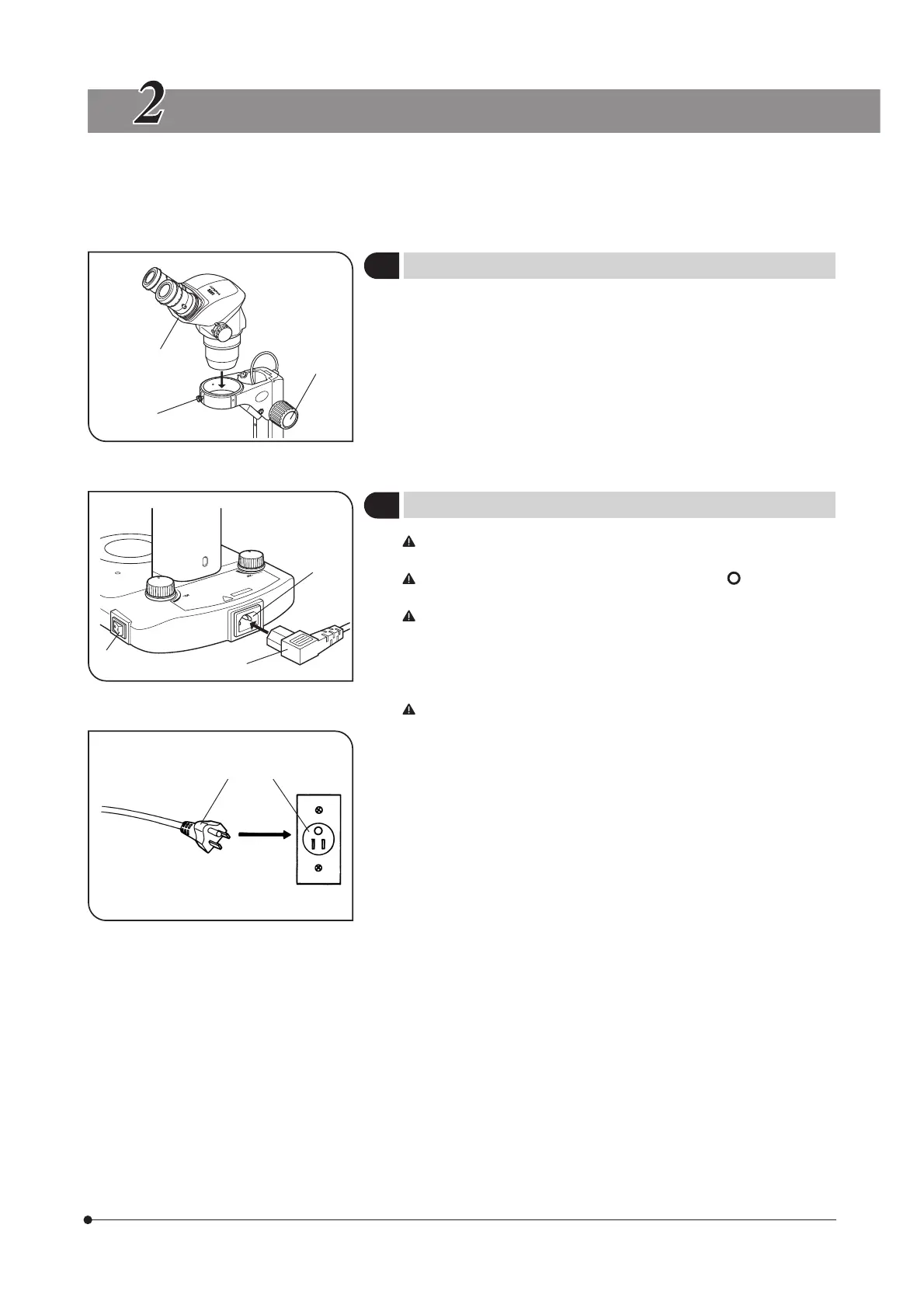
Mounting the Microscope Body
(Fig. 1)
1. Loosen the microscope body clamping knob @.
2. Gently insert an applicable microscope body ² and tighten the
clamping knob.
2
Setting Up the Power Supply
(Figs. 2 & 3)
Cables and cords are vulnerable when bent or twisted. Never
subject them to excessive force.
Make sure that the main switch @ is set to “ ” (OFF) before
connecting the power cord.
Always use the power cord provided by Olympus. If no power cord
is provided, please select the proper power cord by referring to the
section “PROPER SELECTION OF THE POWER SUPPLY CORD” at
the end of this instruction manual.
1. Connect the connector ³ of the power cord to the power cord ² firmly.
Be sure to supply power from a grounded, 3-conductor power outlet
using the proper power cord. If the power outlet is not grounded
properly, Olympus can no longer warrant the electrical safety perfor-
mance of the equipment.
2. Connect the plug | of the power cord to the wall outlet ƒ.
Fig. 1
Fig. 2
Fig. 3
3
1
2
3
1
2
|
ƒ



 To Next Page