22
EN
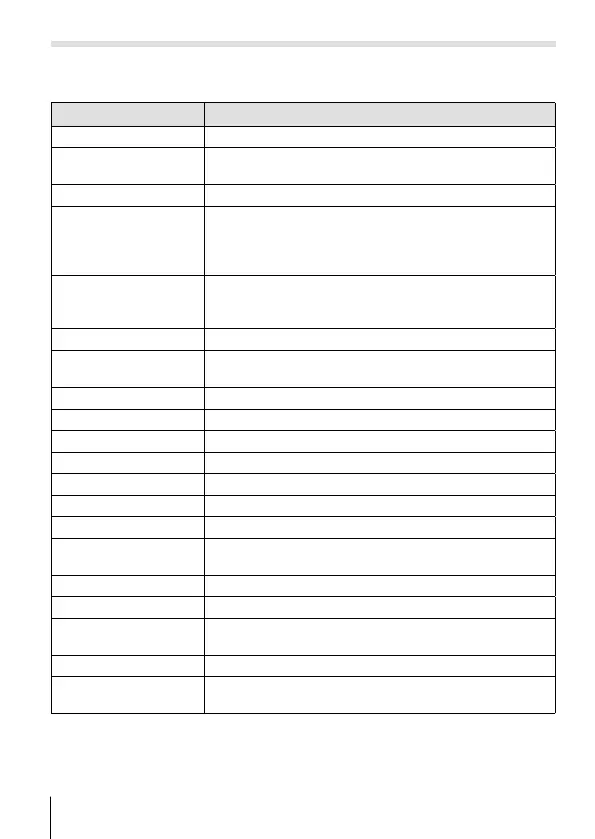
O (scene mode)
Only by selecting a sub mode according to the subject or the scene, you
can shoot with an proper setting.
Sub mode Application
B
Portrait Suitable for portrait shooting.
e
e-Portrait
Smoothes out skin tones and texture. This mode is
suitable when viewing images on a high-definition TV.
F
Landscape Suitable for landscape shooting.
1
Interval Shooting
Automatically shoot successive images according to
set [Start Waiting Time], [Frame], and [Interval Time].
The shot frames can also be recorded as into a single
movie.
H
Hand-Held
Starlight
Suitable for shooting night scenes without a tripod.
Reduces blur when shooting low light/ illuminated
scenes.
G
Night Scene Suitable for tripod shooting of night scenes.
U
Night+Portrait
Suitable for portrait shooting against a background of
night view.
C
Sport Suitable for fast action shooting.
2
Indoor Suitable for shooting portraits indoors like party scene.
3
Self Portrait Suitable for shooting yourself with holding the camera.
`
Sunset Suitable for shooting the sunset.
X
Fireworks Suitable for shooting fireworks at night.
_
Cuisine Suitable for shooting cuisine.
^
Documents Suitable for shooting paper documents or time tables.
g
Beach & Snow
Suitable for shooting at snow-capped mountains,
seascapes in the sun, and other whitish scenes.
]
Snapshot Suitable for shooting seaside and pool portraits.
\
Wide1 Suitable for shooting underwater.
[
Wide2
Suitable for shooting underwater.
The focus distance is fixed to approximately 5 m.
w
Macro Suitable for shooting close-up view underwater.
s
Snow
Suitable for shooting snow scenes. This mode allows
shooting using tap control (P. 61).


 To Next Page