60
EN
60
EN
For the operation method, refer to (P. 41).
Setting functions specifically for tough conditions
d [Tough Settings]
Displaying the current altitude/water depth (atmospheric/hydraulic
pressure) (Manometer)
• The readings may have a margin of error depending on meteorological
conditions. Use the readings only for your reference.
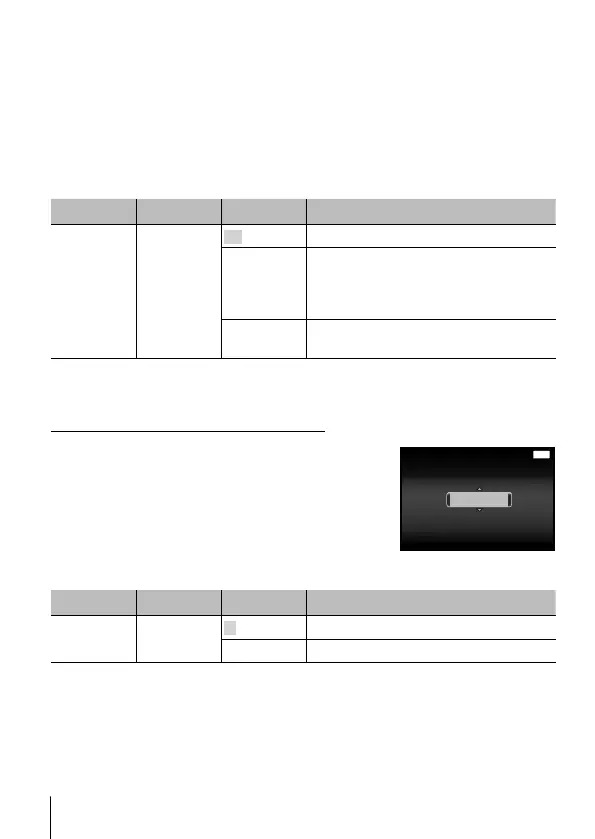
Submenu 1 Submenu 2 Submenu 3 Application
Tough
Settings
Manometer
Off Cancels the manometer display.
On
Displays the current altitude/water
depth (atmospheric/hydraulic pressure)
in the shooting standby mode screen.
(–20 m to 5,000 m)
Calibrate
Proceed to the setting screen. See
below.
• When set to [On], a cautionary message appears if the water depth reaches
12 m (39.4 ft), followed by a warning if the depth exceeds 15 m (49.2 ft).
To adjust the altitude/water depth display
1 Use FG to select [Calibrate], and press the A
button.
2 Use FG to select the current altitude/water
depth, and press the A button to set.
MENU
1200m1200m
Calibrate
Back
Setting the units of elevation, depth, etc. (m/ft)
Submenu 1 Submenu 2 Submenu 3 Application
Tough
Settings
m/ft
m This displays in meters.
ft This displays in feet.


 To Next Page