EasyManua.ls Logo

Olympus TRIP 35 - Camera Setup and Operation; Manual System Activation

Olympus TRIP 35
13 pages
Print Icon
To Next Page IconTo Next Page
To Previous Page IconTo Previous Page
Loading...
I
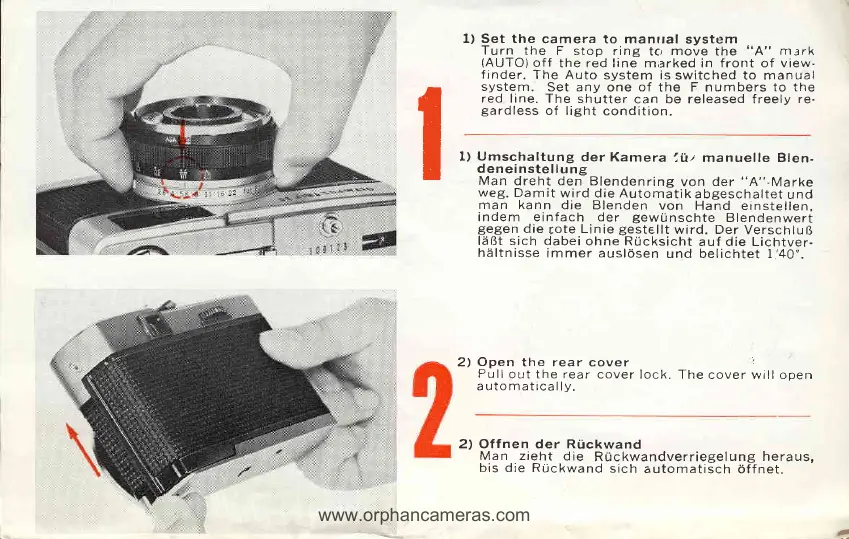
1) Set the
camera to manual
system
Turn
the F stop ring
tc,
move
the
"A" m.:rk
(AUTO)
off
the red line mierked in front of view-
finder.
The Auto
system is
switched to manual
system.
Set any
one
of
the F numbers
to the
red line. The
shutter
can be released freely
re-
gardless
of light
condition.
t) Umschaltung
der Kamera
liiz manuelle Blen-
deneinstellung
Man
dreht den Blendenring
von
der
"A"-Marke
weg.
Damit
wird die Automatik
abgeschaltet
und
man kann
die Blenden
von
Hand einstellen,
indem einfach der
gewtrnschte
Blendenwert
gegen
die
rote
Linie
gestellt
wird. Der
VerschluR
l;iBt sich dabei
ohne Rucksicht
auf die Lichtver.
hiiltnisse
immer ausl6sen
und belichtet l'40".
2)
Open
the rear cover
.
Pullout
the rear
cover lock. The
cover willooen
a uto m at ic
a
lly.
2) Offnen der Rtckwand
Man zieht
die
Ruckwandverriegelung
heraus,
bis die RUckwand
sich
automatisch
6ffnet.
1
www.orphancameras.com

Other manuals for Olympus TRIP 35

Related product manuals