11. Maintenance / Warranty
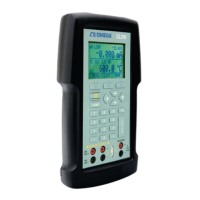
11.1 Replacing Batteries
Replace batteries as soon as the battery indicator turns on to avoid
false measurements. If the batteries discharge too deeply the CL310
will automatically shut down to avoid battery leakage.
Note: Use only AA size alkaline batteries or optional rechargeable
battery pack.
11.2 Cleaning the Unit
Warning
To avoid personal injury or damage to the calibrator, use only the
specified replacement parts and do not allow water into the case.
Caution
To avoid damaging the plastic lens and case, do not use solvents or
abrasive cleansers.
Clean the calibrator with a soft cloth dampened with water or water
and mild soap.
11.3 Service Center Calibration or Repair
Only qualified service personnel should perform calibration, repairs,
or servicing not covered in this manual. If the calibrator fails, check
the batteries first, and replace them if needed.
Verify that the calibrator is being operated as explained in this
manual. If the calibrator is faulty, send a description of the failure with
the calibrator. Be sure to pack the calibrator securely, using the
original shipping container if it is available.
11.4 Replacement Parts & Accessories
PCL-PMA OMEGA Pressure Module Adapter
DPG4000-C32 RS232 Cable with Miniature Plug
PCL422-TL 48" Stackable Testleads
CL20-Kit-2 Thermocouple Test Lead Kit
102


 To Next Page