00038076.DOC, Version 1.0
16/21
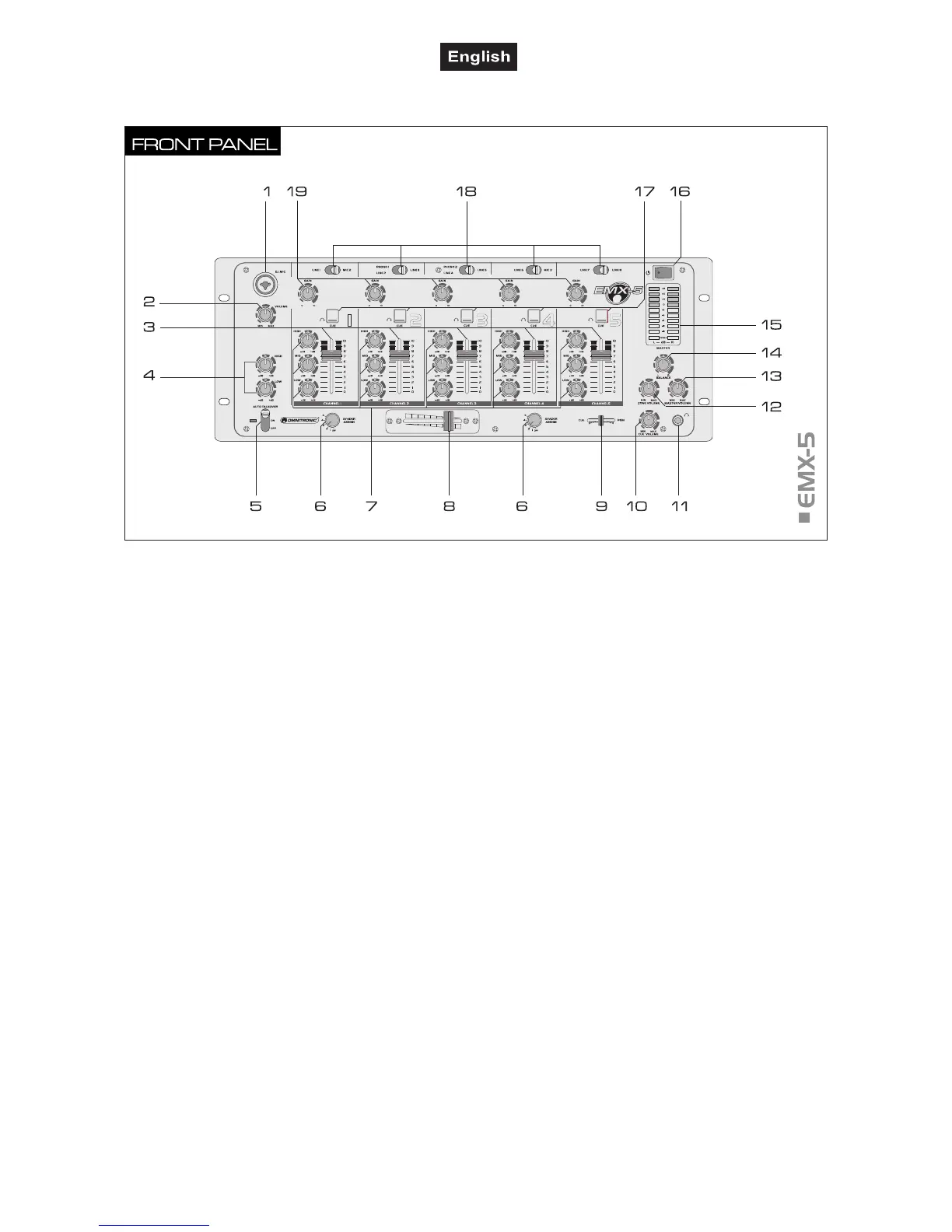
4.2 Operating elements and connections
1 DJ microphone
Input jack (bal.) for connecting a DJ microphone via XLR
or 6.3 mm jack plug.
2 Level control for the DJ microphone
3 Tone controls
2-way equalizers for the DJ microphone: HIGH and LOW.
4 Faders
Level controls for channel 1 to 5.
5 DJ microphone selector
Selector switch (with indicating LED) for the DJ
microphone. Position AUTO TALKOVER (LED lights):
automatic level attenuation (16 dB) of channels 1 to 5 in
case of announcements with the DJ microphone. Position
ON (LED lights): DJ microphone is switched on. Position
OFF (LED off): DJ microphone is switched off.
6 Assignment switch
Selects the channel for crossfading with the crossfader. If
crossfading is not required, set both switches to "OFF".
7 Tone controls
3-way equalizers for channel 1 to 5: HIGH, MID, LOW.
8 Crossfader
For crossfading between two of the channels 1 to 5. In
mid-position, both channels can be heard.
9 Cue/PGM fader
For selecting and crossfading the monitoring signal for
the headphone output:
Left position CUE: the pre fader level of the input channel
of which the CUE button is pressed is monitored. Right
position PGM: the music program currently playing is
monitored ahead of the output controls.
10 Cue volume
Level control for headphone output.
11 Headphones input
6.3 mm jack (bal.) for connecting stereo headphones.
12 Zone level
Level control for the output ZONE.
13 Master level
Level control for the master signal at the master outputs.
14 Balance control
Controls the balance for the output signal at the outputs
MASTER and ZONE.
15 Output level LED meter with power indicator
9-digit LED meter of the master signal within the range of
-18 dB to +12 dB. When the unit is powered on, the
POWER indicators lights up.
16 Power on/off
Press this button to turn the unit on and off. When
powered on, the POWER indicators light up.
17 Cue
Selector switches (with indicating LED) for pre fader
listening of the corresponding channel via headphones.
18 Input selector
For selecting the input source for channels 1 to 5.
19 Gain
Gain controls for adjusting the input amplification for
channel 1 to 5.



 To Next Page