EasyManua.ls Logo

Omron HV-F021-EW - User Manual

Omron HV-F021-EW
26 pages
Print Icon
To Next Page IconTo Next Page
Loading...
FR
DE
IT
ES
NL
RU
TR
EN
AR
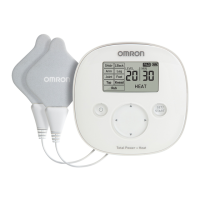
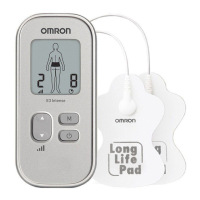
Pain Reliever
E3 Intense (HV-F021-EW)
E3 Intense (HV-F021-ESL)
Instruction Manual
IM-HV-F021-E-05-03/2018
9200776-0E
• Pain Reliever. Instruction Manual.
• Appareil anti-douleur. Mode d’emploi.
• Schmerztherapiegerät. Gebrauchsanweisung.
• Dispositivo per il trattamento del dolore. Manuale di istruzioni.
• Dispositivo para alivio del dolor. Manual de instrucciones.
• Apparaat ter verlichting van pijn. Gebruiksaanwijzing.
ɗɥɟɤɬɪɨɧɟɣɪɨɦɢɨɫɬɢɦɭɥɹɬɨɪ ɞɥɹ ɨɛɟɡɛɨɥɢɜɚɧɢɹ.
Ɋɭɤɨɜɨɞɫɬɜɨ ɩɨ ɷɤɫɩɥɭɚɬɚɰɢɢ.
• A÷rÕ Giderici. KullanÕm KÕlavuzu.

Questions and Answers

  • J
    joe00Aug 18, 2025
    Why is the intensity not felt with my Omron HV-F021-EW?
    • L
      Lisa HarrisonAug 18, 2025
      If you're not feeling the intensity or it's very weak with your Omron Medical Equipment, make sure you're using both pads, as the therapy requires both. Check that the cord is properly connected to the unit. Also, the intensity setting might be too low, so try pressing the ‘UP’ button. If the gel is damaged or the batteries are weak, replace the pads or batteries respectively.
  • S
    sandrabartonAug 20, 2025
    What to do if Omron HV-F021-EW pad gel does not stick to skin?
    • D
      Diana EspinozaAug 20, 2025
      If the pad gel on your Omron Medical Equipment isn't sticking to your skin, try washing the adhesive surface of the pads gently under cold, slow-running water for about 16 seconds and then air dry them. Ensure your skin isn't too wet and dry the area before applying the pads. If the pads have been washed too much or stored improperly (high temperature, humidity, or direct sunshine), consider replacing them. If you are perspiring, dry the pad placement area.
  • D
    Denise CollinsAug 22, 2025
    Why does my skin turn red or feel irritated using Omron Medical Equipment?
    • A
      Amanda CostaAug 23, 2025
      If your skin turns red or feels irritated when using the Omron Medical Equipment, wash the adhesive surface of the pads softly with your fingertips for about 16 seconds under cold slow running water. Limit therapy sessions to less than 15 minutes. Ensure the pads are attached properly to the body. If the pad surface is worn out, replace both pads at the same time.
  • J
    Julian AvilaAug 26, 2025
    What to do if Omron HV-F021-EW power cut off during use?
    • M
      Megan WallAug 26, 2025
      If your Omron Medical Equipment is cutting off during use, the batteries might be weak, so replace them both. Alternatively, the cord may be broken, requiring a replacement.
  • M
    martinezreneeAug 28, 2025
    Why is the pad icon displayed on my Omron Medical Equipment?
    • J
      jay38Aug 28, 2025
      If the pad icon is displayed on your Omron Medical Equipment, it could be due to several reasons. First, ensure that both pads are firmly attached to your skin. If the adhesive surface of the pads is dirty or dry, wash it gently under cold, slow-running water for about 16 seconds. Also, verify that the cord is correctly connected to the main unit. After making these corrections, power the device off and on.
  • L
    lanemarkAug 30, 2025
    Why is the battery icon empty on my Omron HV-F021-EW?
    • Z
      Zachary SmithAug 30, 2025
      If the battery icon on your Omron Medical Equipment is empty or close to empty, it likely indicates that the batteries are weak and need to be replaced.
  • N
    Nina DuncanSep 1, 2025
    How to troubleshoot Omron HV-F021-EW Medical Equipment with no power source?
    • D
      darrellperrySep 1, 2025
      To solve the 'no power source' problem with your Omron Medical Equipment, check if the batteries are aligned correctly and replace them if they are depleted.
  • K
    Krystal MclaughlinSep 4, 2025
    How to fix very weak intensity level on Omron HV-F021-EW Medical Equipment?
    • D
      David ChenSep 4, 2025
      If you're not feeling the intensity or it feels very weak when using your Omron Medical Equipment, consider these possibilities: 1. Ensure you're using both pads, as they're both needed for the therapy to work. 2. Make sure you've peeled off the transparent film from the pads. 3. Check that the pads aren't stacked or overlapping; refer to the Pad Placement guide. 4. Verify the cord is correctly connected to the unit. 5. Increase the intensity setting by pressing the up button. 6. The gel on the pads might be damaged, requiring replacement. 7. Weak batteries can also cause this issue, so replace them if needed.
  • M
    Manuel JonesSep 7, 2025
    Why does Omron Medical Equipment power cut off during use?
    • A
      antonio39Sep 7, 2025
      If the power cuts off during use with your Omron Medical Equipment, it could be due to weak batteries, so replace them both. Another possibility is a broken cord, which would also need replacing.
  • A
    Andrew WilliamsSep 9, 2025
    What does the pad icon mean on my Omron Medical Equipment?
    • V
      Victor GriffinSep 9, 2025
      If the pad icon is displayed on your Omron Medical Equipment, it could be due to a few reasons: * Only one pad is attached, or both pads are not attached. Re-attach any dislocated pad(s) firmly onto the skin and then power the device off and on. * The transparent film hasn't been removed from the pad. Peel off the film on the adhesive surface of the pads and then power the device off and on. * The cord isn't properly connected to the main unit. Connect the cord plug correctly into the jack at the bottom of the main unit and then power the device off and on. * The adhesive surface of the pads is dirty or dry. Wash the adhesive surface of pads softly with your fingertips for about 3 seconds under cold slow running water and then power the device off and on.

Summary

Introduction to E3 Intense

How the Unit Works

Explains the Triple Action TENS technology and its pain relief mechanisms.

Essential Safety Precautions

Device Compatibility and Contraindications

Lists devices and conditions that are incompatible with the unit.

Application and Usage Safety

Prohibited Body Areas and Activities

Specifies areas to avoid and activities during which to not use the unit.

Unit and Pad Handling Precautions

Unit and Cord Precautions

Instructions on altering the unit and handling its cords.

Pad Handling Precautions

Guidelines for pad placement, movement, and sharing.

Battery, Cord, and General Safety

General Precautions and Adverse Reactions

General TENS precautions and potential adverse reactions.

Unit Buttons and Functions

Controls and Display Overview

Details the functions of the unit's buttons and icons.

Assembly and Setup Steps

Inserting Batteries

Step-by-step guide for inserting batteries into the unit.

Pad and Clip Assembly

Getting Started with Therapy

Pad Placement Guide

General guidance on optimal placement of electrode pads on the body.

Pad Placement Examples

More Pad Placement Examples

Selecting Therapy Modes

Adjusting Therapy Settings

Intensity Level Adjustment

Guide to adjusting intensity levels for comfort and effectiveness.

Pain Management and Therapy Duration

Cleaning and Pad Replacement

Troubleshooting Guide

Intensity and Skin Issues

Solutions for problems related to intensity or skin irritation.

Troubleshooting Pad Icon

Omron HV-F021-EW Specifications

General IconGeneral
Model NumberHV-F021-EW
BrandOmron
Channels2
Timer15 minutes
DisplayLCD
Air PressureNot Applicable
Device TypeTENS unit
Treatment Modes/Programs6
Power Source2 AAA batteries
Areas of applicationArm, Shoulder, Back, Leg, Foot, Joint
Dimensions52 mm x 25 mm x 112 mm

Related product manuals