EasyManua.ls Logo

Omron JPN610T - User Manual

Omron JPN610T
82 pages
Print Icon
To Next Page IconTo Next Page
Loading...
Instruction Manual
1
EN
KO
MY
HI
TH
ID
VI
MS
Symbols Description
ZH-TW
Read Instruction manual and before use.
使用前請閱讀使用說明書
사용하기 전에 사용 설명서 읽어 주세요.
အသံးမြပမီတွင် လမးန်လက်စွဲ
ကိ ဖတ်ပါ။
    
  
อ่านคู่มอแนะนาการใช
งาน และ ก่อนใช
งานอปกรณ
Baca buku petunjuk dan sebelum penggunaan.
Đọc hướng dn s dng trước khi s dng.
Baca Manual arahan dan sebelum guna.
㑷儊ѣᮽ
䚐ạ㛨
ĀŖŮûŗ

ĀĒĉĒĠ÷Ă
Bahasa indonesia
Tiếng Việt
Bahasa Melayu
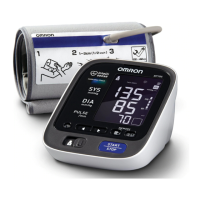
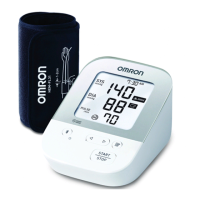
Automatic Blood Pressure Monitor
Model JPN610T

Questions and Answers

  • T
    Troy GreenAug 16, 2025
    How to fix Omron Blood Pressure Monitor when the arm cuff doesn't inflate?
    • E
      Elizabeth MillerAug 17, 2025
      If the arm cuff of your Omron Blood Pressure Monitor doesn't inflate or the symbol appears, it could be due to several reasons. First, ensure the air plug is securely inserted into the monitor. If it is, check that you've applied the arm cuff correctly. If the issue persists, and you notice air leaking from the cuff, you may need to replace the arm cuff. Also, make sure you press the [START/STOP] button again to turn the monitor off. After inserting the air plug securely and applying the arm cuff correctly, press the [START/STOP] button.
  • J
    Jacqueline LeeAug 19, 2025
    What to do if Omron Blood Pressure Monitor shows error after arm cuff inflates?
    • N
      Nicole MitchellAug 19, 2025
      If the symbol appears, or a measurement cannot be completed after the arm cuff inflates on your Omron Blood Pressure Monitor, it could be because you moved or talked during the measurement, preventing sufficient inflation. Remain still and do not talk during measurements. Also, this can happen if your systolic pressure is above 210 mmHg, preventing a measurement from being taken.
  • T
    Tyrone StevensonAug 22, 2025
    Why does my Omron JPN610T show the symbol?
    • D
      daniel70Aug 22, 2025
      If the symbol appears on your Omron Blood Pressure Monitor, it means the arm cuff is inflated exceeding the maximum allowable pressure. To resolve this, avoid touching the arm cuff or bending the air tube during the measurement.
  • A
    Adam DaviesAug 25, 2025
    Why are the readings on my Omron JPN610T too high or too low?
    • E
      Elizabeth WattsAug 26, 2025
      If the readings on your Omron Blood Pressure Monitor appear too high or too low, remember that blood pressure varies constantly. Many factors, such as stress, the time of day, and how you apply the arm cuff, can affect your blood pressure.
  • S
    Sean JohnsonAug 27, 2025
    What does it mean when my Omron JPN610T shows the symbol?
    • W
      wardharryAug 27, 2025
      If the symbol appears on your Omron Blood Pressure Monitor, it indicates that you moved or talked during the measurement, or that vibrations disrupted the measurement. To resolve this, remain still and do not talk while taking a measurement.
  • R
    riverasarahAug 30, 2025
    What does it mean when the transfer symbol flashes on my Omron Blood Pressure Monitor?
    • J
      johnsonjulieAug 30, 2025
      If the symbol flashes on your Omron Blood Pressure Monitor, it indicates that the monitor is ready to transfer your readings to the smart device. To transfer readings, open the 'OMRON connect' app.
  • D
    Dr. Tiffany ThorntonSep 1, 2025
    Why is the memory symbol flashing on my Omron JPN610T Blood Pressure Monitor?
    • W
      williamsmarioSep 2, 2025
      If the symbol is flashing on your Omron Blood Pressure Monitor, it means that more than 80 readings have not been transferred. To resolve this, pair or transfer your readings to the 'OMRON connect' app to store them in the app's memory, which should make the error symbol disappear.
  • J
    Justin BlackburnSep 5, 2025
    What does it mean when the 'Err' symbol appears on my Omron Blood Pressure Monitor?
    • M
      Margaret WaltonSep 5, 2025
      If the symbol appears on your Omron Blood Pressure Monitor, it indicates that the monitor cannot connect to a smart device or transmit data correctly. Follow the instructions shown in the 'OMRON connect' app. If the 'Err' symbol still appears after checking the app, contact your local OMRON representative.
  • D
    Dustin AvilaSep 7, 2025
    Why is the battery symbol flashing on my Omron JPN610T Blood Pressure Monitor?
    • J
      Joel CannonSep 7, 2025
      When the symbol flashes on your Omron Blood Pressure Monitor, it means the batteries are low. It's recommended to replace all 4 batteries with new ones immediately.
  • T
    Tonya NelsonSep 10, 2025
    What to do if Omron Blood Pressure Monitor turns off during measurement?
    • J
      jamesrodriguezSep 10, 2025
      If the symbol appears, or the monitor turns off unexpectedly during a measurement with your Omron Blood Pressure Monitor, it means the batteries are depleted. Replace all 4 batteries with new ones immediately.

Summary

Introduction to the Automatic Blood Pressure Monitor

Safety Instructions

Provides important information about the OMRON Automatic Blood Pressure Monitor for safe and proper use.

Intended Use of the Device

Device is a digital monitor for measuring blood pressure and pulse rate in adults, detecting irregular heartbeats.

Receiving and Inspection Procedures

Instructions on removing the monitor from packaging and inspecting it for damage.

Important Safety Information

Data Transmission Precautions

Information regarding radio frequency emissions and restrictions for the product's wireless features.

Cautionary Safety Guidelines

AC Adapter Handling and Usage

Guidelines for the safe handling and usage of the optional AC adapter.

Battery Handling and Usage

Guidelines for the safe handling and usage of batteries.

General Precautions for Use

General Precautions

Important operational and usage precautions to ensure safety and accurate measurements.

Error Messages and Troubleshooting

Display;Problem E1: Cuff Does Not Inflate

Troubleshooting for when the arm cuff fails to inflate, covering common causes and solutions.

Display;Problem E2: Measurement Cannot Be Completed

Troubleshooting for incomplete measurements, including causes like movement or high systolic pressure.

Display;Problem E3, E4, E5: Cuff Inflation;Pulse Rate Issues

Solutions for errors related to cuff inflation exceeding pressure limits, movement, or undetected pulse rate.

Troubleshooting Device Errors

Display;Problem Er: Monitor Malfunction

Guidance for when the monitor displays an 'Er' error, indicating a potential malfunction.

Display;Problem Err: Connectivity Issues

Troubleshooting steps for 'Err' symbol related to smart device connection or data transmission.

Data Transfer and Battery Status Indicators

Resolving issues with pairing, data transfer, or battery status indicated by symbols.

Product Maintenance and Care

Maintenance and Storage Guidelines

Guidelines for maintaining and safely storing the monitor and its components.

Cleaning Instructions

Proper methods for cleaning the monitor and arm cuff using mild detergents.

Calibration and Service Recommendations

Information on the monitor's accuracy testing and recommendations for periodic inspection.

Device Specifications

Product Description and Model

Details about the OMRON Automatic Blood Pressure Monitor, Model JPN610T.

Measurement Parameters and Accuracy

Specifies cuff pressure, pulse, and blood pressure measurement ranges and accuracy.

Technical Operation Details

Covers inflation, measurement method, wireless communication, operating mode, and IP classification.

Power, Durability, and Physical Specs

Information on power source, battery life, durable period, weight, dimensions, and circumference.

Electromagnetic Compatibility and Interference

EMC Standards and Wireless Interference

Details on EMC conformance, wireless interference, and related guidance.

Guidance and Manufacturers Declaration

Manufacturers Declaration and Notes

Statement on quality, origin, specification notes, and clinical investigation.

Omron JPN610T Specifications

General IconGeneral
Product NameOmron JPN610T
CategoryBlood Pressure Monitor
Measurement MethodOscillometric
AccuracyPressure: ±3 mmHg, Pulse: ±5% of reading
Cuff Size22-42 cm
Display TypeLCD
Memory60 readings
Bluetooth ConnectivityYes
InflationAutomatic
DeflationAutomatic
Warranty3 years
TypeUpper Arm
Measurement RangePressure: 0-299 mmHg, Pulse: 40-180 beats per minute
Power Source4 x AA batteries or AC adapter

Related product manuals