Appendices
A - 32
NX-series Position Interface Units User’s Manual (W524)
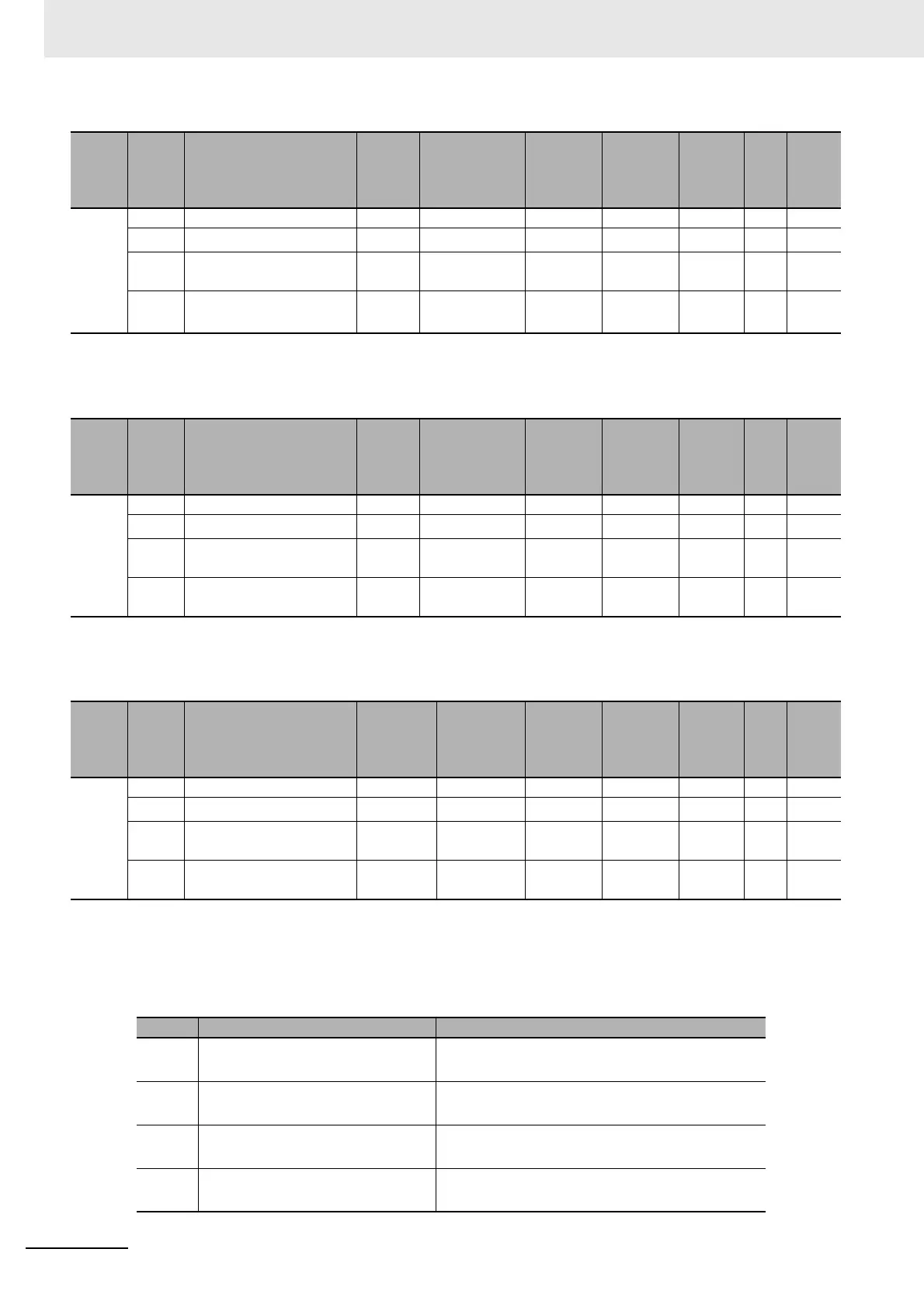
• The following table shows the bit configuration of the Latch Status object.
Index
(hex)
Subin-
dex
(hex)
Object name Default Data range Unit Data type Access
I/O
allo-
cat-
ion
Data
attri-
bute
6002 --- Encoder Present Position --- --- --- --- --- --- ---
00 Number of Entries
*1
*1. The values for the NX-EC0112, NX-EC0122, NX-EC0132, or NX-EC0142 are 1. The values for the NX-EC0212 or
NX-EC0222 are 2.
*1 --- USINT RO No ---
01 Ch1 Encoder Present
Position
0 −2147483648
to 2147483647
--- DINT RO Yes ---
02 Ch2 Encoder Present
Position
*2
*2. This object does not exist on the NX-EC0112, NX-EC0122, NX-EC0132, and NX-EC0142.
0 −2147483648
to 2147483647
--- DINT RO Yes ---
Index
(hex)
Subin-
dex
(hex)
Object name Default Data range Unit Data type Access
I/O
allo-
cat-
ion
Data
attri-
bute
6003 --- Pulse Rate --- --- --- --- --- --- ---
00 Number of Entries
*1
*1. The values for the NX-EC0112, NX-EC0122, NX-EC0132, or NX-EC0142 are 1. The values for the NX-EC0212 or
NX-EC0222 are 2.
*1 --- USINT RO No ---
01 CH1 Pulse Rate 0 0 to
4,294,967,295
--- UDINT RO Yes ---
02
CH2 Pulse Rate
*2
*2. This object does not exist on the NX-EC0112, NX-EC0122, NX-EC0132, and NX-EC0142.
0 0 to
4,294,967,295
--- UDINT RO Yes ---
Index
(hex)
Subin-
dex
(hex)
Object name Default Data range Unit Data type Access
I/O
allo-
cat-
ion
Data
attri-
bute
6004 --- Latch Status --- --- --- --- --- --- ---
00 Number of Entries
*1
*1. The values for the NX-EC0112, NX-EC0122, NX-EC0132, or NX-EC0142 are 1. The values for the NX-EC0212 or
NX-EC0222 are 2.
*1 --- USINT RO No ---
01 Ch1 Latch Status 0000 hex 0000 to
FFFF hex
--- WORD RO Yes ---
02
Ch2 Latch Status
*2
*2. This object does not exist on the NX-EC0112, NX-EC0122, NX-EC0132, and NX-EC0142.
0000 hex 0000 to
FFFF hex
--- WORD RO Yes ---
Bit Status name Description
0
Latch Input 1 Enabled
*1
1: Latch Input 1 enabled.
0: Latch Input 1 disabled.
1
Latch Input 1 Completed Flag
*2
1: Data was latched for Latch Input 1.
0: No data was latched for Latch Input 1
8
Latch Input 2 Enabled
*3
1: Latch Input 2 enabled.
0: Latch Input 2 disabled.
9
Latch Input 2 Completed Flag
*4
1: Data was latched for Latch Input 2.
0: No data was latched for Latch Input 2



 To Next Page
 Loading...





