
 Need help?
Do you have a question about the Omron RS3 Intelli IT and is the answer not in the manual?
Provides information for safe and proper use of the monitor.
Defines the device's purpose and target user population.
Information about RF emission and restrictions.
Guidelines for safe battery use and storage.
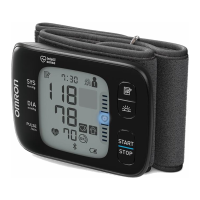
Details the physical components of the blood pressure monitor.
Step-by-step guide for inserting batteries into the monitor.
Instructions for connecting the monitor to a smartphone app.
Advice for obtaining accurate blood pressure readings.
Detailed steps for correctly wearing the wrist cuff.
Step-by-step process for performing a blood pressure measurement.
Instructions to reset the monitor to factory defaults.
General advice for maintaining the monitor's condition.
Guidelines for storing the monitor when not in use.
Instructions on how to clean the monitor and cuff.
Information on accuracy checks and professional servicing.
Explains various symbols used on the monitor and in the manual.
Notes on EMC compliance and potential interference.
Guidance on environmentally sound disposal of the device.
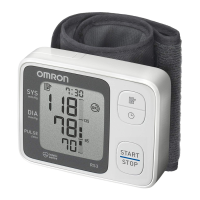
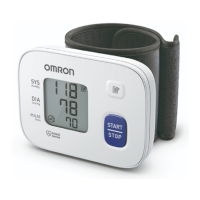
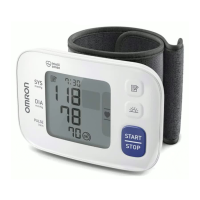
This document describes the OMRON RS3 Intelli IT Automatic Wrist Blood Pressure Monitor (HEM-6161T-E), a digital monitor designed for measuring blood pressure and pulse rate in adult patients. It utilizes the oscillometric method to detect pressure pulsations from the artery under the cuff, displaying digital readings of blood pressure. The device is intended for general household use and can detect irregular heartbeats, providing a warning signal with readings.
The OMRON RS3 Intelli IT is an automatic wrist blood pressure monitor that measures systolic and diastolic blood pressure, as well as pulse rate. It operates by inflating a cuff around the wrist and sensing the pressure pulsations of the artery. The monitor displays these readings digitally. A key feature is its ability to detect irregular heartbeats, alerting the user to potential cardiac arrhythmias.
The monitor includes a "Cuff wrap guide symbol (OK)" which appears if the wrist cuff is correctly applied during measurement, and also when viewing past readings. Conversely, a "Cuff wrap guide symbol (loose)" indicates incorrect cuff application. A "Heartbeat symbol" flashes during measurement and appears if systolic blood pressure is 135 mmHg or above, and/or diastolic blood pressure is 85 mmHg or above, aligning with the 2013 ESH/ESC Guidelines for the management of arterial hypertension. A "Deflation symbol" is shown during cuff deflation.
Bluetooth connectivity is integrated, indicated by a "Bluetooth ON symbol" when enabled and a "Bluetooth OFF symbol" when disabled. A "Sync symbol" flashes or appears when data needs to be transferred to a smart device, particularly when the internal memory is almost or completely full. The monitor can store up to 30 readings internally.
Battery status is indicated by a "Battery symbol (low)" which flashes when batteries are low, and a "Battery symbol (depleted)" which appears when batteries are depleted. The "Irregular heartbeat symbol" appears with readings if an irregular rhythm is detected two or more times during a measurement. An irregular heartbeat is defined as a rhythm that is 25% less or 25% more than the average rhythm detected while measuring blood pressure. If this symbol persists, users are advised to consult their physician. The "Pulse display / Memory number" shows the pulse rate after measurement.
To use the monitor, two "AAA" alkaline batteries must be installed. The battery compartment is accessed by pushing down a hook and pulling the cover downward. Batteries should be inserted with correct polarities. When the "battery" symbol flashes, it's recommended to replace the batteries. Used batteries should be disposed of according to local regulations.
The monitor can be paired with a smart device via Bluetooth. Users need to enable Bluetooth on their smart device, download and install the free "OMRON connect" app, and follow the in-app instructions for pairing. A "OK" symbol on the monitor confirms successful connection. If an "Err" symbol appears, troubleshooting via the app is recommended. Readings are automatically transferred to the app after successful pairing and measurement, or can be transferred manually by pressing the "Connection" button.
For accurate blood pressure measurements, several tips are provided: avoid taking measurements during stressful times, measure in a quiet place, and take measurements at the same times each day (morning and evening are recommended). Users should rest for at least 5 minutes before measuring, remove tight-fitting clothing and accessories from the wrist, and remain still without talking during measurement. The monitor should only be used on wrists within the specified circumference range (13.5 cm to 21.5 cm). It's crucial for the monitor to acclimate to room temperature before use, especially after extreme temperature changes.
Applying the wrist cuff correctly is essential. The cuff should be applied to the left wrist (or right wrist using the same steps) with a clearance of 1 to 2 cm between the cuff and the bottom of the palm. It should be wrapped firmly, ensuring no gap between the wrist and cuff, and not covering the protruding wrist bone. The palm and monitor display should face upward.
Correct sitting posture is vital for accurate readings: sit in a chair with legs uncrossed and feet flat on the floor, with back and arm supported. The monitor should be approximately at the same level as the heart.
To take a measurement, press the [START/STOP] button. All symbols appear on the display before measurement begins. Users must remain still and silent until the measurement is complete. The monitor automatically determines the ideal inflation level and detects blood pressure and pulse rate. If the "Cuff wrap guide symbol (loose)" appears, the cuff is not applied correctly, and the user should turn off the monitor, reapply the cuff, and restart. After detecting readings, the cuff deflates, and blood pressure and pulse rate are displayed. If readings are high, the "Heartbeat symbol" appears. To turn off the monitor, press the [START/STOP] button again, or it will automatically turn off after 2 minutes. A wait of 2-3 minutes between measurements is recommended to allow arteries to decompress.
Bluetooth can be disabled in restricted areas (e.g., aircraft, hospitals) by pressing and holding the "Connection" button for more than 10 seconds when the monitor is off. "OFF" appears on the display, and the Bluetooth OFF symbol is shown. To re-enable, press and hold the "Connection" button for more than 2 seconds.
The monitor can be restored to default settings, deleting all stored information, by holding down the "Connection" button and pressing and holding the [START/STOP] button for more than 2 seconds. This process will require re-pairing the monitor with a smart device for data transfer.
To ensure the longevity and accuracy of the monitor, proper maintenance is crucial. The manufacturer advises against disassembling or attempting to repair the monitor or its components, as this can lead to inaccurate readings and voids the user warranty.
The monitor should be stored in its storage case when not in use, in a clean and safe location. Avoid storing it in wet conditions, extreme temperatures, high humidity, direct sunlight, dust, corrosive vapors (like bleach), or areas exposed to vibrations or shocks.
For cleaning, abrasive or volatile cleaners should not be used. The monitor and wrist cuff should be cleaned with a soft dry cloth or a soft cloth moistened with neutral soap, followed by wiping with a dry cloth. Do not wash or immerse the monitor or wrist cuff in water, and avoid gasoline, thinners, or similar solvents.
The accuracy of the blood pressure monitor is carefully tested and designed for a long service life. It is generally recommended to have the unit inspected every two years to ensure correct functioning and accuracy. Users should consult their authorized OMRON dealer or customer service for calibration and service.
In case of error messages (e.g., "Er" for malfunction, "Err" for connection issues, "E1" for cuff inflation problems, "E3" for overinflated cuff, "E4" for movement during measurement, "E5" for pulse rate not detected), troubleshooting steps are provided. These include reapplying the cuff, remaining still, checking battery levels, and, if problems persist, contacting OMRON retail outlets or distributors.
The device also provides guidance on correct disposal of the product (Waste Electrical & Electronic Equipment) to prevent environmental harm and promote sustainable reuse of material resources. Household users are advised to contact retailers or local government offices for recycling details, while business users should consult their suppliers.
 General
| Measurement Method | Oscillometric |
|---|---|
| Display Type | LCD |
| Bluetooth Connectivity | Yes |
| Device Type | Upper Arm Blood Pressure Monitor |
| Intellisense Technology | Yes |
| Irregular Heartbeat Detection | Yes |
| Clinically Validated | Yes |
| Average Reading Function | Yes |
| Pressure Range | 0 to 299 mmHg |
| Pulse Rate Range | 40 to 180 beats/min |
| User Profiles | 2 |



 To Next Page