ET28KH QUICK GUIDE | 01
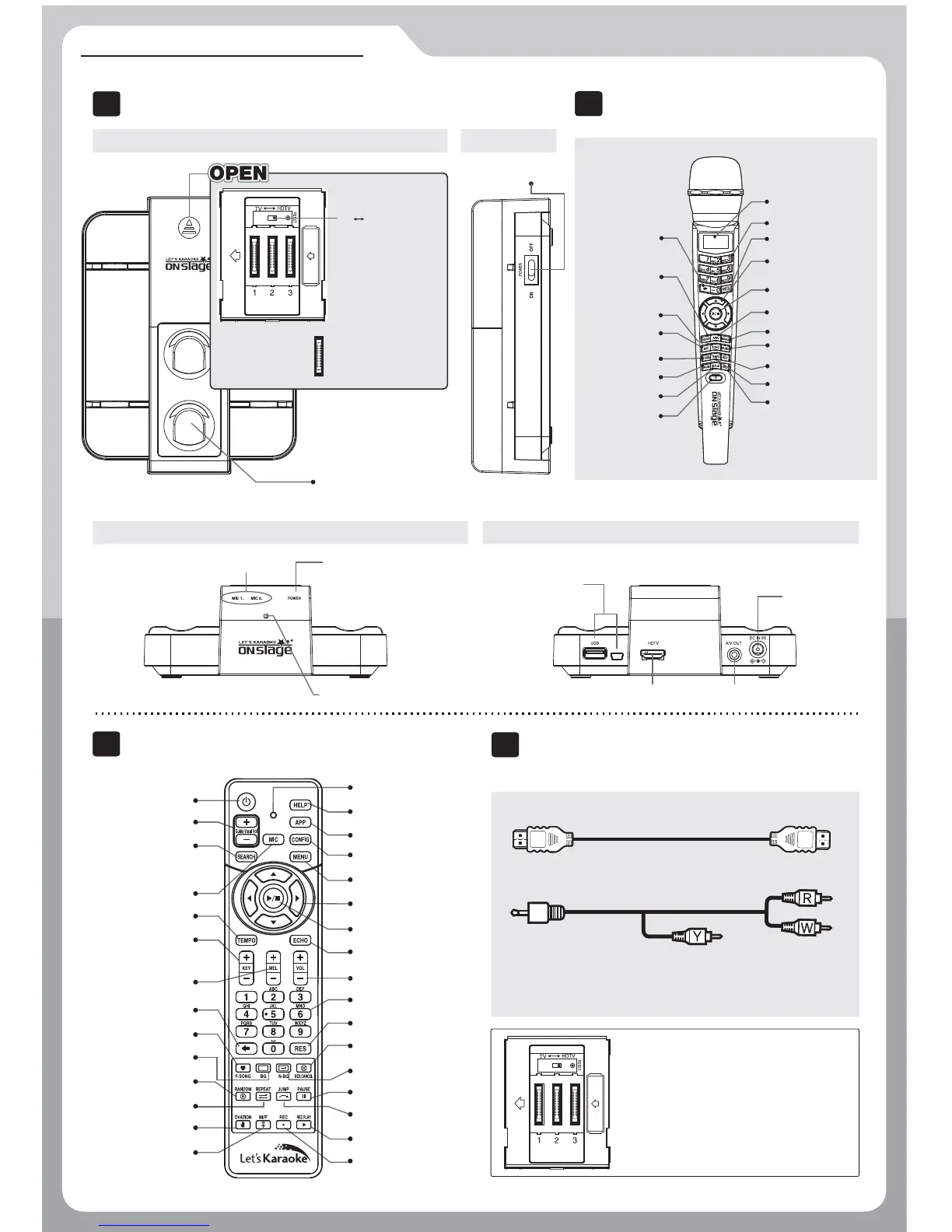
Main Device
I
SIDE
Remote Control
III
Activity Indication LED
Power
Guide Vocal Volume
Microphone Volume
Song Search
Tempo
Key
Melody Volume
Exit
Favorite Song
Background Change
Random Song Selection
Repeat
Clapping Sound Effect
Male/Female Key Change
Help
Application
Configuration
Menu
Direction Key
Start / Stop
Echo
Music Volume
Number / Letter Input
Song Reservation
Cancel Reservation
Next Background
Pause / Resume
Skip prelude or interlude
Recorded Songlist and Play
Record
II
2 Wireless MIC
HD-TV Cable, Tri-color RCA cable, Power adaptor, Quick guide
Accessories
IV
I
III
II
IV
TOP
SIDE
BACK
Power Switch
COMPONENTS & FUNCTIONS
Tri-color RCA cable
120cm (47.2 inch)
Yellow for Video output
190cm (74.8 inch)
Red for stereo/
audio right output
and White for stereo/
audio left output
HD-TV Cable
150cm(59 inch)
※ To adjust, select the switch located
above the song pack slots to
HDTV or TV depending on what
kind of TV the device will be
connected.
MIC Holder
FRONT
NAVIGATION button
PLAY/STOP button
APP button
MENU button
NUMBER button
LED display
MUSIC VOL button
KEY button
TEMPO button
RECORD button
SEARCH button
ECHO button
CANCEL button
MIC button
FAVORITE SONG
button
PAUSE button
REPLAY button
POWER button
RESERVATION button
WIRELESS MIC INDICATORWIRELESS MIC INDICATOR POWER INDICATORPOWER INDICATOR
REMOTE CONTROLL SENSORREMOTE CONTROLL SENSOR
HD OUTPUTHD OUTPUT
USB PORTUSB PORT
DC INDC IN
AUDIO / VIDEO OUTPUTAUDIO / VIDEO OUTPUT
Expansion slot
To add additional
song pack
TV
HDTV Switch
●
HDTV : Switch
toward HDTV
●
Non-HDTV
:
Switch toward TV


 To Next Page