ET28KH QUICK GUIDE | 03
●
[REAL TIME SCORE]
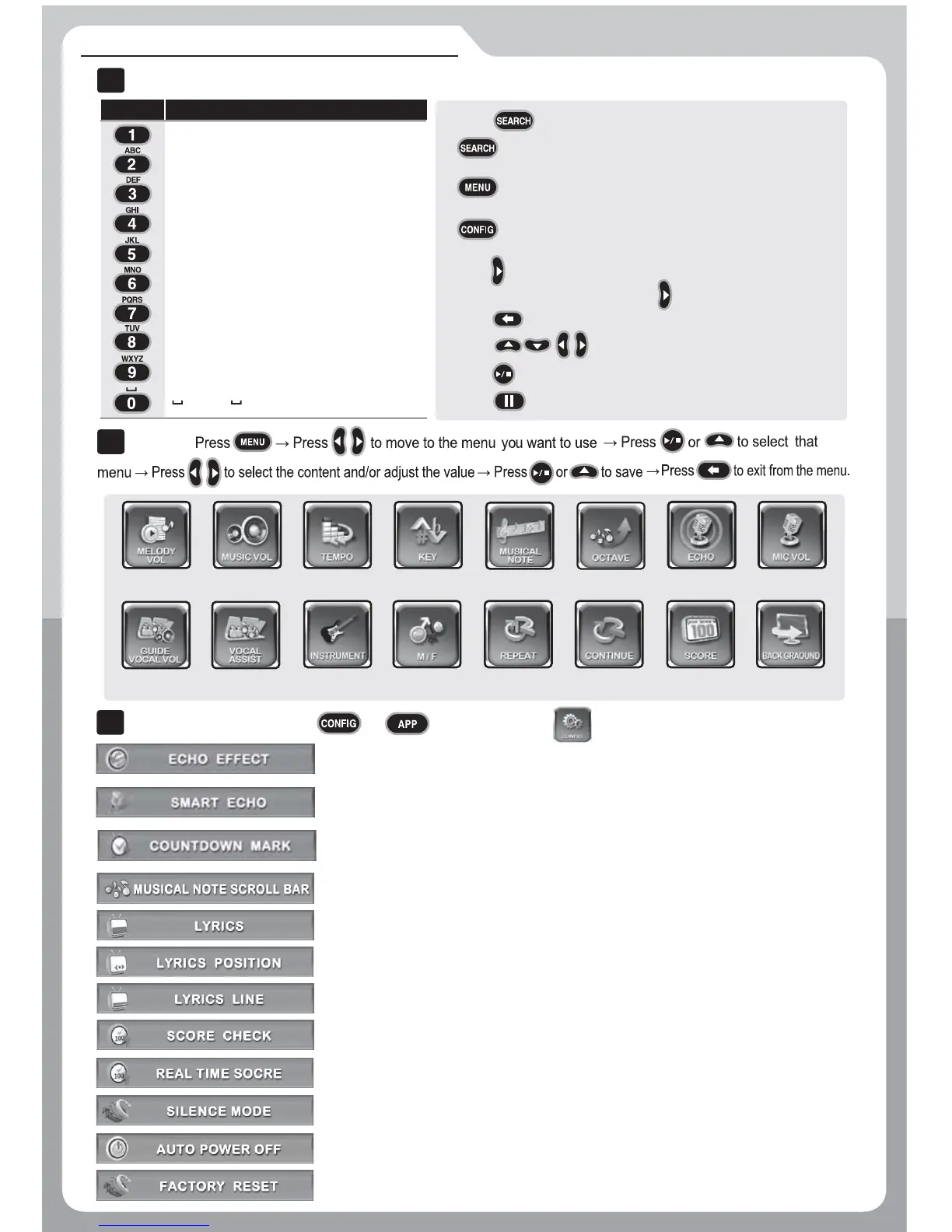
Turn on/ off the Real time score on the screen.
●
[SCORE CHECK]
Set the scoring mode to None, Beginner, Amateur or Professional.
●
[LYRICS POSITION]
Select position of the lyrics on the screen.
●
[LYRICS]
Turn on/off lyrics on the screen.
●
[MUSICAL NOTE SCROLL BAR]
Turn on/off the musical note scroll bar which
●
[COUNTDOWN MARK]
Turn on/off the song countdown “4, 3, 2, 1” which
●
[SMART ECHO]
Automatically uses the MIC effect (Echo) only
●
[ECHO EFFECT]
Select long, longer, room or hall.
Press or to open a page for .
Adjust tempo Adjust keyAdjust melody
volume
Adjust music
volume
Adjust MIC
volume
Adjust echo
Adjust volume
of guide vocal
Turn on/off
guide vocal
Change melody
instrument
Change
male/female key
Adjust octave
Set a part of
song to be repeated
Play songs
continuously
Change
background
Turn on/off
the musical note
Change
settings for score
●
[LYRICS LINE]
Choose the number of lines to be displayed in 2 LINES or 3 LINES.
A → B → C → 2 → A → Circulate
(Press repeatedly.)
Press to open the search panel
9
.
Press to pause / resume.
8. Press to play (resume) / stop.
7. Press to select a song.
6. Press to delete the letter.
G → H → I → 4 → G → Circulate
(Press repeatedly.)
J → K → L → 5 → J → Circulate
(Press repeatedly.)
M → N → O → 6 → M → Circulate
(Press repeatedly.)
P → Q → R → S → 7 → P → Circulate
(Press repeatedly.)
T → U → V → 8 → T → Circulate
(Press repeatedly.)
W → X → Y → Z → 9 → W → Circulate
(Press repeatedly.)
→ 0 → Circulate
(Press repeatedly)
D → E → F → 3 → D → Circulate
(Press repeatedly.)
1
TITLE → SINGER → LYRIC → NUMBER → TITLE → Circulate
(Press repeatedly.)
ALL → GUIDE VOCAL → Listing by Country → ALL → Circulate
(Press repeatedly.)
Alphabet → Other Languages Available → Alphabet → Circulate
(Press repeatedly.)
5. Press to move the cursor to the right (or after 2 secon
ds the cursor
will move to the right without pressing .)
2.
1.
3.
4.
CONFIGURATION
III
Button Letter Input
Song Search
I
II
MENU
SONG SEARCH, MENU&CONFIGURATION
●
[SILENCE MODE]
Set the silence mode to OFF to Level 1 to Level 2.
●
[AUTO POWER OFF]
Set the Auto power off when there is no input signal.
●
[FACTORY RESET]
Reset all settings to the factory default settings.
indicates where it is playing.
indicates the starting point of a song.
when you start a song.


 To Next Page
 Loading...