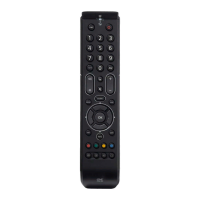
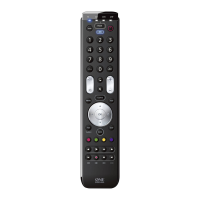
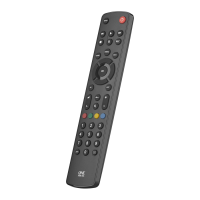
The Samsung URC-1310 is a universal remote control designed to simplify the control of various home entertainment devices. This manual provides comprehensive instructions for its setup, usage, and maintenance, available in multiple languages including English, Danish, Norwegian, Swedish, Finnish, and Lithuanian.
Function Description
The URC-1310 serves as a central control unit for your television and potentially other devices. Its primary function is to replace multiple remote controls with a single, easy-to-use device. It allows users to power on/off devices, select inputs, navigate menus, control playback (rewind, play, fast forward, pause, stop), adjust volume, change channels, and access specific applications or features like Teletext/Mix, Guide, Info, and channel lists. The remote is designed to be programmable, meaning it can "learn" functions from your original remote control, ensuring compatibility with a wide range of brands and models.
Important Technical Specifications
The remote control is powered by 2x AAA batteries. The manual emphasizes the importance of using quality alkaline batteries and provides a caution regarding the risk of explosion if batteries are replaced by an incorrect type. It also includes a "DO NOT TOUCH" symbol for the battery compartment, indicating a safety warning.
Usage Features
Setup:
The setup process for the URC-1310 involves a few simple steps:
- Battery Installation: Insert 2x AAA batteries into the remote control.
- Initial Test: After inserting batteries, test a few keys. If they work, the remote is ready. If not, proceed to the next steps.
- Power On/Off Test: Ensure your TV is on (not on standby).
- Red + Blue Button Test: Hold down the RED + BLUE buttons simultaneously. The LED behind the Power Key will blink twice.
- Power Key Test: Point the remote towards the TV and hold down the Power Key until the TV turns off.
- Signal Transmission: The remote will send a different Power signal every 3 seconds. As soon as the TV turns off, let go of the Power key.
- Final Check: The light will blink twice. Now test the rest of the keys. If they work as your original remote did, your remote is ready to use.
Key Functions (English Labeling):
- INPUT (1): Input Select.
- APP (2): Netflix.
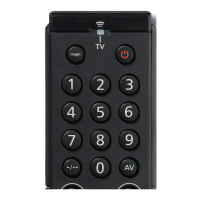
- PWR (3): Power Toggle.
- 0-9 (4): Digits for Channel Entry.
- TTX/MIX (5): Teletext on and off.
- PRE-CH (6): Previous Channel.
- HOME (7): Home, Smart Hub.
- GUIDE (8): Guide.
- INFO (9): Info, i.
- UP, DOWN, LEFT, RIGHT (10): Navigate the Menu.
- RETURN (11): Back on level in the Menu.
- EXIT (12): Menu Exit.
- MENU (13): Menu.
- MUTE (14): Mute.
- CH +/- (15): Channel Up and Down.
- VOL +/- (16): Volume Up and Down.
- CH. LIST (17): Channel List.
- RED, GREEN, YELLOW, BLUE (18): Fasttext, ABCD.
- REW, PLAY, FF, REC, PAUSE, STOP (19): Playback control.
- TOOLS (20): Tools, Settings.
- AD.SUBT (21): Subtitle, Audio Description.
- APP 2 (22): Amazon Prime Video.
Learning Function:
The URC-1310 can learn functions from your original (working) remote control.
- Placement: Place the original remote facing the One For All remote on a flat surface, approximately 3-5 cm apart.
- Learning Mode Activation: Hold down GREEN + YELLOW until the LED blinks twice.
- Press 975: The LED will blink twice.
- Select Key to Learn: Press the key on the One For All remote you want to learn (e.g., VOL +). The LED will blink rapidly.
- Press Key on Original Remote: Press the key on the original remote you want to learn (e.g., VOL + key of your Audio Device).
- Confirmation: The LED will blink twice, indicating successful learning. Repeat from step 4 for any more keys to learn. If the LED blinks long, try again from step 4.
- Exit Learning Mode: When you have learned all the keys you need, press and hold the OK key for 3 seconds. The LED will blink twice.
Troubleshooting (If Step 1 Does Not Work As Expected):
- Ensure your TV is on (not on standby).
- Hold down RED + BLUE until the LED behind the Power Key blinks twice.
- Point towards the TV and hold down one of the keys that is not working correctly (e.g., Menu).
- The remote will send a signal every 3 seconds.
- When the correct function is shown on the screen (in this case the Menu), let go of the key.
- The LED will blink twice - your remote is ready to use.
Deleting Learned Functions:
- Hold down GREEN + YELLOW until the LED blinks twice.
- Press 976.
- Press the key to reset twice.
- The LED flashes twice and the key will revert to the original function.
Maintenance Features
The manual includes important information regarding product and battery disposal, adhering to European Directives (2012/19/EU and 2006/66/EF).
- Product Disposal: The product is manufactured using high-quality components that can be recycled and reused. The symbol of a crossed-out wheeled bin indicates that the product should not be disposed of with normal household waste. Users should inform themselves about the local collection system for electrical and electronic products. This helps prevent negative effects on the environment and human health.
- Battery Disposal: Batteries should not be disposed of with normal household waste. Users should refer to local regulations for the proper disposal of batteries to prevent potential negative environmental and human health impacts.
- Warranty: Universal Electronics guarantees that the product is free from defects in materials and workmanship for a period of three years from the date of purchase. If the product proves defective within this period, it will be repaired or replaced free of charge. The warranty does not cover damage or failures caused by products or services not supplied by Universal Electronics, or which result from not mounting the product according to manual instructions. This also applies to damage caused by modifications, improper installation, misuse, abuse, neglect, accident, improper connection, improper operation, maintenance, modifications, fire, water, lightning, natural disasters, wrong use or carelessness. To obtain warranty service, contact your dealer or Universal Electronics. This warranty does not affect your statutory rights.
The URC-1310 is designed to be a durable and user-friendly remote control, offering a streamlined experience for managing your home entertainment system.

 Need help?
 General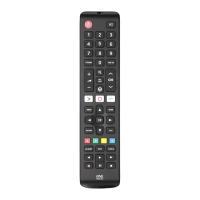



 To Next Page