3/16
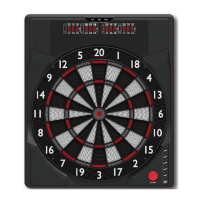
Dartboard Functions
POWER button - Press to turn on and off the dartboard.
START button - Press to start the game when all options have been selected.
GAME button – Press to page through the on-screen game menu and select game.
SELECT button – Press to select various difficulty settings for games. Many games contain
several difficulty options that can be accessed by pressing this button
PLAYER/PAGE button – This button is used at the start of each game to select the number
of players you want to play the game. In addition, this button allows players to see other
player scores of not on active display.
DOUBLE/MISS button – This button is used to activate the Double In/Double Out and
Master Out options for the “01” games. This function is only active when selecting 301, 401,
etc. games. Note: not all models have Master Out option. The MISS feature is active during
play of any game. Press button to register a “missed” dart. Player can press when dart
lands outside target area so computer registers a thrown dart.
SOUND button – Sound level adjustable from 0-7 levels (8 levels).
iMATCH/RETURN button – This exciting feature allows single player to play against the
computer at one of five different levels of skill! Only 1 player can complete against the iMatch
competitor at a time. The iMatch feature adds a level of competition to normally routine
practice sessions. Press to activate iMatch feature where you can play against the computer
and then press START. When play begins: the ‘human’ player throws first. After 3 darts art
thrown, go to the board to take darts out and press START to change the next player
(iMatch). Watch as the iMatch opponent’s dart scores are registered on the display.
After the iMatch opponent completes his round, the board will automatically reset for the
‘human’ player. Play continues until one player wins. GOOD LUCK! The RETURN feature is
active during play of any game. Press button to return a dart score.
iMatch Skill Levels Level 1 (C1) Professional
Level 2 (C2) Advanced
Level 3 (C3) Intermediate
Level 4 (C4) Novice
Level 5 (C5) Beginner
Live Catching ring - If a dart hits live catching ring, the dartboard will score zero and counts
a hit.


 To Next Page
 Loading...