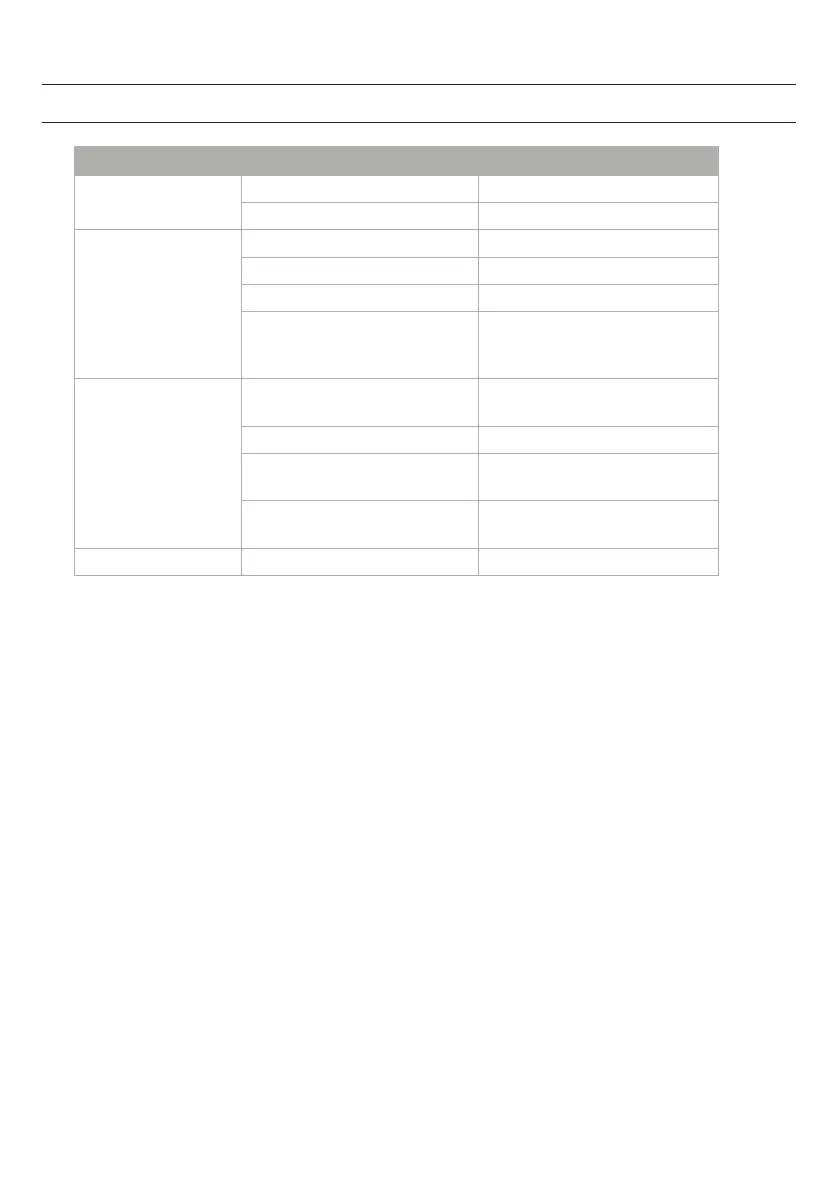
TROUBLESHOOTING GUIDE
Problem Possible Reason Solution
No sound
Battery no power Replace all batteries with new ones.
Volume set at minimum Increase Volume.
CD player will not play
Unit not in CD mode Switch to CD mode
CD is installed incorrectly Insert CD with label side up.
Batteries become exhausted Replace all batteries with new ones.
It the CD is self-compiled, the media
used may not be compatible with
the player.
Use better quality blank media and
retest.
CD skips while playing
Disc is dirty or scratched. Wipe CD with clean cloth or use
another disc.
Dirty or defective disc Clean or replace the defective disc
Dirty pick up lens Use a CD-lens cleaning disc to clean
the lens
Player is subject to excessive shock
or vibration
Relocate the player away from shock
or vibration
CD skips while playing Batteries become exhausted Replace all batteries with new ones.
24


 To Next Page