54
EN
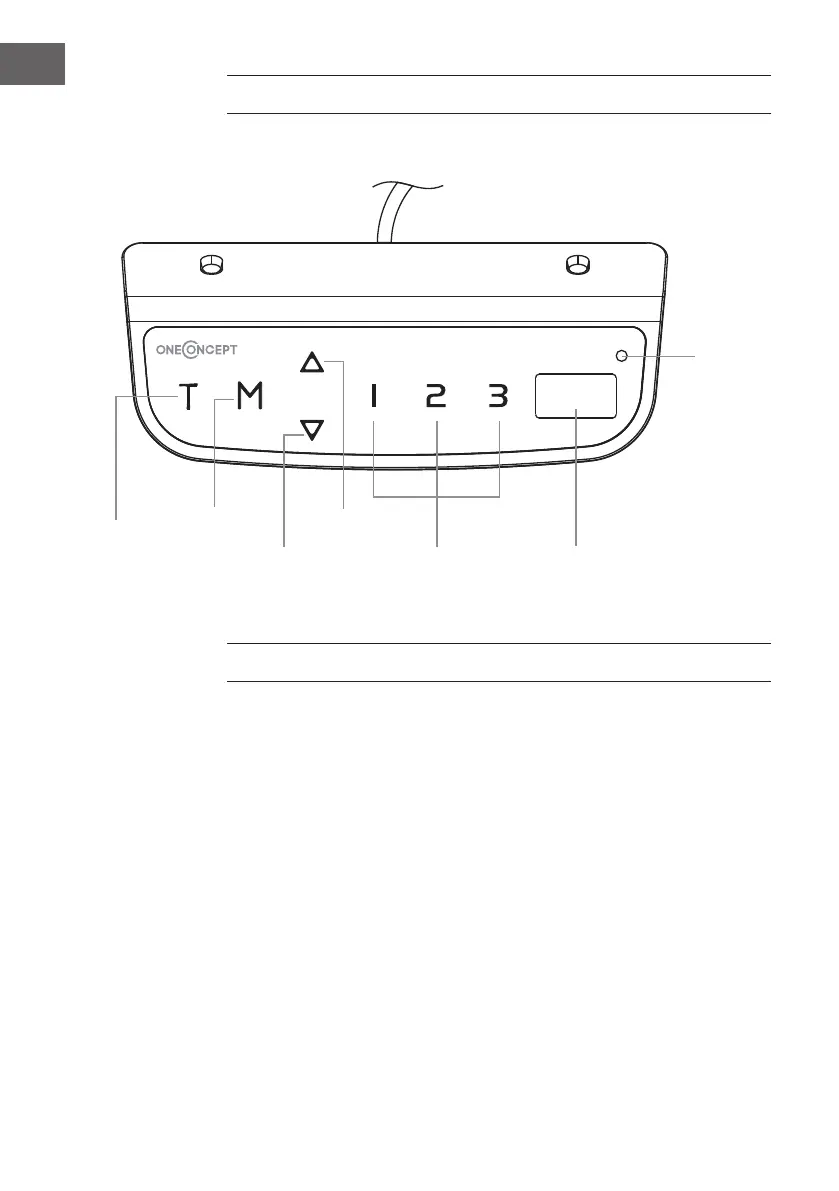
CONTROLLER
Control Panel
OPERATION
Activate the System: Touch the screen. The “---“ will appear on the display.
Then, press and hold the “M“ button for 3 seconds.
The current height will display, and you can start operating the system.
Height Adjustment: Press and hold the up button to lift the desk. Press and
hold the down button to lower the desk.
Timer: The timer is designed to inform users to stand up after a set period
of time. Press the “T“ button to set the period of time. The display will ash
“0.5h“ for 0.5 hour. Each press of the “T“ button leads to a 0.5 hour increment.
The maximal setting of time is 2 hours. When the display stops ashing, then
the period of time is successfully set. And the indicator light on the top right
of panel will be on. When the set time is up, the buzzer will beep to remind
the users. The timer will turn off automatically after a long beep. To cancel the
timing, press “T“ button for 5 times until the display shows the current height
and the indicator light is off.
Memory/
Screen
lock
(unlock)
Downward
movement
Timer
Upward
movement
Memory
1 / 2 / 3
Display
1 / 2 / 3
Indicator
light


 To Next Page