3
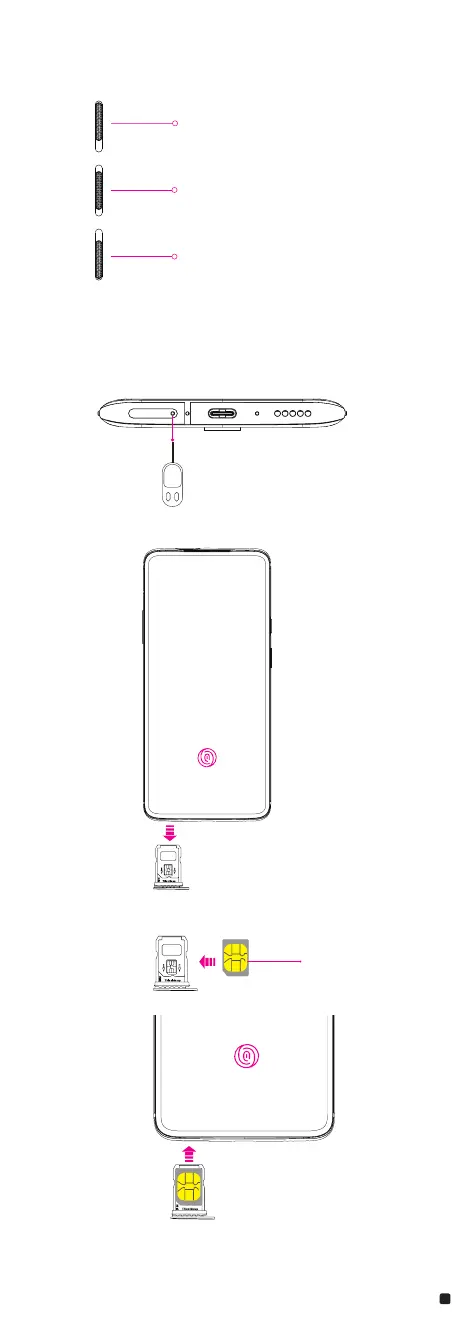
Alert Slider
The Alert Slider is a toggle switch located on the upper edge of your phone. Effortlessly
toggle between 3 notication proles without taking your phone out of your pocket.
Installing the SIM Card
Insert the SIM (Subscriber Identity Module) card provided to start using the device.
1. Insert the ejection pin into the hole on the card tray.
2. Pull out the card tray.
3. Put the Nano SIM card on the card tray with the gold-colored contacts facing up.
4. Insert the card tray back into the slot.
Please use the SIM Tray Ejector (found in the box) to remove the SIM tray from the device
and insert Nano SIM cards in the tray.
Silent
Disables all sound & vibration for
notications and calls
(alarms will still be enabled)
Vibrate
Disables all sound for
notications and calls
(alarms will still be enabled)
Ring
Allows sound & vibration for
all notications and calls
for SIM card















 To Next Page