
 Need help?
Do you have a question about the OnePlus Watch and is the answer not in the manual?
Proper way to wear the watch for comfort and optimal sensor function.
Instructions on how to detach and attach different watch straps.
Step-by-step guide to pairing the watch with your smartphone via Bluetooth.
Detailed steps to turn on, turn off, and restart the OnePlus Watch.
Instructions for charging the watch using the provided charging dock and adapter.
Explanation of button functions and touch gestures for device navigation.
Overview of customizable widgets for quick access to selected features.
How to select and set different watch faces directly on the watch.
Procedure to select and set watch faces using the companion mobile application.
Steps to download and add new watch face designs from the app.
Instructions on how to remove unwanted watch faces from the device.
Assigning specific application shortcuts to the watch's down key.
How to adjust the watch's time display and language settings.
Setting up various common features like notifications and reminders.
Activating and utilizing the Do Not Disturb mode for uninterrupted periods.
Instructions for updating the watch firmware and companion app software.
Procedure to restore the watch to its original factory settings.
Managing incoming notifications and clearing messages on the watch.
Setting up contacts and handling phone calls directly from the watch.
How to accept or decline phone calls when alerted on the watch.
Accessing and managing the record of recent incoming and outgoing calls.
Managing music playback, volume, and playlists on the watch.
How to view current weather conditions and forecasts on the watch.
Creating, editing, and managing alarm clock functions on the watch.
Utilizing the countdown timer for various time-based activities.
Employing the stopwatch feature for timing events and laps.
Activating and using the watch's integrated LED flashlight.
Measuring atmospheric pressure and altitude using built-in sensors.
Using the watch's compass for directional guidance and calibration.
Pairing with and controlling compatible televisions using the watch.
Locating a misplaced smartphone by triggering a sound from the watch.
Selecting workout types, setting targets, and tracking exercise progress.
How the watch automatically detects and prompts to track activities like running.
Accessing daily activity metrics such as steps, duration, and calories burned.
Continuous and on-demand measurement of heart rate for health insights.
Measuring blood oxygen saturation (SpO2) levels for health status.
Monitoring sleep duration, quality, and stages.
Tracking and analyzing your stress levels throughout the day.
Performing guided breathing sessions to promote relaxation and reduce stress.
Receiving reminders to stand and move to combat prolonged sitting.
 General
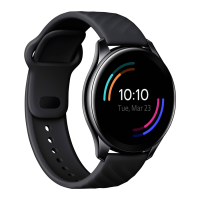
| Shape | Round |
|---|---|
| Band size | - |
| Color name | Moonlight Silver |
| Band material | Fluoroelastomer |
| Watch case size | 46 mm |
| Watch case color | Silver |
| Water resistance | 5 ATM |
| Market positioning | Smartwatch |
| Protection features | Waterproof |
| Watch case material | Stainless steel |
| International Protection (IP) code | IP68 |
| Display type | Digital |
| Display diagonal | 1.39 \ |
| Display resolution | 454 x 454 pixels |
| Display technology | AMOLED |
| Flash memory | 4 GB |
| Built-in camera | No |
| Mobile operating systems supported | Android 10, Android 6.0, Android 7.0, Android 7.1, Android 7.1.2, Android 8.0, Android 9.0, iOS |
| Bluetooth version | 5.0 |
| Headphone connectivity | Bluetooth |
| Battery capacity | 402 mAh |
| Battery life (max) | - h |
| Operating temperature (T-T) | 0 - 35 °C |
| Operating relative humidity (H-H) | 35 - 85 % |
 Weight and Dimensions
| Width | 46.4 mm |
|---|---|
| Weight | 76 g |
| Thickness | 10.9 mm |

 To Next Page