EasyManua.ls Logo

Onespace 50-JN1205 - User Manual

Onespace 50-JN1205
7 pages
Print Icon
To Next Page IconTo Next Page
Loading...
ULTRAMODERN GLASS COMPUTER DESK
ASSEMBLY INSTRUCTIONS
MODEL # 50-JN1205
SUPPLIER CODE: JNFF
OneSpace is a Trademark of Comfort Products, Inc.
Question and Answer IconNeed help?

Do you have a question about the Onespace 50-JN1205 and is the answer not in the manual?

Summary

Assembly Instructions and Overview

Model and Product Identification

Identifies the desk model number, supplier code, and product name.

Assembly Overview Diagram

Visual representation of desk components with weight capacities indicated.

Parts and Hardware Details

Component Identification

Lists all furniture parts (A-H) with their respective stock numbers and quantities.

Hardware Kit Contents

Details the hardware kit including screws, nuts, and the included Allen wrench.

Step-by-Step Assembly Guide

Initial Assembly Steps

Covers attaching steel plates to tray slides and connecting slides to stands and feet.

Intermediate Assembly Steps

Involves attaching the back board to the stands and mounting the keyboard shelf.

Final Assembly Step

Guides the attachment of the desktop to the assembled desk structure.

Safety, Maintenance, and Warranty

Safety and Maintenance Guidelines

Provides safety warnings and recommends periodic checks of fasteners for tightness.

Limited Warranty Information

Details the one-year warranty, its coverage, limitations, and how to claim.

Overview

This document provides assembly instructions and product information for the OneSpace Ultramodern Glass Computer Desk, Model # 50-JN1205, with supplier code JNFF.

Function Description

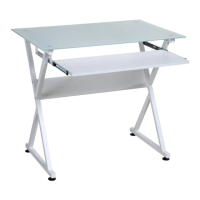
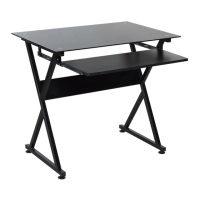
The OneSpace Ultramodern Glass Computer Desk is designed as a functional workstation, featuring a glass tabletop and a pull-out keyboard tray. It is intended for use as a computer desk, providing surfaces for a monitor, keyboard, and other accessories. The desk's design emphasizes a modern aesthetic with its glass top and X-shaped metal stands.

Important Technical Specifications

  • Model Number: 50-JN1205
  • Supplier Code: JNFF
  • Tabletop Maximum Weight Capacity: 88 lbs (40 kg)
  • Keyboard Tray Maximum Weight Capacity: 33 lbs (15 kg)
  • Components:
    • A: Desktop (Glass) - 1 unit
    • B: Keyboard Tray - 1 unit
    • C: Back Board - 1 unit
    • D: Left Stand - 1 unit
    • E: Right Stand - 1 unit
    • F: Tray Slide - 2 units
    • G: Foot - 4 units
    • H: Steel Plate for Slide - 4 units
  • Hardware Kit (STOCK#50-JN1205HA):
    • (1) M6X30MM Screws: 4 units
    • (2) M5.5X55MM Screws: 4 units
    • (3) M6X12MM Screws: 8 units
    • (4) M4X14MM Screws: 4 units
    • (5) M4X6MM Screws: 4 units
    • (6) M4 Nut: 4 units
    • (7) Allen Wrench: 1 unit
  • Compliance: California 93120 Compliant for Formaldehyde.

Usage Features

The desk is designed for ease of assembly, with a step-by-step guide provided. It features a pull-out keyboard tray for ergonomic typing and a spacious glass tabletop. The assembly process involves attaching the steel plates to the tray slides, then securing these to the left and right stands. The backboard is then attached, followed by the keyboard shelf, and finally the glass desktop. It is crucial not to overtighten screws until the entire assembly is complete to allow for minor adjustments. The desk is not intended to be stood upon or used as a stepladder. All bolts and screws must be firmly secured before use.

Maintenance Features

  • Cleaning: Surfaces should be cleaned with a dry or damp cloth. Abrasive cleaners, furniture wax, or polish should not be used, as the unit is finished with a protective clear lacquer.
  • Regular Checks: All bolts and screws should be checked every 6 months to ensure they remain tight.
  • Replacement Parts: In case of missing or damaged parts, customers can visit www.comfortproducts.net/support and reference the model number. Replacement parts are typically shipped within 48 hours.
  • Warranty: Comfort Products offers a one-year limited warranty to the original end-user customer, covering defects in material and workmanship under normal use. The warranty does not cover defects from improper assembly, modification, intentional damage, misuse, or exposure to elements. It is not applicable for rental purposes. The original sales receipt is required for warranty claims. For claims or questions, customers can visit the website or email customerservice@comfortproducts.net.
  • Safety Precautions:
    • Do not stand on the desk.
    • Do not use the desk as a stepladder.
    • Ensure all bolts and screws are firmly secured before use.
    • Read the instruction manual thoroughly before assembly.
    • Remove all pieces before beginning installation.
    • Assemble in an area with plenty of space.
    • Read each step before beginning construction.
    • Never force screws or fittings.
    • Keep the manual for future reference.
    • The provided Allen wrench is the only tool included for assembly; other tools may be required but are not included.

Onespace 50-JN1205 Specifications

General IconGeneral
BrandOnespace
Model50-JN1205
CategoryIndoor Furnishing
LanguageEnglish

Related product manuals