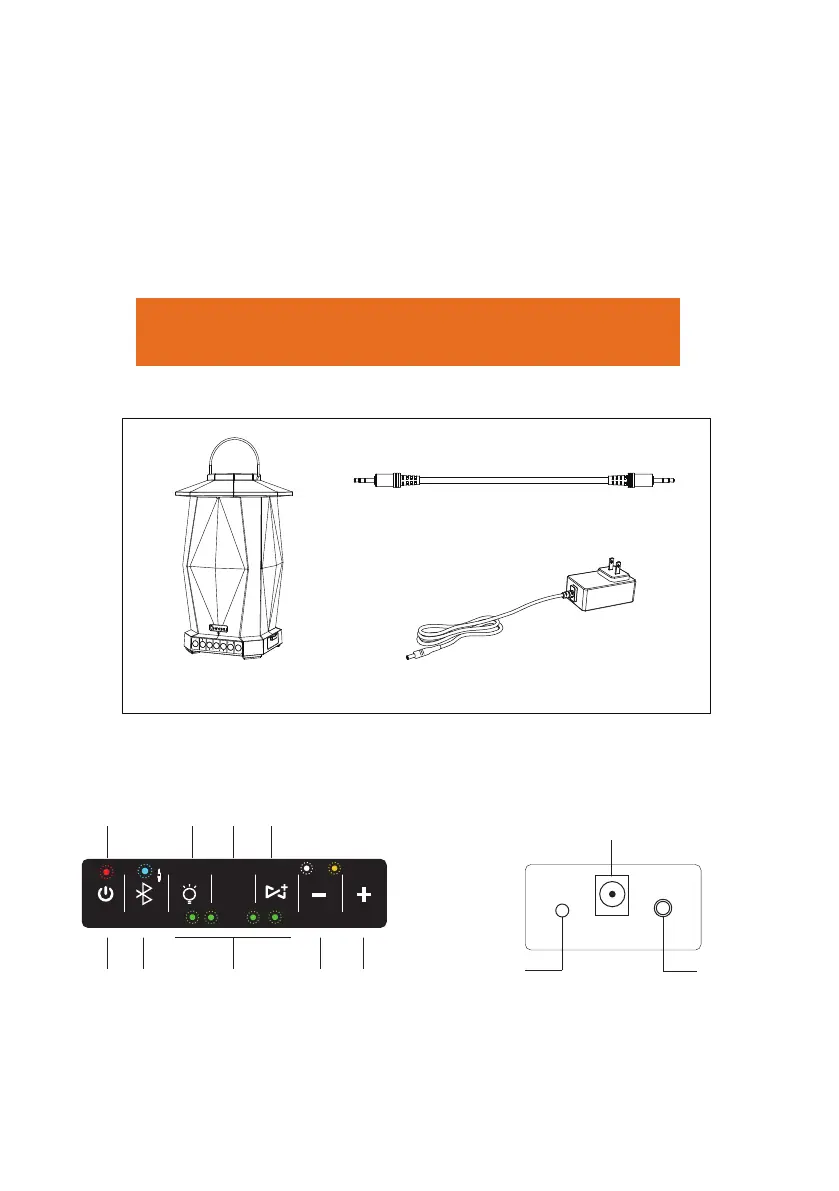
1 Unpack the Box
Speaker
Auxiliary Cable
3.28ft/ 1m
INSTALLATION GUIDE
Thank you for buying this product. Please read all safety information and
installation introduction before using the Bluetooth speaker.
2 Speaker Control Panel and Ports
FUNCTION AND DISPLAY PANEL BUTTONS RELEASE COVER TO ACCESS PORTS
RESET
AUX IN
1 2
39 4 5
68 7
1. POWER ON/OFF
2. BLUETOOTH Pair/ Wake/ Disconnect
3. LIGHT ON/OFF + BRIGHTNESS CONTROL
4. COLOR/TIME SETTING
5. SYNC (requires additional speakers)
2
6. VOLUME DOWN
7. VOLUME UP
8. LIGHTING TIME INDICATOR
9. INDICATOR LIGHT
01 QUICK START GUIDE
2H 4H 6H 8H
COLOR
TIMER
TX RX
15V DC
Power Adapter
CHARGING PORT
Tips:
In case that you can not connect with Bluetooth device, sync your
speakers, or operate your device properly, you can long press"+""-"
(Volume UP/Volume Down) button at the same time to restore
factory setting.


 To Next Page