2
Onity OS700 RFID Safe User Manual
3 Emergency Opening
CAUTION! Keep all tools, emergency card, Portable Programmer, and mechanical key in a secure location.
There are three (3) ways to open the safe in emergency situations:
• Safe emergency card
• Portable Programmer or tablet PP
• Mechanical key
Safe Emergency Card Option
1. Touch the safe emergency key card to the safe RFID reader.
2. Green light ashes until the safe bolts are retracted and the safe is open.
Portable Programmer or Tablet PP Option
Note: The PP or Tablet PP would open the safe even if the safe batteries are dead.
1. Attach the PP cable to the safe RFID reader.
2. Use the OPEN option to open the safe.
3. Green light ashes until the safe bolts are retracted and the safe is open.
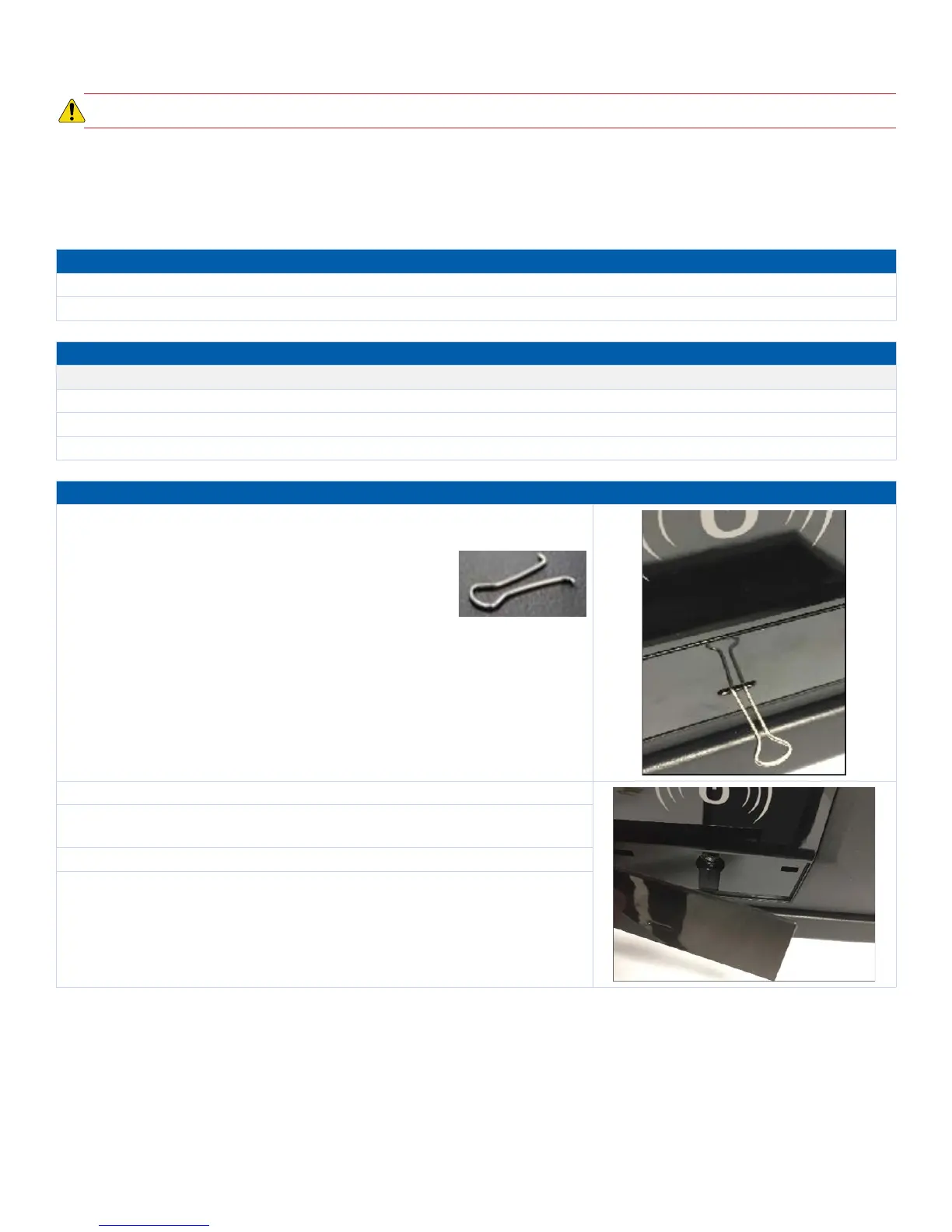
Mechanical Key Option
1. Insert the clip or screwdriver into the cover slot and remove the plas-
tic cover over the programming connection of the safe.
2. Insert the mechanical key in the cylinder hole.
3. Rotate the key clockwise until the bolts are retracted and the safe
door opens.
4. Retrieve your items.
5. Rotate the key counter-clockwise until the bolts secure the door.


 To Next Page