
 To Next Page
В
ВероникаMay 7, 2026
Добрый день подскажите как подключить его к компьютеру ?

Добрый день подскажите как подключить его к компьютеру ?
Guide to setting up speaker systems, including configurations and installation examples.
Instructions for connecting the unit to a TV, covering ARC and non-ARC scenarios.
Connecting AV components like Blu-ray players, audio devices, and video cameras.
Setting up audio playback in a separate room (Zone 2) using AV components.
Guide for connecting FM and AM antennas for radio reception.
Setting up wired or wireless LAN connections for network features.
Final step to connect the unit to a power source.
Playing audio from AV components like Blu-ray players via the unit.
Wireless audio streaming from BLUETOOTH-enabled devices.
Accessing and playing Internet radio stations via network connection.
Streaming music wirelessly from Spotify Connect enabled devices.
Playing music wirelessly from iOS devices using AirPlay.
Wireless music playback using DTS Play-Fi technology and the Onkyo app.
Enjoying group playback with multiple Onkyo products via the Controller App.
Playing music files directly from a connected USB storage device.
Streaming music files from PCs or NAS devices on the home network.
Creating and managing playlists (Play Queue) for USB or network music files.
Tuning into and receiving AM and FM radio stations, including presets.
Enjoying audio in a separate room (Zone 2) while controlling playback.
Adjusting tone controls (Bass/Treble) for front speakers.
Choosing listening modes and understanding their effects based on input formats.
Configuring TV output, OSD display, and assigning HDMI/Video/Audio input jacks.
Setting speaker channels, subwoofer, height speakers, zone speakers, and impedance.
Adjusting multiplex audio, Dolby, DTS, LFE level, and volume settings.
Configuring IntelliVolume, naming inputs, and selecting video sources.
Managing HDMI CEC, Standby Through, Network, Bluetooth, and Power Management.
Configuring Zone 2 playback and remote play zones.
Adjusting tuner frequency step, remote ID, firmware update, initial setup, and lock.
Overview of updating unit firmware via network or USB port.
Step-by-step guide for updating the unit's firmware using a network connection.
Step-by-step guide for updating the unit's firmware using a USB storage device.
Guide to the initial setup process for configuring the unit upon first use.
Configuring speaker layout and performing AccuEQ room calibration.
Outputting test tones to Zone 2 for audio playback in a separate room.
Procedures for restarting or resetting the unit to resolve operational issues.
Solutions for the unit not turning on or turning off unexpectedly.
Troubleshooting no sound from speakers, TV, or connected players.
Resolving problems like no image, flickering images, or out-of-sync video/audio.
Troubleshooting HDMI CEC and linked operation problems with compatible devices.
Addressing poor reception or noise issues with the AM/FM tuner.
Resolving issues with connecting, playback, sound quality, or interruptions.
Troubleshooting inability to access internet radio, network servers, or sound interruptions.
Solutions for USB storage devices not being displayed or functioning correctly.
Troubleshooting wireless connection problems, including SSID and stealth mode issues.
Addressing problems with ZONE output or remote controller modes.
Troubleshooting common problems with the remote controller's functionality.
Resolving problems where the unit's display does not light up.
Addressing strange noise, error messages during calibration, and measurement result discrepancies.
Explanation of HDMI features like CEC, ARC, Standby Through, Deep Color, 3D, 4K, Lip Sync.
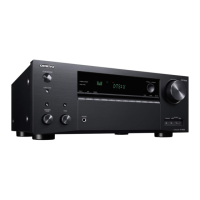
Technical specifications for the unit's amplifier, video, tuner, network, and HDMI features.
 General
| Receiver type | Surround |
|---|---|
| Audio output channels | 7.2 channels |
| Total Harmonic Distortion (THD) | 1 % |
| Power output per channel (1KHz@6 Ohm) | 165 W |
| Power output per channel (20-20KHz@8 Ohm) | - W |
| HDMI in | 7 |
| Digital audio coaxial in | 1 |
| Component video (YPbPr/YCbCr) in | 2 |
| Line-out | Yes |
| Connectivity technology | Wireless |
| Speakers connectivity type | - |
| Bluetooth version | 4.1 |
| Bluetooth profiles | A2DP, AVRCP |
| AM band range | 522 - 1710 kHz |
| FM band range | 57.5 - 108 MHz |
| Supported radio bands | AM, FM |
| Preset stations quantity | 40 |
| Optical drive included | No |
| Supported video modes | 2160p |
| Supported graphics resolutions | 3840 x 2160 |
| HDCP version | 2.2 |
| Product color | Silver |
| Audio decoders | DTS-HD Master Audio, DTS:X, Dolby Atmos, Dolby Digital 5.1, Dolby TrueHD |
| AC input voltage | 220 - 240 V |
| AC input frequency | 50 - 60 Hz |
| Power consumption (standby) | 0.15 W |
| Power consumption (typical) | 570 W |
| Package weight | 12500 g |
| Package depth | 450 mm |
| Package width | 539 mm |
| Package height | 260 mm |
 Weight and Dimensions
| Depth | 379.5 mm |
|---|---|
| Width | 435 mm |
| Height | 173.5 mm |
| Weight | 10000 g |