EasyManua.ls Logo

Onn 100010108 - Installation Steps; Step 2: Attach Brackets to TV; Step 3: Install Wall Plate

Onn 100010108
7 pages
Print Icon
To Next Page IconTo Next Page
To Previous Page IconTo Previous Page
Loading...
TV,
choose
corespondin
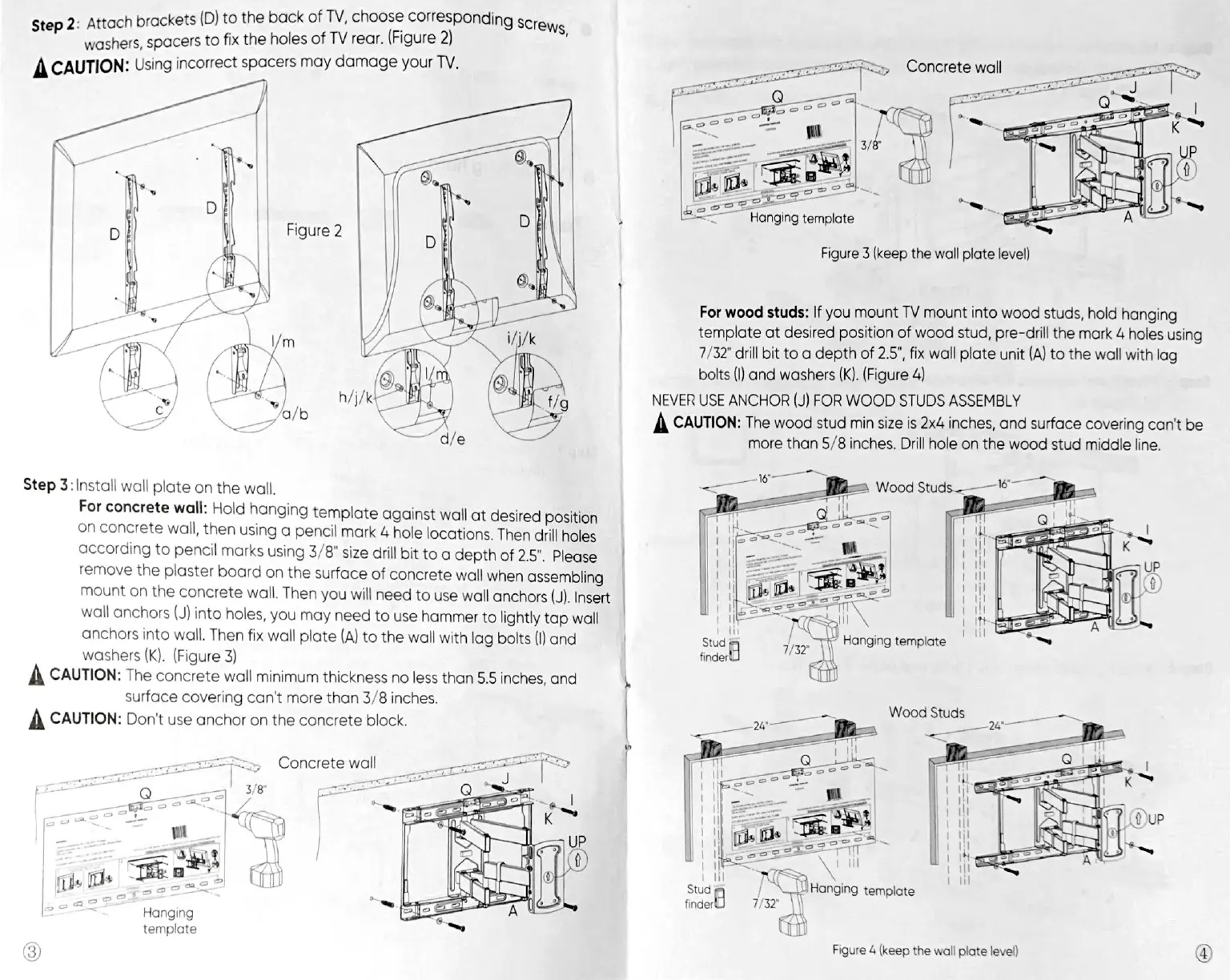
2:
Attach
brackets
(D)
to
the
back
of
TV,
ster
washers,
spacers
to
fix
the
holes
of
TV
rear.
(Figure
2)
A
CAUTION:
Using
incorrect
spacers
may
damage
your
TV.
9
Screws,
sole
SST
eae
i
ja
a
Figure
3
(keep
the
wall
plate
level)
|
For
wood
studs:
If
you
mount
TV
mount
into
wood
studs,
hold
hanging
template
at
desired
position
of
wood
stud,
pre-drill
the
mark
4
holes
using
7/32"
drill
bit
to
a
depth
of
2.5”,
fix
wall
plate
unit
(A)
to
the
wall
with
lag
bolts
(I)
and
washers
(Figure
4)
NEVER
USE
ANCHOR
(J)
FOR
WOOD
STUDS
ASSEMBLY
A
CAUTION:
The
wood
stud
min
size
is
2x4
inches,
and
surface
covering
can't
be
more
than
5/8
inches.
Drill
hole
on
the
wood
stud
middle
line.
Step
3:
Install
wall
plate
on
the
wall.
For
concrete
wall:
Hold
hanging
template
against
wall
at
desired
position
on
concrete
wall,
then
using
a
pencil
mark
4
hole
locations.
Then
drill
holes
according
to
pencil
marks
using
3/8"
size
drill
bit
toa
depth
of
2.5",
Please
remove
the
plaster
board
on
the
surface
of
concrete
wall
when
assembling
mount
on
the
concrete
wall.
Then
you
will
need
to
use
wall
anchors
Insert
wall
anchors
(J)
into
holes,
you
may
need
to
use
hammer
to
lightly
tap
wall
anchors
into
wall.
Then
fix
wall
plate
(A)
to
the
wall
with
lag
bolts
(I
and
washers
(Figure
3)
A
CAUTION:
The
concrete
wall
minimum
thickness
no
less
than
5.5
inches,
and
4
surface
covering
can't
more
than
3/8
inches.
A
CAUTION:
Don't
use
anchor
on
the
conerete
block.
|
r
1
=,
Concrete
wall
3/8"
eae
EIS
~
tr
.
45
mw
|
oy
~
i
|
=
\
7/32
Hanging
template
3)
Figure
4
(keep
the
wall
plate
level)
ey)

Related product manuals