Need help?
Do you have a question about the Onn 100010116 and is the answer not in the manual?
Verifies VESA size and weight compatibility for the mount, ensuring it fits your TV.
Crucial safety instructions for installation and use, including child safety.
Illustrates product dimensions, VESA interface specifications, and swivel angles.
Advice for a smooth installation process, including floor protection.
Cautionary note regarding the maximum weight the mount can safely support.
Lists essential parts like the base, column, TV plate, and anti-tip strap kit.
Details screws, Allen wrench, and cable clips for assembling the base unit.
Lists screws, spacers, and washers for attaching the TV to the mount.
Guidance on choosing the right screws for your TV's mounting holes.
Instructions on when and how to use spacers with mounting screws.
Process for attaching the TV brackets to the back of the TV.
Connects the main column to the base unit using provided screws.
Secures the TV plate to the column at the desired height.
Procedure for lifting and mounting the TV onto the plate. Requires two people.
How to reposition the TV vertically on the column.
Fine-tuning the TV's horizontal alignment using leveling screws.
Adjusting the TV's swivel angle for optimal viewing.
Installing a clip to organize TV cables on the column.
Details all components included in the anti-tip strap kit.
Instructions for attaching the strap to an existing TV stand.
How to attach the anti-tip strap to a wall's wood stud.
Instructions for attaching the strap to concrete, stone, or masonry.
This document describes the onn. 32"-65" Swivel TV Base, Model: 100010116, a product designed to provide a stable and adjustable mounting solution for televisions within a specific size and weight range. The product guide, dated November 5, 2020, V1, outlines the installation process, safety precautions, and features of the TV base.
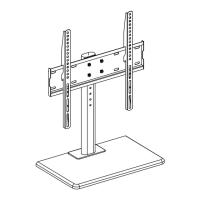
The onn. Swivel TV Base serves as a freestanding support for televisions, allowing for placement on various surfaces such as TV stands or furniture. Its primary function is to securely hold a television, offering both height adjustment and a swivel capability for optimal viewing angles. The base is designed to accommodate TVs with VESA patterns ranging from 75mm x 75mm (2.95" x 2.95") to 400mm x 400mm (15.75" x 15.75"). It is crucial that the TV's VESA pattern falls within this range for compatibility. Additionally, the TV base is engineered to support televisions weighing up to 77 lbs (35 kg), including any accessories attached to the TV. Exceeding this weight limit can compromise the stability of the mount and potentially lead to damage or injury. The swivel feature allows users to rotate the TV ±35 degrees horizontally, providing flexibility in adjusting the screen's direction to suit different seating arrangements or room layouts. An optional anti-tip safety strap kit is included to further enhance stability and prevent accidental tipping, which can be installed on an existing TV stand, wood stud, or concrete/masonry wall.
The TV base offers several features designed to enhance usability and viewing experience. The swivel functionality is a key advantage, enabling users to easily adjust the TV's angle without moving the entire base or furniture it rests on. This is particularly useful in rooms with multiple viewing areas or to reduce glare from windows or lights. The height of the TV can also be adjusted by selecting different holes on the column during assembly, allowing users to position the TV at their preferred eye level. After initial assembly, fine-tuning of the TV's horizontal level is possible, with a ±4° leveling adjustment that can be made by loosening and tightening specific screws with an Allen wrench.
Installation is designed to be a two-person job for safety and ease of handling, especially when attaching the TV to the base. The product guide emphasizes the importance of carefully reading all instructions and ensuring all parts are present and in good condition before beginning assembly. It also recommends assembling the product on a flat, open carton or a rug to protect both the product and the floor. The installation process involves attaching TV brackets to the television, then securing the column to the base, and finally hanging the TV unit onto the column. Various screws, spacers, and washers are provided to accommodate different TV models and VESA mounting hole depths. Users are instructed to choose the appropriate hardware that fits their specific TV to ensure a secure attachment.
Cable management is another practical feature, with a plastic cable management clip included to help organize and conceal TV cables, contributing to a cleaner and more organized appearance. The optional anti-tip safety strap provides an additional layer of security, which is highly recommended, especially in households with children or pets, to prevent the TV from accidentally tipping over. The strap can be anchored to different surfaces depending on the user's setup, including an existing TV stand, a wood stud, or a concrete/masonry wall, offering versatile installation options.
While the product guide does not explicitly detail ongoing maintenance, the design of the TV base suggests minimal upkeep. The materials used are likely durable and designed for long-term use without requiring frequent attention. Regular checks of the tightness of all screws and connections are advisable to ensure the TV remains securely mounted. If the TV is frequently swiveled, periodically inspecting the swivel mechanism for any signs of wear or loosening could help maintain smooth operation.
The guide stresses the importance of proper initial installation as a key aspect of "maintenance" in ensuring the product's longevity and safety. This includes using the correct screws and hardware for the TV, ensuring the TV brackets are centered and level, and adhering to the weight limit. Discarding all unused hardware after installation is also recommended to avoid confusion or misuse later.
The safety warnings provided in the guide serve as important "maintenance" guidelines to prevent damage or injury. These include never allowing children to climb or play on the product, not sitting or standing on it, and ensuring the TV's weight does not exceed the recommended load rating. The manufacturer explicitly states that they are not liable for damage or injury caused by incorrect mounting, assembly, or use, underscoring the user's responsibility in following the instructions and maintaining safe usage practices. In case of any issues or questions, a customer support hotline is provided, indicating a resource for troubleshooting and assistance, which can be considered a form of product support "maintenance."
 General
| Mounting Hardware | Included |
|---|---|
| Material | Steel |
| Color | Black |
| Tilt Range | +5° to -15° |
| Compatible TV Sizes | 32" to 70" |
| Mount Type | Wall Mount |
| Type | Full Motion TV Mount |
| Profile | Low Profile |

 To Next Page