EasyManua.ls Logo

Onn 100010108 - Step 9: Adjust TV Angle; Step 10: Manage Cables; Final Checks and Mounting Advice; TV Bracket Attachment Caution

Onn 100010108
7 pages
Print Icon
To Next Page IconTo Next Page
To Previous Page IconTo Previous Page
Loading...
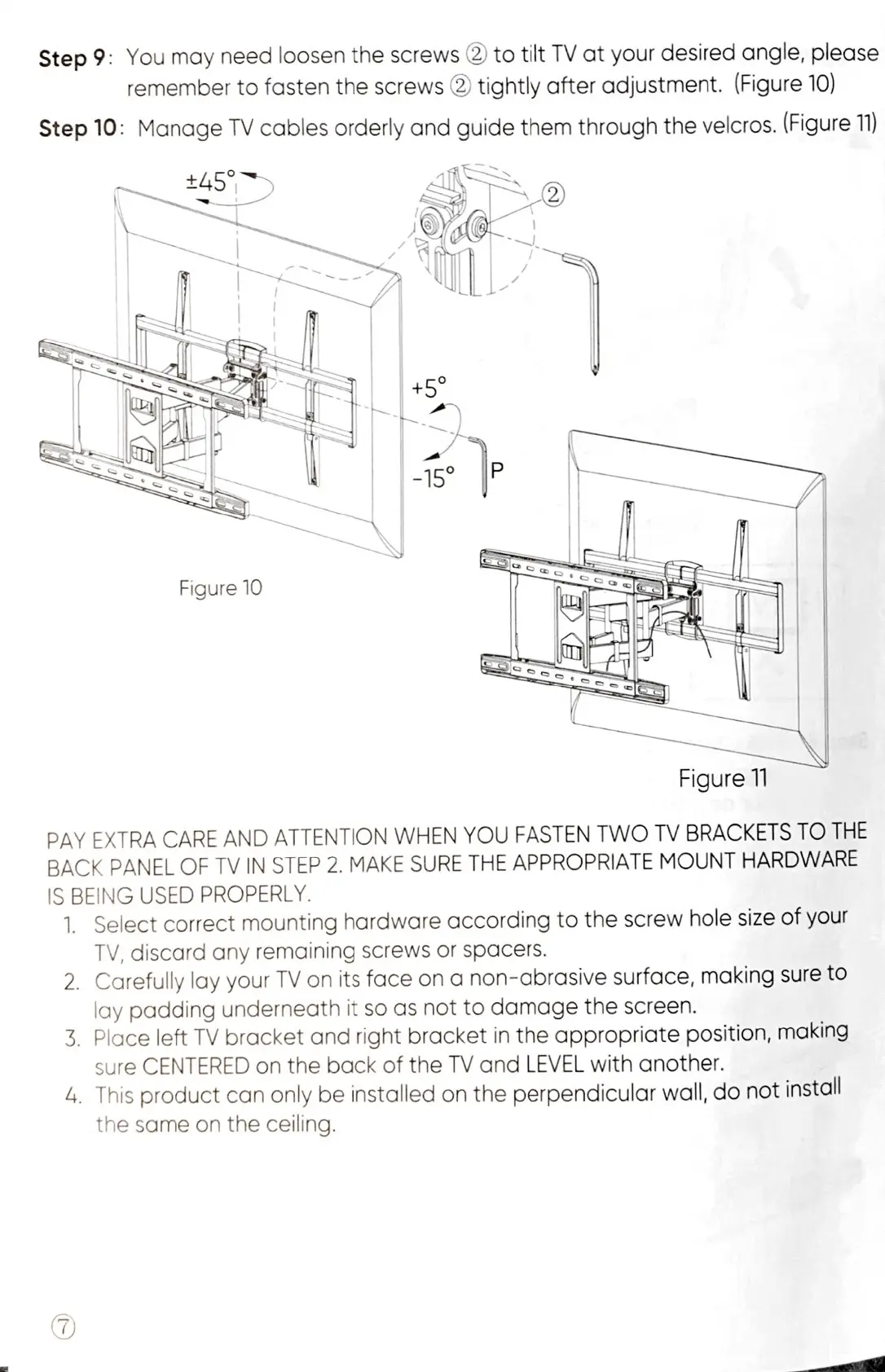
Step
9:
You
may
need
loosen
the
screws
@)
to
tilt
TV
at
your
desired
angle,
please
remember
to
fasten
the
screws
@
tightly
after
adjustment.
(Figure
10)
Step
10:
Manage
TV
cables
orderly
and
guide
them
through
the
velcros.
(Figure
11)
Figure
10
Figure
11
PAY
EXTRA
CARE
AND
ATTENTION
WHEN
YOU
FASTEN
TWO
TV
BRACKETS
TO
THE
BACK
PANEL
OF
TV
IN
STEP
2.
MAKE
SURE
THE
APPROPRIATE
MOUNT
HARDWARE
IS
BEING
USED
PROPERLY.
1.
Select
correct
mounting
hardware
according
to
the
screw
hole
size
of
your
TV,
discard
any
remaining
screws
or
spacers.
2.
Carefully
lay
your
TV
on
its
face
on
a
non-abrasive
surface,
making
sure
to
lay
padding
underneath
it
so
as
not
to
damage
the
screen.
3.
Place
left
TV
bracket
and
right
bracket
in
the
appropriate
position,
making
sure
CENTERED
on
the
back
of
the
TV
and
LEVEL
with
another.
4.
This
product
can
only
be
installed
on
the
perpendicular
wall,
do
not
install
the
same
on
the
ceiling.

Related product manuals