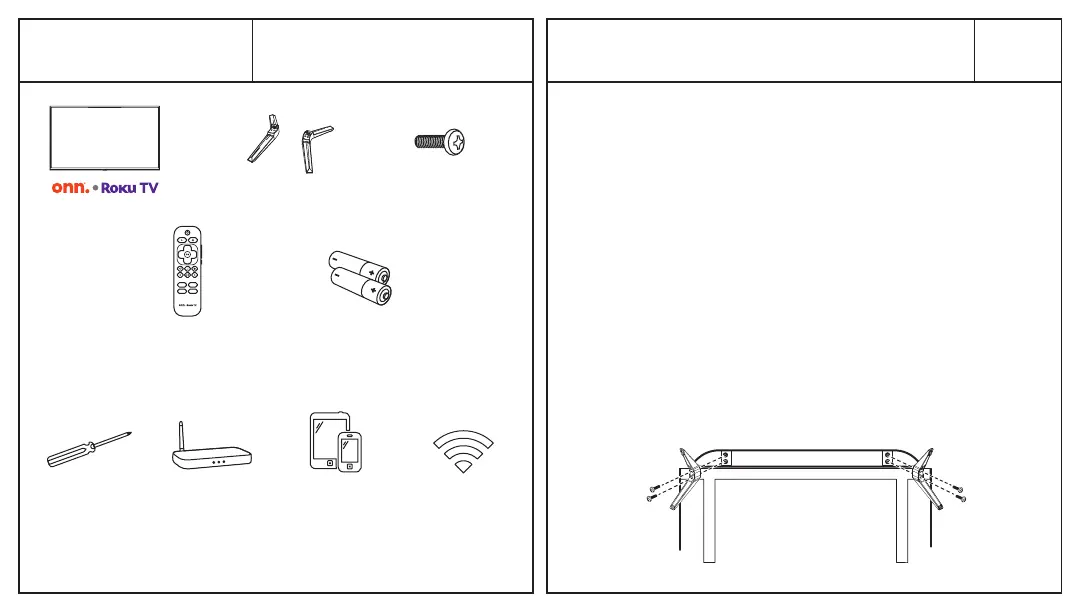
What’s in the Box?
Installing the Stands
Check to make sure you
have everything below.
01
TV Stand 4 Screws
TV Remote 2 x AAA Batteries
for Remote
What you need:
Phillips
Head
Screwdriver
Wireless
Router
(needed for
streaming)
Computer,
Tablet, or
Smartphone
(needed for setup)
Internet
Connection
(needed for
streaming)
Do not install the stands if you want to wall
mount your TV. See your wall mount instructions
or chat live at www.onntvsupport.com.
You will need: Phillips screwdriver (not included)
1. PlacetheTVscreen-downonaclean,at,
soft surface (e.g.: blanket) to prevent
scratches or damage to the screen.
2. Use a Phillips screwdriver to attach each
stand with the provided screws.
3. Place the TV upright on a stable, level
surface.


 To Next Page