EasyManua.ls Logo

Onn 100012589 - Remote Control and Device Connectivity; Remote Control Overview; Connecting External Devices

Onn 100012589
6 pages
Print Icon
To Next Page IconTo Next Page
To Previous Page IconTo Previous Page
Loading...
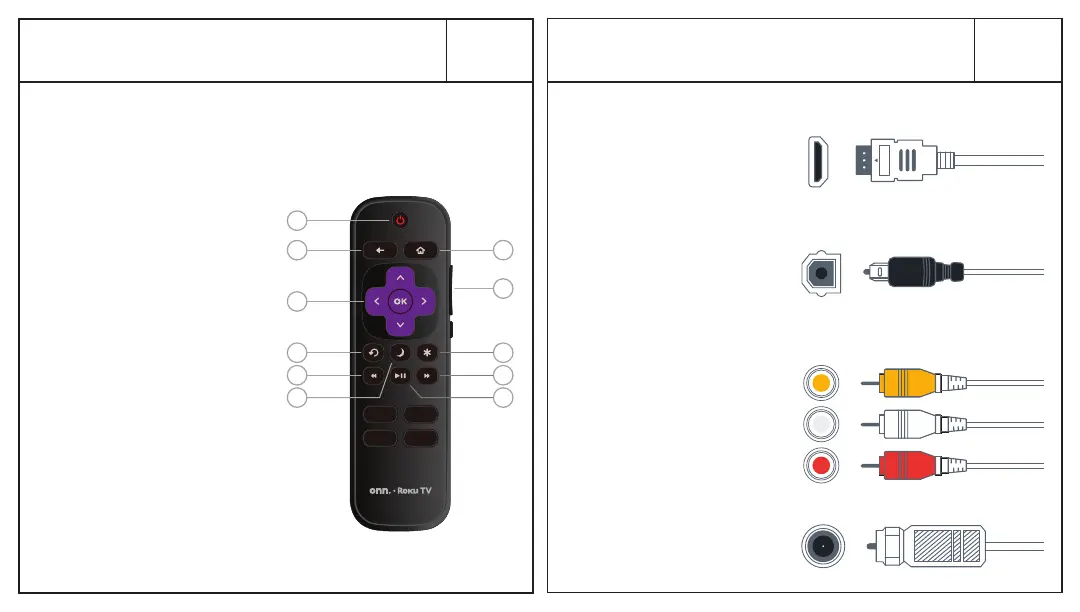
Power your TV remote by inserting the
included batteries carefully matching (+) and
(-) indicated inside the battery compartment.
A Power
B Back
C Directional keypad
D Channel recall
E Rewind
F Sleep
G Home
H Volume
I View more options
J Fast forward
K Play/Pause
Visit go.roku.com/tvmanual
for the complete Roku User Guide.
Grab your remote
02
Connecting Devices
03
D
C
B
G
H
I
J
K
A
E
F
HDMI
connect a Blu-ray,
DVD player, gaming
console or other devices
Best Quality
Better Quality
Good Quality
Digital Optical
connect an external
digital audio system
Component
connect an
external AV device
Coaxial
connect to
antenna/cable
VIDEO
LEFT
RIGHT