This document provides a quick start guide for an Onn. Roku TV, detailing its setup, connectivity, and features.
Function Description
The Onn. Roku TV is a smart television designed to provide a comprehensive entertainment experience, offering access to a vast array of streaming content, live TV, and traditional broadcast channels. It integrates the Roku operating system, allowing users to navigate through a personalized home screen, discover new content, and manage their entertainment preferences. The TV functions as a central hub for various media sources, including streaming services, gaming consoles, Blu-ray/DVD players, and antenna/cable connections. Its core purpose is to deliver high-quality visual and audio entertainment, with an emphasis on ease of use and access to a wide range of digital content. The Roku TV platform enables seamless switching between different inputs and streaming channels, creating a unified entertainment interface. It supports both wired and wireless internet connections, facilitating access to online streaming services. The TV is designed to be user-friendly, with a straightforward setup process and intuitive remote control.
Usage Features
The Onn. Roku TV offers a variety of usage features that enhance the viewing experience:
- Easy Stand Installation: The TV comes with stands that can be easily attached using a Phillips screwdriver. The process involves placing the TV screen-down on a soft surface, attaching the stands with provided screws, and then placing the TV upright on a stable surface. This ensures a secure and level setup for tabletop placement. For those preferring wall mounting, the guide directs users to wall mount instructions or online support.
- Remote Control Functionality: The included remote control is designed for intuitive navigation. It requires two AAA batteries, which should be inserted carefully, matching the positive (+) and negative (-) indications. Key functions on the remote include:
- Power (A): Turns the TV on or off.
- Back (B): Returns to the previous screen or menu.
- Directional keypad (C): Navigates through menus and selects options (up, down, left, right, OK).
- Channel recall (D): Quickly switches between recently viewed channels.
- Rewind (E): Rewinds playback of media.
- Sleep (F): Activates a sleep timer for the TV.
- Home (G): Returns to the main Roku home screen.
- Volume (H): Adjusts the audio volume.
- View more options (I): Accesses additional settings or options for the current content.
- Fast forward (J): Fast forwards playback of media.
- Play/Pause (K): Plays or pauses media playback.
The remote's design prioritizes ease of access to common functions, making content navigation simple.
- Diverse Connectivity Options: The TV provides multiple ports for connecting various external devices:
- HDMI: For best quality, connect Blu-ray players, DVD players, gaming consoles, and other high-definition devices.
- Digital Optical: For better quality audio, connect external digital audio systems.
- Component: For good quality video and audio, connect external AV devices using red, white, and yellow RCA cables.
- Coaxial: Connects to an antenna or cable for broadcast TV.
- LAN (for 4K models only): Provides a wired connection to the internet, offering a stable and potentially faster connection for streaming.
- Headphone: Connects headphones or external speakers for private listening or enhanced audio output.
- USB: Connects for viewing photos, playing music, watching movies, and other multimedia playback from USB storage devices.
These options ensure compatibility with a wide range of legacy and modern entertainment devices.
- Seamless Setup & Activation: The TV's setup process is guided by on-screen instructions. Users will need their wireless network name and password handy for internet connectivity. While the TV can be used as a regular TV without a wireless connection, activating the Roku TV requires linking it to a Roku account using a computer, smartphone, or tablet. This activation unlocks access to thousands of streaming channels and entertainment options. The guide explicitly warns users about scams, stating that Roku does not charge for activation support.
- Personalized Entertainment Experience: The Roku TV allows users to customize their home screen with favorite channels for quick access. It offers a massive selection of free, live, and premium TV content, keeping users updated on trending shows, events, and live news. This personalization ensures that users can easily find and access the content they enjoy most.
- Streaming Capabilities: With the Roku platform, users can stream content from popular services like Netflix, Disney+, Apple TV, Peacock, HBO Max, and many others. The TV is designed to be a gateway to a new world of streaming, offering a rich library of on-demand and live content.
- Support for Different Content Resolutions: The content resolution available on the TV is based on TV compatibility and may vary by channel. Channels are subject to change, may vary by region, and some may require payment, providing flexibility in content choices.
Maintenance Features
While the guide primarily focuses on initial setup and usage, it touches upon aspects related to long-term care and support:
- Product Registration for Warranty: Users are encouraged to register their product to activate a two-year warranty. This can be done by scanning a QR code with a smartphone camera or visiting onntvsupport.com. The guide clarifies that a 1-year manufacturer warranty is included with purchase, which extends to 2 years with product registration within 90 days of purchase. This feature provides peace of mind regarding potential defects or issues.
- Customer Support Access: Comprehensive customer support is available through multiple channels:
- Online Chat: www.onntvsupport.com
- Email: customerservice@onntvsupport.com
- Phone/Text: 844-334-2355 (available 9 am – 9 pm EST daily)
These support options ensure that users can get assistance with any setup, usage, or troubleshooting questions they may have.
- User Manual Availability: The complete Roku User Guide is accessible online at go.roku.com/tvmanual, providing detailed information beyond the quick start guide for more in-depth understanding and troubleshooting.
- Recommendation to Keep Packaging: The guide recommends keeping the TV box for the duration of the warranty. This is a practical tip for potential returns, repairs, or moving the TV, as original packaging often provides the best protection.
- Battery Replacement: The remote control requires two AAA batteries, which will need to be replaced periodically. The guide provides clear instructions for inserting them correctly, implying that battery replacement is a straightforward maintenance task.
The Onn. Roku TV is designed for a modern entertainment experience, combining ease of setup with extensive content access and robust customer support.

 Need help?
 General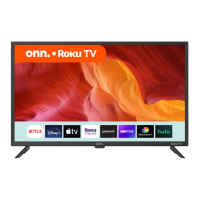

 To Next Page