EasyManua.ls Logo

Onn AAYLW100125284 - User Manual

Onn AAYLW100125284
2 pages
Print Icon
To Next Page IconTo Next Page
Loading...
Wireless Earphones
QUICK START GUIDE
Overview
FCC
ID: 2AIXC-ONN40082
Manufactured in China
CHARGING CASE
RIGHT
EARPHONE
LEFT
EARPHONE
RIGHT
EAR
LEFT
EAR
HAVING TROUBLE? WE CAN HELP
7 DAYS/WEEK 7:00am- 9:00pm CST
18885162630
Model # AAYLW100125284, AACHY100125284,
AASMLY100125284, AAIRA1001252824,
AACHK100125284,ONN40082, ONN40082W-PNK,
ONN40082W-YEL, ONN40083W-SMLY,
ONN40083W-SWRL, ONN40083W-BWCB
FCC Statement
This equipment has been tested and found to comply with the limits for a Class B digital device, pursuant to part
15 of the FCC rules. These limits are designed to provide reasonable protection against harmful interference in a
residential installation. This equipment generates, uses and can radiate radio frequency energy and, if not
inst
alled and used in accordance with the instructions, may cause harmful interference to radio communications.
However, there is no guarantee that interference will not occur in a particular installation. If this equipment does
cause harmful interference to radio or television reception, which can be determined by turning the equipment
off and on, the user is encouraged to try to correct the interference by one or more of the following measures:
-Reorient or relocate the receiving antenna.
-Increase the separation between the equipment and receiver.
-Connect the equipment into an outlet on a circuit different from that to which the receiver is connected.
-Consult the dealer or an experienced radio/TV technician for help.
To assure continued compliance, any changes or modifications not expressly approved by the party.Responsible
for compliance could void the user’s authority to operate this equipment.
This equipment complies with Part 15 of the FCC Rules. Operation is subject to the following two conditions:
(1) This device may not cause harmful interference, and
(2) This device must accept any interference received, including interference that may cause undesired operation.
FCC Radiation Exposure Statement:
The device has been evaluated to meet general RF exposure requirement.
The device can ben used inthe portable exposure condition with restiction
Question and Answer IconNeed help?

Do you have a question about the Onn AAYLW100125284 and is the answer not in the manual?

Summary

Product Overview

Wireless Earphones Components

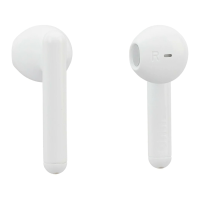
Diagrams illustrating the charging case, left earphone, and right earphone for the wireless earphones.

Model Identification

List of model numbers associated with the wireless earphones.

Support and Compliance

Customer Support Contact

Provides a phone number and operating hours for customer assistance.

FCC Regulatory Information

Details FCC compliance, operational conditions, and radiation exposure.

Charging Instructions

Connect to Charger

Instructions on connecting the USB-C cable to the charging case and a power source.

Pairing and Controls

Bluetooth Pairing Process

Steps to pair the earphones by selecting them from Bluetooth settings.

Audio Touch Controls

Guide to using tap and press-and-hold gestures for music and audio playback.

Phone Touch Controls

Instructions for managing calls and smart assistant via earphone touch controls.

Overview

This document provides a quick start guide for the Onn. Wireless Earphones, covering their overview, charging, pairing, and control functions.

The Onn. Wireless Earphones are designed to provide a convenient and untethered audio experience, suitable for listening to music, other audio content, and managing phone calls. The system consists of two individual earphones, designated as Left and Right, and a portable charging case. The earphones are designed to fit comfortably in the ear, providing a secure fit for various activities. The charging case serves as a protective storage unit for the earphones and also recharges them when they are not in use.

Usage Features:

Pairing:

To begin using the earphones, they must first be paired with a Bluetooth-enabled device, such as a smartphone. The pairing process is straightforward:

  1. Remove from Case: Take both earphones out of their charging case. This action typically initiates their pairing mode, indicated by flashing lights (red and blue) on the earphones.
  2. Select from Bluetooth Settings: On your smartphone or other device, navigate to the Bluetooth settings. Look for "onn. bts TWS EB" in the list of available devices and select it to establish the connection. Once paired, the earphones will typically connect automatically to the last paired device when removed from the case.

Audio Touch Controls:

The earphones feature intuitive touch controls for managing audio playback:

  • Left Earphone (Press & Hold*): This action is used to navigate backward in your audio content, such as skipping to the previous track.
  • Left or Right Earphone (Tap x 2): Tapping either earphone twice will typically play or pause the current audio track. This universal control allows for quick management of playback regardless of which earphone you are interacting with.
  • Right Earphone (Press & Hold*): This action is used to navigate forward in your audio content, such as skipping to the next track. *Note: The "Press & Hold" functionality for skipping tracks may not be available when using only one earphone, as it often requires both earphones to be active for full stereo control.

Phone Touch Controls:

In addition to audio management, the earphones also provide controls for handling phone calls and interacting with your device's smart assistant:

  • Left or Right Earphone (Tap): A single tap on either earphone will answer an incoming call or end an ongoing call. This allows for quick and convenient call management without needing to access your phone.
  • Left or Right Earphone (Press & Hold): Pressing and holding either earphone will decline an incoming call. This is useful when you are unable to take a call and wish to send it to voicemail.
  • Left or Right Earphone (Tap x 3): Tapping either earphone three times will activate your smartphone's smart assistant (e.g., Siri, Google Assistant). This allows you to issue voice commands, ask questions, or control other smart features of your device hands-free.

Maintenance Features:

Charging:

The Onn. Wireless Earphones are designed for easy and convenient charging using their dedicated charging case:

  1. Connect USB-C End to Case: To charge the case, connect the USB-C end of the provided charging cable into the USB-C port on the charging case.
  2. Connect to Power Source: Connect the other end of the USB-C cable to a standard USB smartphone charger (not typically included with the earphones but commonly available). The charging case will then begin to charge, and indicator lights on the case will usually show the charging status. The earphones themselves charge automatically when placed inside the charging case, as long as the case has power. This ensures that your earphones are always ready for use when you take them out of the case.

FCC Compliance:

The device adheres to FCC regulations, ensuring it operates within specified limits for digital devices and radio frequency emissions. It is designed to minimize harmful interference in residential installations. Users are advised to ensure proper installation and usage according to instructions to prevent interference. In case of interference, troubleshooting steps include reorienting the receiving antenna, increasing separation between equipment and receiver, connecting to a different circuit, or consulting a technician. Any unauthorized modifications could void the user's authority to operate the equipment. The device complies with Part 15 of the FCC Rules, meaning it accepts received interference and does not cause harmful interference. It also meets general RF exposure requirements for portable use.

Onn AAYLW100125284 Specifications

General IconGeneral
BrandOnn
ModelAAYLW100125284
TypeOver-Ear
ConnectivityWireless
Bluetooth Version5.0
Battery Life20 hours
Charging Time2 hours
Driver Size40 mm
Frequency Response20 Hz - 20 kHz
Impedance32 ohms
MicrophoneYes
ColorBlack
Water ResistanceNo
Playtime20 hours

Related product manuals