EVBUM2868/D
www.onsemi.com
5
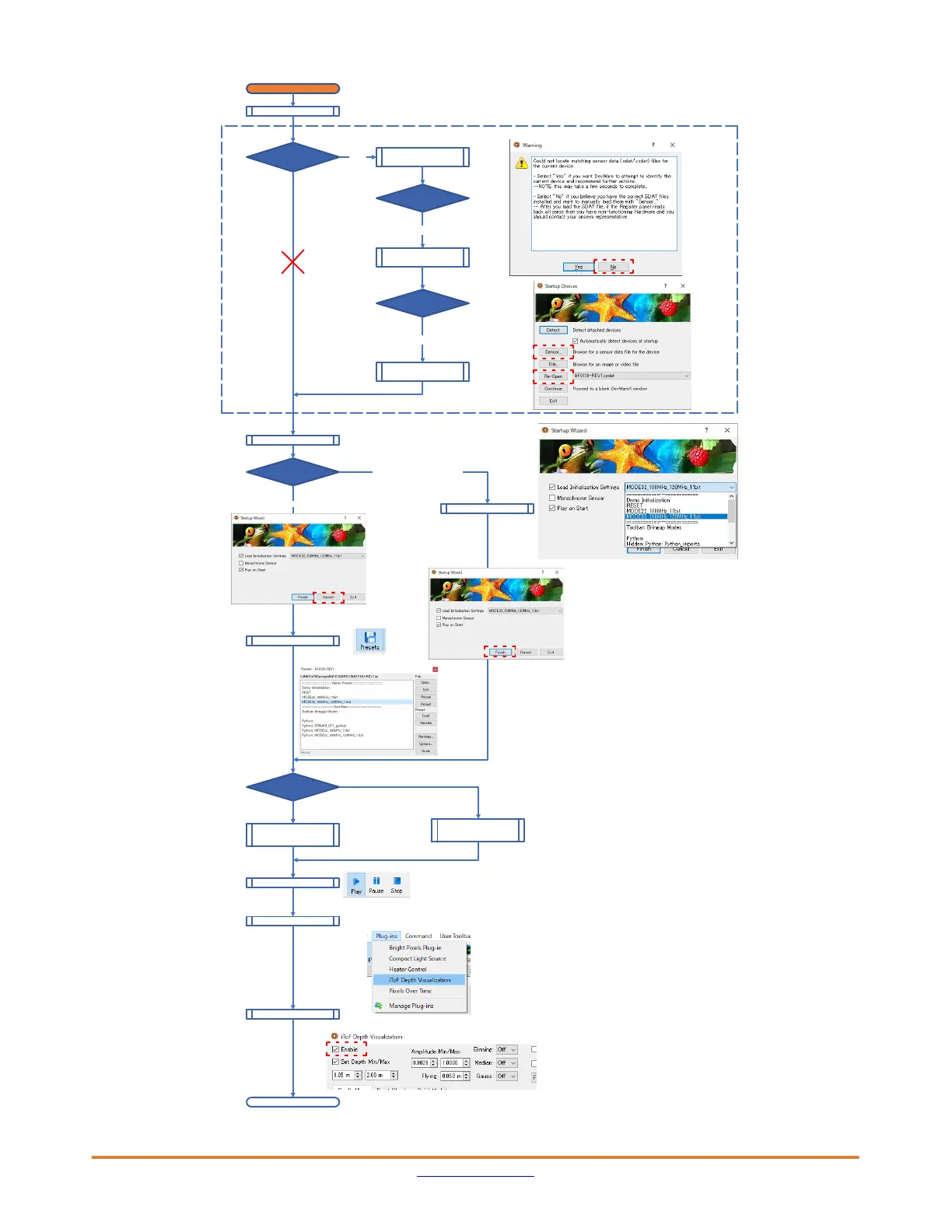
Figure 5. Procedure of DevwareX Startup Wizard
Devware wake−up
Startup Wizard
Presets
Mode32_100MHz_120
MHz_11bit
Mode22_100MHz_11bit
Mode 2.2: ~7.5 m, 1280 x960 px
Mode 2.2: ~7.5 m, 640 x 480 px
Stream out
Open the Plug−in
Depth Enable
DevWareX Open
Headboard
Jumper P3
Popup
“Warning” window
Open
Because Rev1 needs to use SPI, below warning window definitely pops up.
Option for Rev1
Warning
Popup
“Startup Choices”
No
Startup Choices
Select
“AF0130−Rev1.xsdat”
Sensor or Re−Open
Startup Wizard
Four−Wire Serial
Interface (SPI)
Two−Wire Serial
Interface (I2C)
Cancel
Open presets
Manual Select
Select Tab
Plug−in tab
End
Choose one mode.
C:\Aptina Imaging\sensor_data
See Issue 4 & 5
in Errata
LoadInitializationSettings
Select mode 2.2 (Single Frequency)
Select mode 3.2 (Dual Frequency)
→ iTof Depth Visualization
Plug−in tab → iTof Depth Visualization


 To Next Page
 Loading...