EVBUM2868/D
www.onsemi.com
6
CALIBRATIONS
Several calibrations are necessary to show the optimal
performance of the sensor. For the AF0131 sensor variant,
these calibrations are applied off−chip, after Devware has
calculated the depth information from the RAW interleaved
phase captures. The final version of AF0130 has these
calibration features planned on−chip.
Global Offset (Phase Bias) Calibration
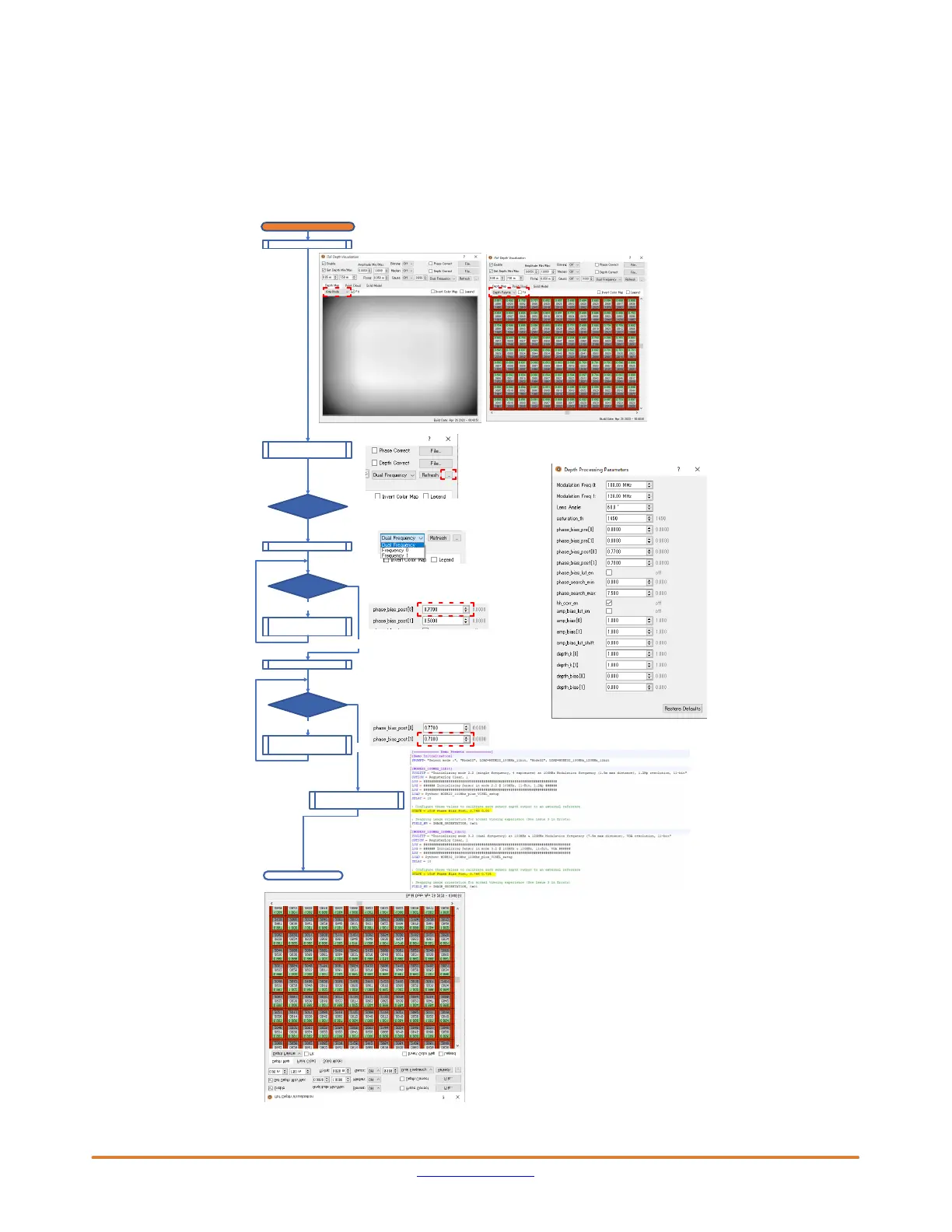
Figure 6 describes the procedure to set the correct phase
bias values for your system in the AF0130−REV1.ini file.
This is a one−time calibration needed for your system.
Please have a look at the limitations of Four−Wire Serial
Interface (below) when a change of calibration is
experienced.
Figure 6. Procedure of Phase Bias Calibration
Set Mode3.2
Calibration
Phase Bias Calibration
Each pixel depth results (back color : green ) are able to be seen if zoom in.
*) This example is white wall.
Frequency 0
Select frequency
Frequency 1
Here is button to open the Depth Processing Parameters
Adjust the
phase_bias_post[0]
Open Depth
Processing Parameters
Depth =1.0m?
Here is the selector which frequency 0 or 1
Here is adjustor for frequency 0. Valid number is 0.0~1.0
Depth =1.0m?
No
Here is adjustor for frequency 1. Valid number is 0.0~1.0
Yes
This calibration makes the depth result adjusted to actual distance.
Add your system
parameters to the INI file
End
Yes
1 m distance between AF0130 and the object
No
Adjust the
phase_bias_post[1]


 To Next Page
 Loading...