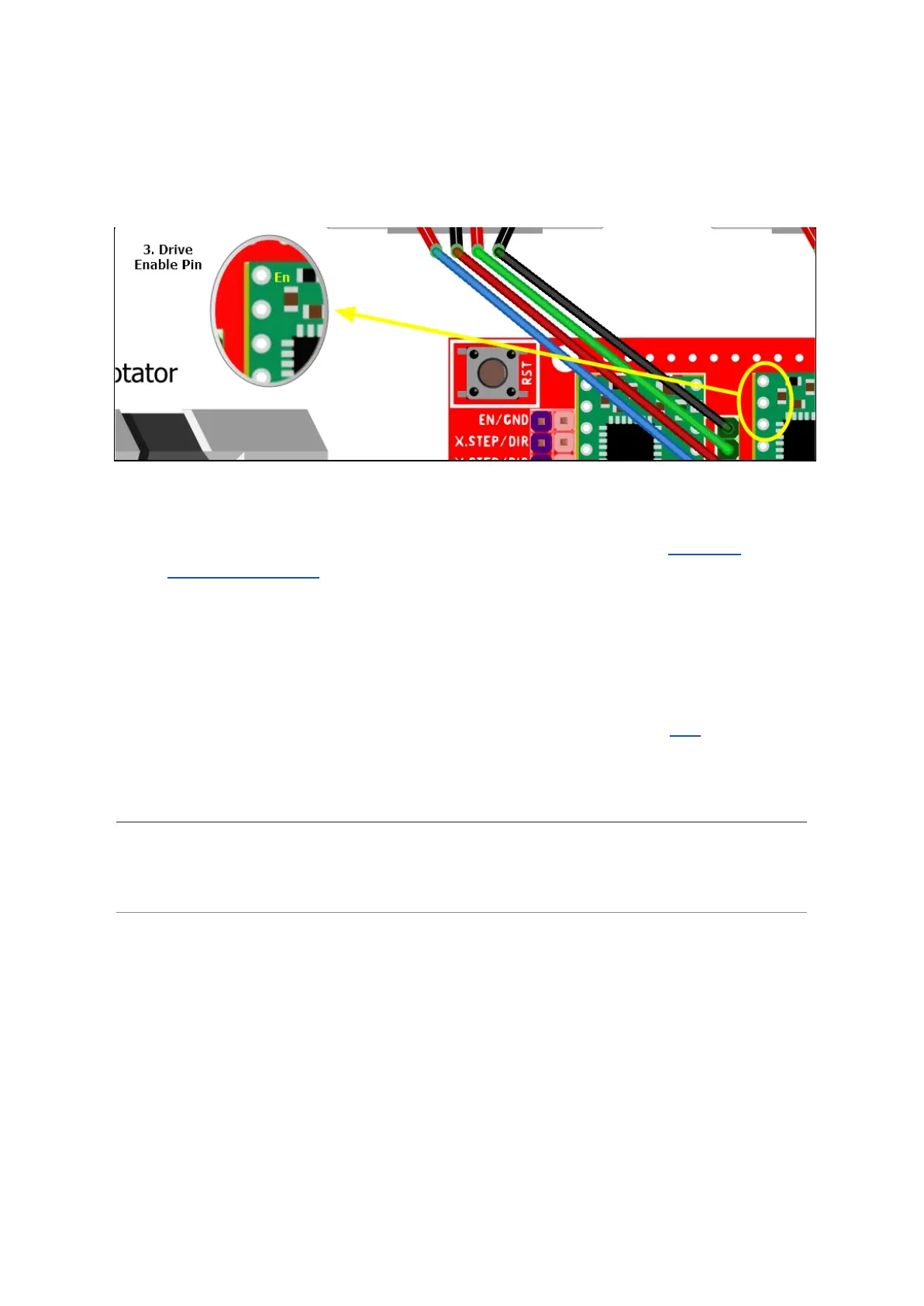
3. Now insert all the LV8729 drivers into their sockets. Make sure that the “En - Enable”
pin is located in the upper left corner and that the Vref adjustment screw is pointing
down or towards you when you have the shield oriented in such a way that all the
text is in its normal readable orientation.
Figure 4 - LV8729 Driver orientation
4. Connect everything, except the motors, together according to the “Figure 1 -
Connection diagram”.
5. Before we connect the motors we have to make sure to adjust the drivers correctly
with regards to the motor ratings and the correct type of drivers. This must be done
with the motors disconnected (Never connect or disconnect a stepper motor if the
system is powered up!). Formula to find the current starting point for Vref is:
Motor Max Amp * 1.41 * 0.4 = Starting Amp for Vref” (Link).
In my case this would be: 1.68A * 1.41 * 0.4 = 0.95A
Note: The LV8729 has a current limit of 1.8A. Since the motor is rated for 1.68A this will be
our limiting factor and we’re comfortably within the operational constraints of the driver. The
general recommendation seems to be not to load the motors with more than 70%.



 To Next Page