Step 2. Turn Power on and Test Unit
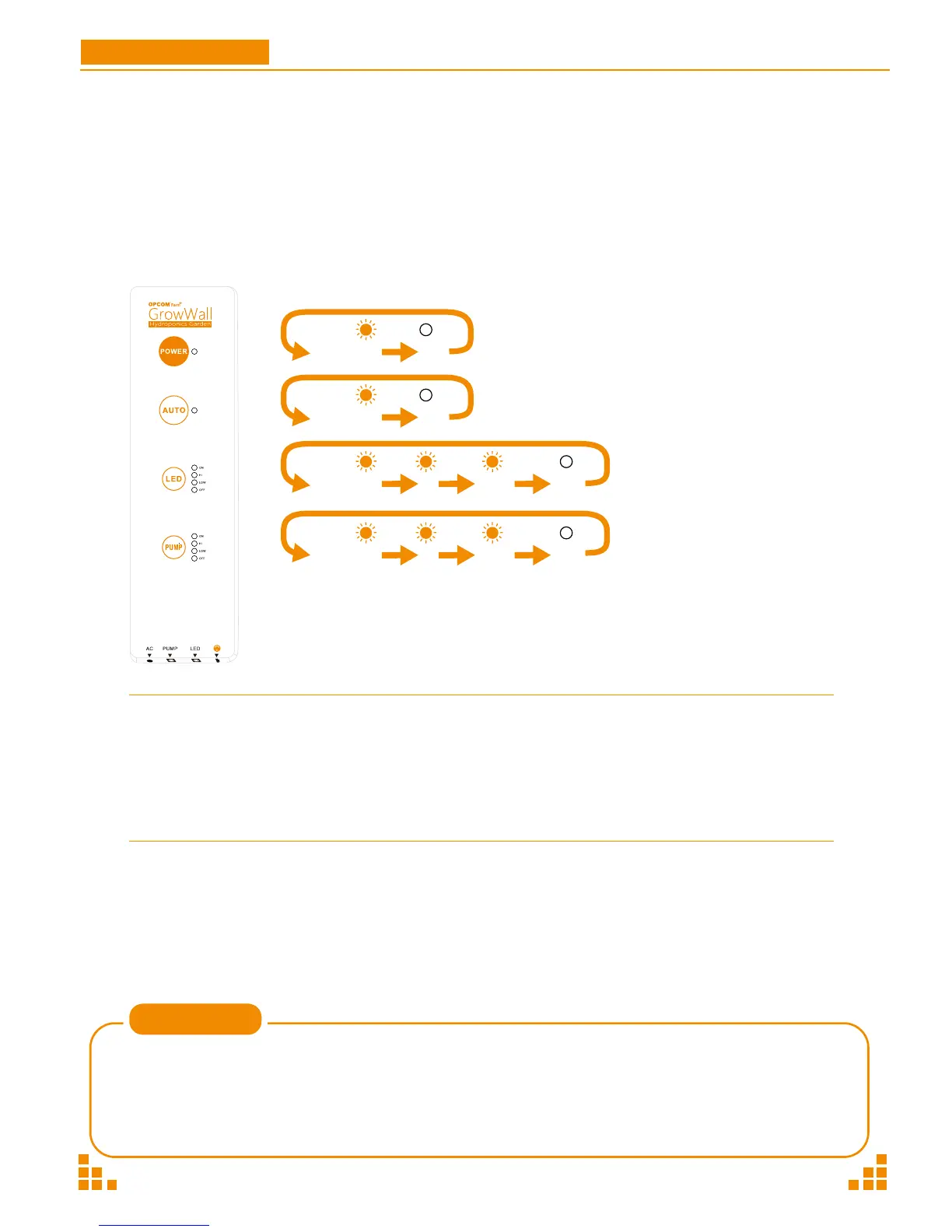
Press the POWER button. Confirm that the LED lights are on and that the water pump motor is
running. Do not start the unit without water, as this will damage the pump.
Please power and turn on GrowWall at 6-9 AM to meet daytime / night cycle time.
Most plants can be grown using the AUTO mode. For specific varietals or if you want to
experiment on your own, you can manually control the timing of the LED growth lamps
and pump.
Note
GrowWall
P15
User Manual
Click: ON HI LOW OFF
Click: ON HI LOW OFF
Click: ON OFF
Click: ON OFF
Mode
AUTO
ON
HI
LOW
OFF
AUTO
ON
HI
LOW
OFF
Time (On / Off)
Normal
ON
High Duty Cycle
Low Duty Cycle
OFF
Normal
ON
High Duty Cycle
Low Duty Cycle
OFF
(12H / 12H)
(24H / 0H)
(16H / 8H)
( 8H / 16H)
( 0H / 24H)
12 cycles/day
48 cycles/day
4 cycles/day
2 cycles/day
0 cycles/day
*
10 mins/cycle
Control Panel
LED
Pump


 To Next Page