Low
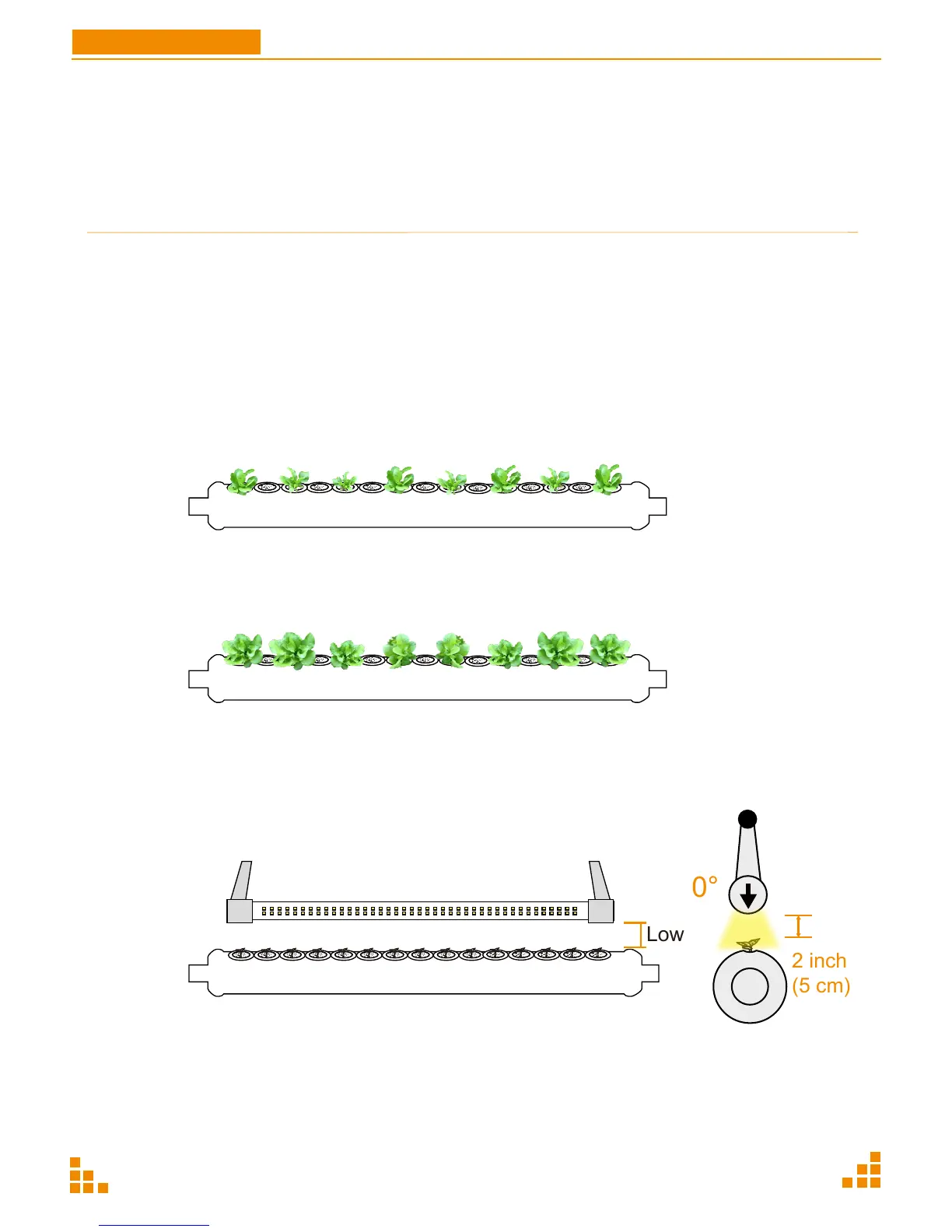
Adjust the LED light close to the young plants, no more than 2 inches
away.
Follow instructions on page 21, adjusting the height using the release
mechanism on each side, and rotating the LED light tube to direct the
light towards the plants.
0°
2 inch
(5 cm)
GrowWall
P22
User Manual
B3. Growing Stage
Once a week, check the water level and refill as needed. Also test the water's pH and EC levels
and adjust as necessary. For more information, see pages 28-29.
Below are images of what to expect as your plant progresses through the growth stages. Have
fun and enjoy experimenting with your plants at home!
Week 3-4
The picture shows the growth status of lettuce around the 3rd - 4th week. (Growth pattern varies
by seed type).
Week 5
The picture shows the growth status of lettuce around the 5th week. (Growth pattern varies by
seed type).
Adjust the Lamps Close to Plants
Stage
Growing
Stage
Time afer planting
After Day 14
LED
Auto
Pump
Auto
Note
・When young plants grow to 3-4 inches
height, change control box to AUTO mode.
・Maintain EC & pH value.


 To Next Page