Introduction 75
Overview
Control elements on instrument
panel
1 e knob ................................. 76
Briefly press: switch on/off
Infotainment system .............. 76
Turn: adjust volume .............. 76
2 TUNER .................................. 86
Switch between FM and
AM ......................................... 86
If DAB receiver is
connected: Switch
between analogue and
digital reception ..................... 86
3 CDC ...................................... 99
CD changer programme
selection ................................ 99
4 MAIN ..................................... 76
Main menu ............................ 76
5 Multifunction knob ................. 76
Turn: select function .............. 76
Press: confirm function ......... 76
6 INFO ..................................... 76
Information page ................... 76
7 SOUND ................................. 82
Sound function
programme selection ............ 82
8 BC ......................................... 74
On-board computer ............... 74
9 1...9 ....................................... 86
Radio: number buttons,
station buttons ...................... 86
CD changer: direct
selection of the CDs
inserted using the buttons
1-6 ......................................... 99
10 Audio/MP3 CD slot ................ 99
11 SETTINGS ............................ 76
Context-depending
settings .................................. 76
12 Rocker switch ........................ 99
Radio: mn automatic
station search, dc manual
station search ........................ 86
CD: mn track selection/
fast forward/fast rewind,
dc Album/CD selection, c
Repeat track, d Scan CD ...... 99
13 TP ......................................... 91
Traffic programme ................. 91
14 j CD-Changer menu ............ 99
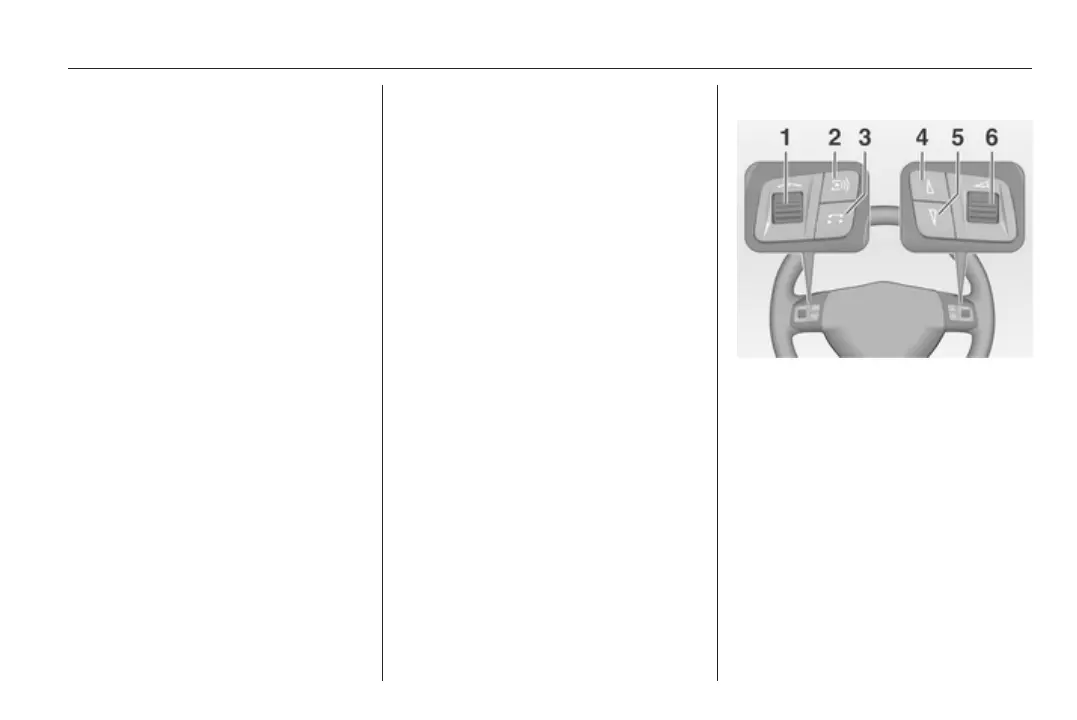
Steering wheel audio controls
1 Thumbwheel ......................... 76
Turn: Move cursor ................. 76
Press: confirm a selection ..... 76
2 q button ............................... 86
Radio: next stored station ..... 86
CD: next CD .......................... 99









 To Next Page