EasyManua.ls Logo

Oppo HA-1 - User Manual

Oppo HA-1
32 pages
Print Icon
To Next Page IconTo Next Page
Loading...
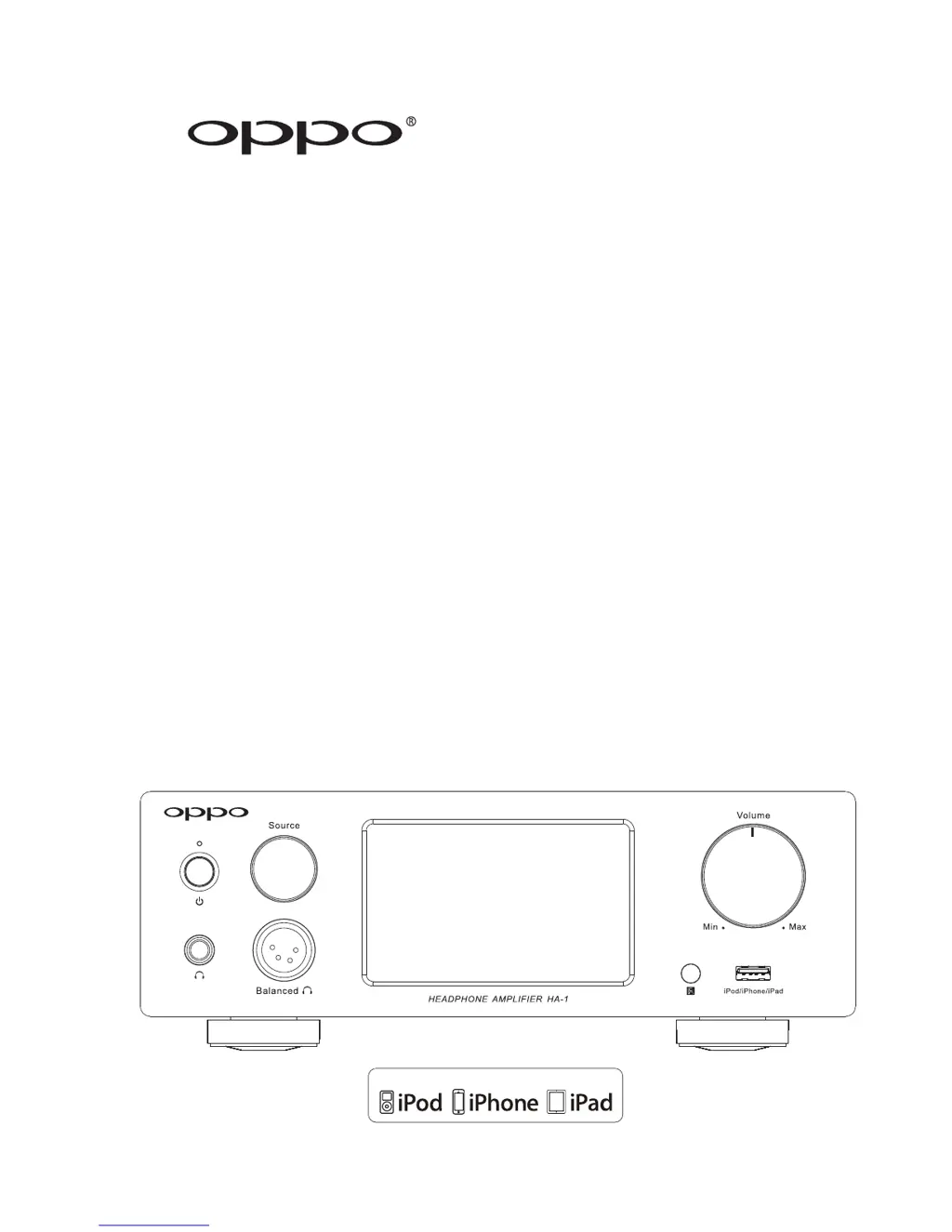
HEADPHONE AMPLIFIER HA-1
USER
MANUAL
USB
Made for

Questions and Answers

Summary

Safety and Compliance Information

General Safety Instructions

Read, keep, heed instructions; avoid water; clean dry; ensure ventilation; avoid heat sources; check plugs; protect cords; use specified accessories; unplug during storms or long periods; refer servicing to qualified personnel.

Precautions

Ensure correct voltage supply, use protective earth, be aware of continuous power, unplug when unused, hold plug when unplugging, ensure ventilation, avoid direct sunlight/heat.

Setup and Installation Guide

Front Panel Controls

Identifies and describes front panel components: Power Button, Indicator, Headphone Jacks, Source, Display, IR Sensor, Volume Knob, Mobile USB.

Back Panel Connectors

Identifies and describes back panel connectors: Analog/Digital Inputs/Outputs, Triggers, AC IN.

Remote Control Operation

Remote Control Buttons

Lists and describes functions of remote buttons: POWER, MUTE, VOLUME, playback, input selection.

Connecting Headphones

Headphone Output Options

Connecting headphones using 6.35mm or 4-pin XLR connectors, including adapter use and gain adjustment.

Balanced Headphone Jack Pin-out

Details the pin assignment for the 4-pin XLR balanced headphone jack.

Pre-Amplifier and DAC Usage

Audio Input Connections

USB (Type B) Audio Input

Connecting a computer via USB-A to USB-B cable for digital audio playback.

Bluetooth Connectivity

Bluetooth Pairing and Connection

Instructions on pairing and connecting Bluetooth-capable mobile devices for audio streaming.

Basic Operations Guide

Power On;Off and Display Modes

Covers powering the unit on/off and understanding the front panel display modes (Status, Spectrum, VU Meter).

Source Selection

How to select active input sources using the Source Selector Knob or remote control buttons.

Volume Control

Instructions for adjusting volume using the knob or remote, and its behavior when powered off.

Advanced Settings and Operations

Headphone Gain Adjustment

Home Theater Integration

System Integration Example

How to integrate the HA-1 into a home theater system for stereo and multi-channel audio.

Support and Reference

Troubleshooting Guide

A chart to help resolve common operational problems and their solutions.

Technical Specifications

Summary

Safety and Compliance Information

General Safety Instructions

Read, keep, heed instructions; avoid water; clean dry; ensure ventilation; avoid heat sources; check plugs; protect cords; use specified accessories; unplug during storms or long periods; refer servicing to qualified personnel.

Precautions

Ensure correct voltage supply, use protective earth, be aware of continuous power, unplug when unused, hold plug when unplugging, ensure ventilation, avoid direct sunlight/heat.

Setup and Installation Guide

Front Panel Controls

Identifies and describes front panel components: Power Button, Indicator, Headphone Jacks, Source, Display, IR Sensor, Volume Knob, Mobile USB.

Back Panel Connectors

Identifies and describes back panel connectors: Analog/Digital Inputs/Outputs, Triggers, AC IN.

Remote Control Operation

Remote Control Buttons

Lists and describes functions of remote buttons: POWER, MUTE, VOLUME, playback, input selection.

Connecting Headphones

Headphone Output Options

Connecting headphones using 6.35mm or 4-pin XLR connectors, including adapter use and gain adjustment.

Balanced Headphone Jack Pin-out

Details the pin assignment for the 4-pin XLR balanced headphone jack.

Pre-Amplifier and DAC Usage

Audio Input Connections

USB (Type B) Audio Input

Connecting a computer via USB-A to USB-B cable for digital audio playback.

Bluetooth Connectivity

Bluetooth Pairing and Connection

Instructions on pairing and connecting Bluetooth-capable mobile devices for audio streaming.

Basic Operations Guide

Power On;Off and Display Modes

Covers powering the unit on/off and understanding the front panel display modes (Status, Spectrum, VU Meter).

Source Selection

How to select active input sources using the Source Selector Knob or remote control buttons.

Volume Control

Instructions for adjusting volume using the knob or remote, and its behavior when powered off.

Advanced Settings and Operations

Headphone Gain Adjustment

Home Theater Integration

System Integration Example

How to integrate the HA-1 into a home theater system for stereo and multi-channel audio.

Support and Reference

Troubleshooting Guide

A chart to help resolve common operational problems and their solutions.

Technical Specifications

Oppo HA-1 Specifications

General IconGeneral
Product colorBlack
Pre-out connectivityYes
Power sourceAC
AC input frequency50 - 60 Hz
Power consumption (typical)70 W
DC-in jackNo
Audio (L/R) in1
Headphone connectivity6.3mm
Weight and Dimensions IconWeight and Dimensions
Depth333 mm
Width254 mm
Height91 mm
Weight5900 g

Related product manuals