ENGLISH 25
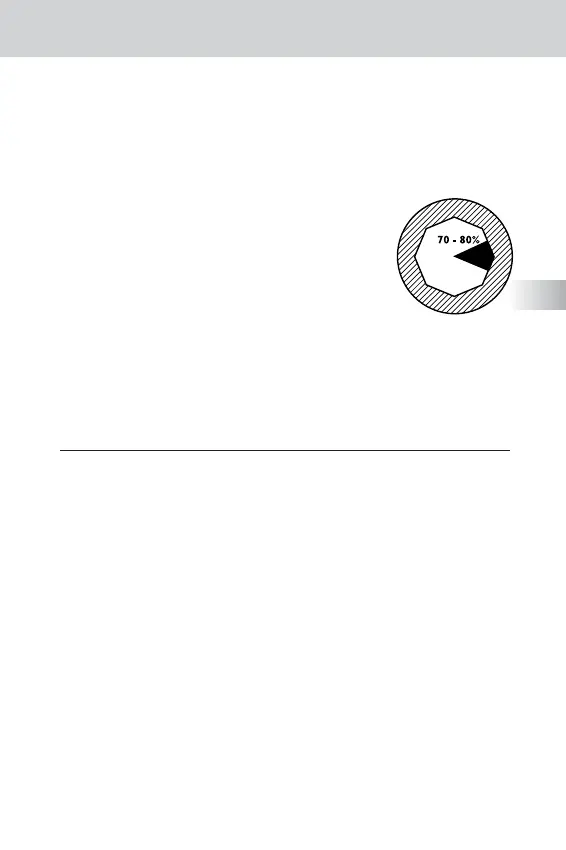
Figure 3
E
2.3 c) Now looking only through the left eye and using the left eyepiece (13 - ref. fig. 1),
adjust the focus on the specimen using just the dioptric compensation ring (14 - ref. fig. 1).
In this way, both eyes will view the specimen together in perfect focus.
2.4 Condenser centring (7 - ref. fig. 1) (B4 and B5 models only)
2.4 a) Selecting the 4x objective, close the condenser diaphragm (19 - ref. fig. 1)
2.4 b) Lower the condenser (8 - ref. fig. 1) using the condenser control knob (9 - ref. fig. 1)
until, observing through the eyepieces (13 - ref. fig. 1),
there is a sharp image of the internal edges
of the condenser diaphragm (19 - ref. fig. 1).
2.4 c) If the internal edges are not in the centre of the viewing
field, centre the condenser (8 - ref. fig. 1) by adjusting
the condenser centring screws (17 - ref. fig. 1).
2.5 Using the condenser diaphragm.
Adjusting the condenser diaphragm (19 - ref. fig. 1)
ensures that the specimen image displays the best balance
between resolution, luminosity, contrast and depth of field.
We suggest opening the diaphragm to approximately 70-80% of it’s maximum
aperture (see fig. 3). If the objective is changed then the condenser diaphragm
setting must be re-adjusted accordingly.
3. CARE AND MAINTENANCE
3.1 Cleaning
ATTENTION: always unplug the microscope before cleaning.
•To remove any dust on the lenses, use a soft bristle brush or lens cleaning tissue.
•To remove fingerprints or greasy marks from the lenses, use lens cleaning
tissue or a soft cloth soaked in a solvent such as xylene, benzene or ethyl
alcohol.The same solvents can also be used to clean oil immersion objectives
(16 - ref. fig. 1) NOTE: please remember to remove oil from these objectives
every time you finish using them.
•To clean the external, painted surfaces of the microscope,
use a gentle detergent and a soft cloth.
•We recommend that you always keep the microscope protected from dust
after use, a dust cover is provided for this purpose.
3.2 Please do not:
• Remove the eyepieces (13 - ref. fig. 1) from the head, after fitting; dust ingress
could dirty prisms and internal lenses, reducing optical performance.
• Use strong solvents to clean the external painted parts of the microscope;
they may damage the lacquer coating and plastic components.


 To Next Page
 Loading...