Need help?
Do you have a question about the Optics11 Life PAVONE and is the answer not in the manual?
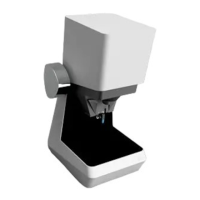
Lists and describes the main components of the Pavone system.
Explains how to connect the various components of the Pavone system.
Instructions for powering on, starting the Pavone system, and mounting the probe.
Overview of the main software interface and its control elements.
Outlines key calibration steps like finding the probe and initializing it.
Covers finding surfaces, setting heights, and moving within wells.
How to set up experiments, including indentation, DMA, and matrix scans.
Calibrating wellplates and adjusting safety areas for precise movement.
Aligning the camera to ensure precision in movement and imaging.
Factors affecting measurement stability due to environmental conditions.
Ensuring probe stability for accurate measurements, including air bubbles.
How to use the interferometer's measurement, wavelength, demodulation, and settings menus.
 General
| Category | Laboratory Equipment |
|---|---|
| Brand | Optics11 Life |
| Model | PAVONE |
| Technology | Fiber Optic Sensing |
| Measurement Principle | Optical Interferometry |
| Wavelength | 1550 nm |
| Fiber Diameter | 125 µm |
| Type | Optical Sensor |
| Application | Material Characterization |
| Sample Format | Solid, Gel |
| Measurement Type | Force, Pressure, Displacement |
| Interface | USB, Optical Fiber |
| Spatial Resolution | Micrometer (µm) range |
| Tip Diameter | 10 µm |

 To Next Page