Refresh RF link
Press and hold the receiver’s centre override buon unl the Heang on LED ashes rapidly. Release the buon
ensuring the LED is sll ashing.
Receiver ON / OFF
You can disable the heang by turning o the receiver. The receiver’s output will switch o, and it will stop re-
sponding to signals from the transmier.
Transmier ON / OFF
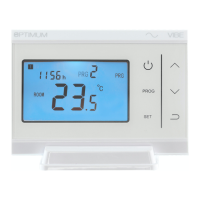
You can save baery power on the transmier, by touching the ON/OFF icon. The transmier is powered-down
and will stop sending control signals; the receiver will remain in it’s current state (ON or OFF). If the receiver is
powered-up you can control the output by pressing the override buon.
Specicaon:
868 MHz radio frequency control set, with 4 character hexadecimal coding giving 65,536 code combinaons.
Transmier power 2 x AAA alkaline. Touch-screen keys. 70 x 40mm backlit LCD. Dimensions 120 x 85 x 22.5mm
Receiver power 230V AC, volt-free changeover 10A (resisve) switching, ON/OFF & manual override buons.
Dimensions 85 x 85 x 25mm. Wall-xing centres 60mm.
Set control features: 20—30m range in buildings. ON/OFF, Opmising & TPI temperature regulaon. Hysteresis
+/- 0.5
0
C. 5 & 2 or 7 day programming. 6 me / temperature periods. Temperature range 5—35
0
C.
Boiler Plus compable: Class IV control, 2% contribuon to system eciency
Approvals: CE - Radio Equipment Direcve EN 2014/53/EU - RoHS
Do not dispose of this product with household waste - use local recycling facilies
Conguraon opons—addional notes:
Opon Descripon
05 If you set a frost-protecon temperature, the heang will be switched on when the meas-
ured temperature falls below this level, even if the thermostat has been turned o.
10 0 (default) shows Set and Room temperatures. Seng 1 shows Set temperature only.
51 76—every day can be set with a dierent 6-stage programme
526—two 6-stage programme sequences can be set, one for weekdays, one for weekends
52 Please read ‘how it works’ for a full explanaon of temperature regulaon modes
53 For Opmum Start regulaon. For best funcon, the me interval selected should equal the
me taken to increase the room temperature by 1 degree.
54 For TPi regulaon. Select a low number for fast-acng systems, and a high number for slow-
acng systems
55 For TPi regulaon. Sets the temperature below the set-point at which TPi control will begin
Low Baery Indicaon
In normal use, the baeries should last for 12—18 months. ‘Normal use’ allows for one user interacon per day—
frequent use of the backlight will drain the baeries more quickly. When the baeries need to be replaced, the
display will alternate between LO bAt and the normal display every 30 seconds. Aer changing the baeries,
your programming and conguraon sengs are saved, but you will need to input the me and weekday. The
screen will jump to me-seng mode. Use the UP or DOWN arrows to adjust the minutes, hours and weekday.
Conrm each seng by touching the SET icon. When you have completed seng, touch the ON/OFF or BACK
icons to return to normal run mode.
QR058 Prepared for TFC Group by: J. Todd Issue 3: June 2019


 To Previous Page
 Loading...