SET
Parameter seng — how to congure the way your Opmum Vibe thermostat works:
+
Conguraon opons should be set-up when the Vibe is rst installed, but you can re-visit these
sengs if necessary.
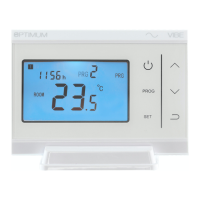
To open the conguraon menu, touch the transmier ON/OFF buon to turn the display o, then touch
the SET and UP buons simultaneously for 5 seconds:
You will be viewing the rst of 15 opons which can be congured to adjust the operaon of the OPTIMUM
VIBE, to best suit the installaon and the user’s requirements.
Touch the UP or DOWN arrows to adjust the parameter, and touch SET to move sequenally through the
opons. Changes will be saved by pressing the ON/OFF buon. If no buon is touched for 10 seconds, the
display will ‘me-out’, but your changes will sll be saved.
Opon Descripon Range Default
value
01 Temperature calibraon -8
0
C ~ +8
0
C 0
0
C
02 Maximum temperature seng 5
0
C ~ 35
0
C 35
0
C
03 Minimum temperature seng 5
0
C ~ 35
0
C 5
0
C
> 05 Frost-protecon temperature OFF; 5
0
C ~ 15
0
C 5
0
C
09 Hysteresis (dierenal) 0.5
0
C ~ 3.5
0
C 0.5
0
C
> 10 Display seng 0 ~ 1 0
17 Reset (reset all values to factory
default)
Change to 1. Then touch Power buon
for 5 seconds
0
18 Firmware code Non - adjustable * 5091
19 Firmware code Non - adjustable * 0202
50 Backlight 0: OFF 1: AUTO 1
> 51 Programme mode 76: 7 days / 6 periods
526: Weekday / Weekend / 6 periods
526
> 52 Temperature regulaon mode NOr: Normal (ON/OFF)
OPs: Opmum Start
tPi: Time Proporonal / Integral
NOr
> 53 Time interval for Ops 10 min, 15 min, 20 min 20 min
> 54 Number of heang cycles per
hour (for TPi)
Range: 2 ~ 3 ~ 6 ~ 12 6
> 55 Proporonal Bandwidth (for TPi) Range: 1.5
0
C— 3
0
C 2
0
C
> See addional notes about these conguraon opons on Page 4
* Firmware is pre-loaded in the factory, and visible for reference but cannot be changed. Firmware
versions correct at me of going to press


 To Next Page
 Loading...