13
CLEANING THE TAPE-
HANDLING PARTS
Dirt, dust, or particles of the tape’s
coating can accumulate on the tape
heads and other parts that the tape
touches. This can cause noise and
poor high-frequency response which
can greatly reduce the cassette play-
er’s performance.
To help keep the cassette player work-
ing at its best, clean the cassette play-
er’s tape-handling parts after every 20
hours of use using a tape cleaning kit,
such as Cat. No. 44-1115, not sup-
plied.
1. Remove the batteries and discon-
nect any other power source.
2. Open the cassette compartment
cover.
3. Press the erase-protection tab
sensor, then press
RECORD to
expose the tape-handling parts.
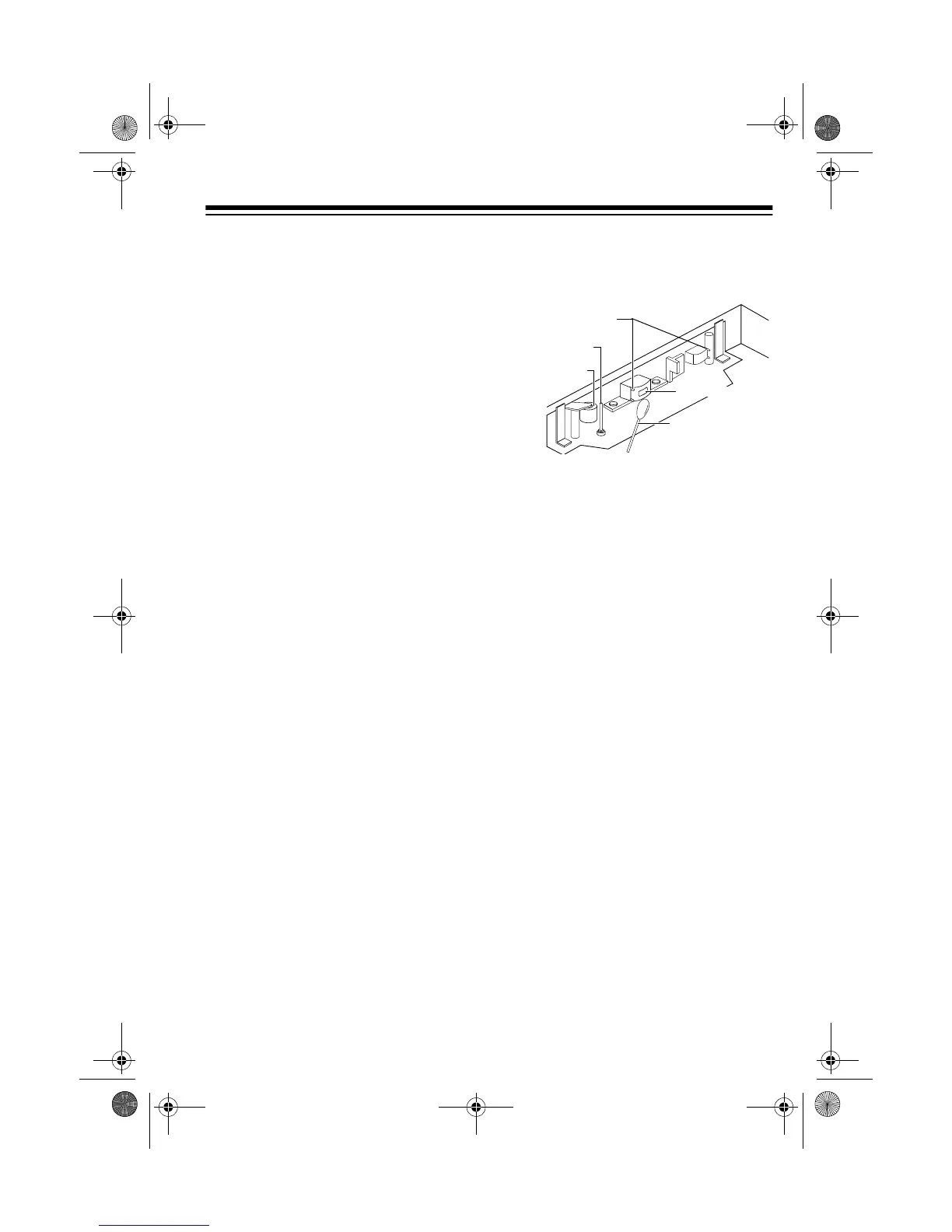
4. Gently clean the capstan, pinch
roller, tape guides, and record/
play head.
5. When you finish cleaning, press
STOP and close the compartment
door. Then reconnect power.
Pinch Roller
Capstan
Cotton Swab
Tape Guides
Tape Head
14-1115.fm Page 13 Friday, January 8, 1999 10:31 AM



 To Next Page