EasyManua.ls Logo

Optoma EX400 - Remote Control and Connections; EX400 Remote Control Overview; EX400 Connections Guide

Optoma EX400
6 pages
Print Icon
To Next Page IconTo Next Page
To Previous Page IconTo Previous Page
Loading...
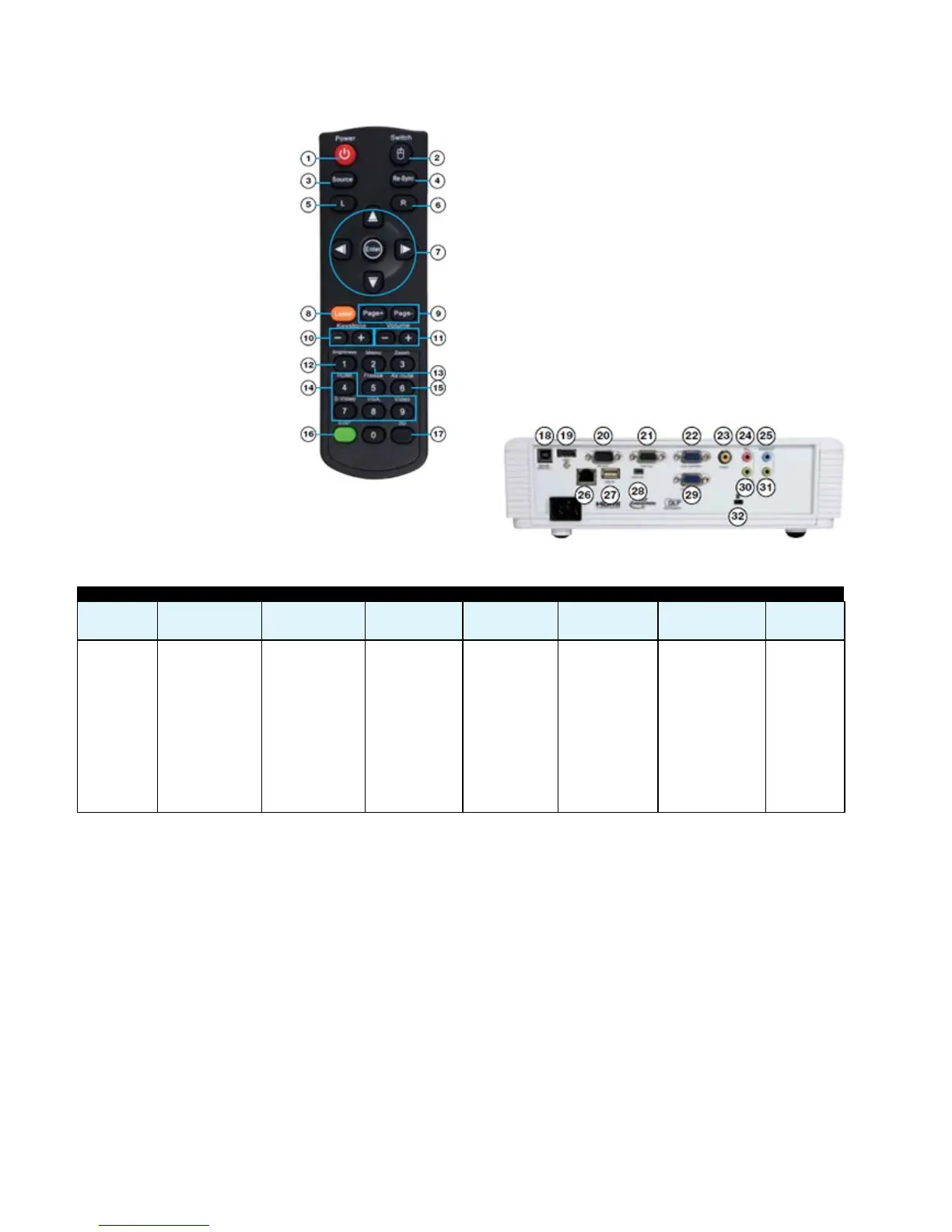
EX400 Remote Control
1. Power
2. Mouse select
3. Source
4. Re-sync
5. Left mouse click
6. Right mouse click
7. Mouse control
8. Laser
9. Page up/down control
10. Vertical keystone
correction
11. Volume control
12. Brightness
13. Menu
14. Direct input source select
15. AV mute
16. Eco+
17. 3D control
Easy to use remote control
EX400 Connections
18. USB Type B (Remote Mouse)
19. HDMI
20. RS232
21. VGA Out
22. VGA 1
23. Composite
24. Microphone In
25. Audio Out
26. RJ45
27. USB Type A (Reader/Wireless)
28. USB Display
29. VGA 2
30. Audio In
31. Audio In
32. Kensington Lock
EX400 Projection Distance 1.2 - 12m (4:3 Aspect Ratio)
Projection
Distance (m)
Max. Horizontal Image
Size (m)
Min. Horizontal Image
Size (m)
Max. Vertical Image
Size (m)
Min. Vertical Image
Size (m)
Max Diagonal Image
Size (m)
Max Diagonal Image
Size (inch)
Max. Image
Offset (m)
1.20 0.75 0.63 0.56 0.47 0.94 36.94 0.08
2.00 1.25 1.04 0.94 0.78 1.56 61.57 0.14
2.50 1.56 1.30 1.17 0.98 1.95 76.96 0.18
3.00 1.88 1.56 1.41 1.17 2.35 92.36 0.21
4.00 2.50 2.08 1.88 1.57 3.13 123.14 0.28
5.00 3.13 2.60 2.35 1.96 3.91 153.93 0.35
6.00 3.75 3.13 2.82 2.35 4.69 184.71 0.42
7.00 4.38 3.65 3.29 2.74 5.47 215.50 0.49
8.00 5.00 4.17 3.76 3.13 6.26 246.29 0.56
9.00 5.63 4.69 4.23 3.52 7.04 277.07 0.63
10.00 6.25 5.21 4.70 3.92 7.82 307.86 0.70
11.00 6.88 5.73 5.17 4.31 8.60 338.64 0.78
12.00 7.50 6.25 5.64 4.70 9.38 369.43 0.85


Related product manuals