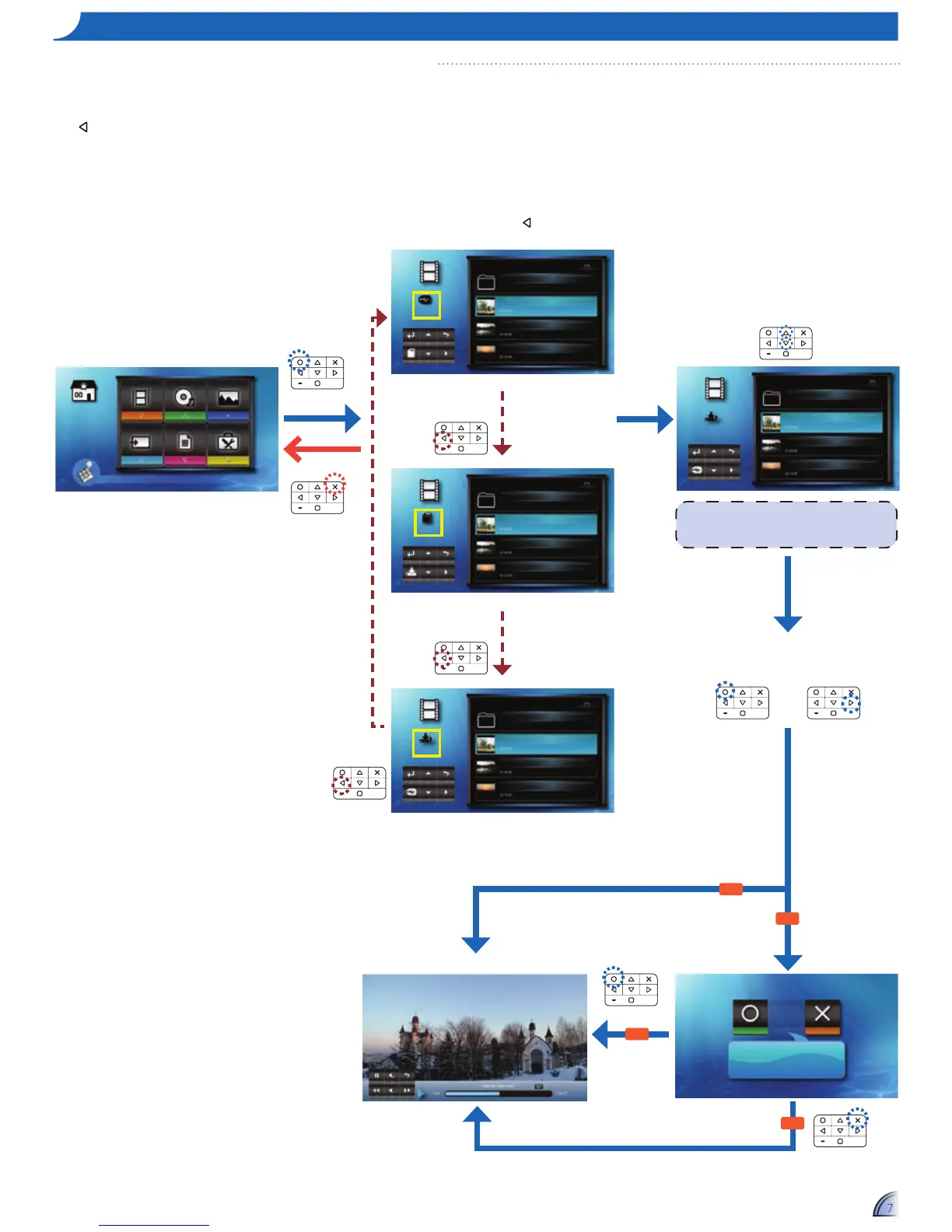
Ifanexternalsource(USB)isinserted,the
external memory is read first. If you want to read
data from the microSD card or internal memory,
press in the appropriate screen to change the
data source. See steps below.
Video Music Photo
Input Office Viewer Setup
Press matched symbol to enter specific function directly
Play from start?
Iftheselectedvideo
leisunnishedfrom
apreviousplayback.
Playback
from start
No
Playback
from start
Playback from
last point
Video Playback mode (seepage8)
Yes
No
Yes
Video
External
Memory
Travel
Travel Day1.mkv
Travel Day2.mkv
Travel Day3.mkv
Video
MicroSD
Card
Travel
Travel Day1.mkv
Travel Day2.mkv
Travel Day3.mkv
Video
Internal
Memory
Travel
Travel Day1.mkv
Travel Day2.mkv
Travel Day3.mkv
Change data
source
Change data
source
Change data
source
<Note>
Thedisplayedscreenmayvarydependingonthe
selecteddatasourceonthepreviousstep.
Video
Internal
Memory
Travel
Travel Day1.mkv
Travel Day2.mkv
Travel Day3.mkv
1.
Select "Video"
2.
Select Data Source
3.
Select Video File
4.
Playback File
or
The screen, the source icon on the button guide,
andthesequenceinwhichscreensappearvary
dependingontheavailabledatasource.Ifthe
external source or microSD card is not inserted,
its screen is skipped when
is pressed and the
source icon on the button guide is not shown.



 To Next Page
 Loading...