The device described in the manual is the Mongoose-Plus, an SAE J2534-compliant vehicle communication interface powered by Drew Technologies, an Opus IVS company. It is designed to facilitate re-flashing of modern vehicle controllers to stock settings and perform dealer-level diagnostics on select manufacturer's vehicles.
Function Description:
The Mongoose-Plus serves as a bridge between a laptop or desktop computer and a vehicle's On-Board Diagnostics II (OBDII) port. Its primary functions include:
- Vehicle Re-flashing: Allows users to update or restore vehicle controller software to factory specifications.
- Dealer-Level Diagnostics: Enables advanced diagnostic capabilities typically available at dealerships for specific vehicle manufacturers.
- J2534 Compliance: Adheres to the SAE J2534 standard, ensuring compatibility with a wide range of OEM diagnostic and reprogramming applications.
- Compact and Rugged Design: All necessary electronics are housed within the OBDII connector shell, making it a durable and portable tool.
- USB Powered: The device draws power directly from the USB connection to the computer, eliminating the need for an external power source and allowing it to remain powered even when unplugged from a vehicle.
- Bluetooth Connectivity (Optional): Certain versions of the Mongoose-Plus offer Bluetooth capability, allowing for wireless connection to a PC. However, the manual explicitly states that Opus IVS does not recommend performing any reprogramming over Bluetooth.
The accompanying software, the J2534 Toolbox 3, enhances the device's functionality by providing:
- Current Information and Assistance: Offers walk-through documents, OEM documentation, web-links, quick-links, videos, and basic diagnostic functions.
- Connection Verification: Helps ensure proper communication between the device and the vehicle/PC.
- News and Announcements (General Tab): Keeps users informed about important news, current OEM concerns, training broadcast invitations, and general information.
- Sales Information (Sales Tab): Connects users to the Opus IVS website.
- Diagnostic Resources (Diagnostic Tab): Provides links, diagnostic functions, information, and videos related to flashing and OEMs that support J2534 diagnostics.
- Flashing Resources (Flashing Tab): Contains information, links, walk-throughs, and helper functions specific to OEM J2534 flashing.
- Support Features (Support Tab): Includes tools to check driver installation, vehicle communication, update the device, create debug logs, and contact Technical Support.
- Training Videos (Training Tab): Offers general information, installation guides, and videos on using OEM J2534 applications with Drew Technologies products.
Important Technical Specifications:
The manual provides a table detailing the "Maximum Voltage Per Mongoose-Plus® Product" for various vehicle manufacturers and communication protocols:
| Product |
Max VBatt |
Min VBatt CAN |
Min VBatt J1850 |
Min VBatt K-Line |
Min VBatt SCI |
| Chrysler |
32 |
N/A |
9 |
6 |
10 |
| Ford |
32 |
N/A |
N/A |
6 |
N/A |
| GM II |
32 |
N/A |
9 |
6 |
N/A |
| Honda |
32 |
N/A |
N/A |
6 |
N/A |
| ISO/CAN |
32 |
N/A |
N/A |
6 |
N/A |
| Nissan |
32 |
N/A |
N/A |
6 |
N/A |
| Toyota 2 |
32 |
N/A |
9 |
6 |
N/A |
| VW |
32 |
N/A |
N/A |
6 |
N/A |
The device also features LED indicators to show its status:
USB Only Device LED Indicators:
- Left LED Blinking Red: N/A
- Left LED Solid Red: Firmware Error - Call Support
- Left LED Blinking Green: Device Start Up Process
- Left LED Solid Green: Device is Functioning
- Right LED Data Transfer: Data Transfer
- Right LED N/A: Vehicle Power With No USB
- Right LED N/A: N/A
USB and Bluetooth Device LED Indicators:
- Left LED Blinking Red: N/A
- Left LED Solid Red: Firmware Error - Call Support
- Left LED Blinking Green: Device Start Up Process
- Left LED Solid Green: Device is Functioning
- Left LED Blinking Blue/Green: N/A
- Left LED Solid Blue: Bluetooth On
- Left LED Blinking Blue: N/A
- Left LED Blinking White/Blue: N/A
- Right LED Data Transfer: Data Transfer
- Right LED N/A: N/A
- Right LED N/A: N/A
- Right LED N/A: Pairable
- Right LED N/A: Bluetooth Connected
- Right LED N/A: Not Pairable
- Right LED N/A: Data Transfer
Environmental Specifications (Indoor use only):
- Temperature: 5°C to 40°C
- Relative Humidity: Maximum 80% for temperatures up to 31°C, decreasing linearly to 50% relative humidity at 40°C. Overall range: 0 to 90%.
- Altitude: 2000m above mean sea level
- Over Voltage Category: II
- Pollution Degree: 2
Usage Features:
- Driver Installation: The manual provides a step-by-step guide for installing the necessary drivers and software from the Opus IVS support website. This includes accepting the End-User License Agreement and running the installer.
- Device Activation: After installation, the device requires activation. The process involves connecting the Mongoose-Plus to the PC, clicking "Activate My Device," selecting the specific device from a list, entering user information (First Name, Last Name, Country, Company, Address, City, State, Zip Code, Email, Phone), and providing business details (Business Type, Reprogramming Experience, Supported OEMs).
- Bluetooth Setup (for BT versions): Instructions are provided for installing a Bluetooth dongle (if not already present) and pairing the Mongoose-Plus BT by right-clicking the Bluetooth icon in the System Tray, selecting "Add Device," entering a pairing code (2534), and clicking "Next." The manual advises against having multiple Mongoose-Plus devices paired to avoid erroneous test results.
- J2534 Toolbox Access: Users can access the J2534 Toolbox by double-clicking its icon on the desktop, then selecting their interface from a drop-down menu and clicking "Auto Login."
- Safety Precautions: The manual emphasizes that while the Mongoose-Plus is designed to comply with OBDII protocols and has been tested for safety and reliability, there is an inherent risk when using any product that may affect vehicle operation. Users are advised to pull over and disconnect the device if any concerns arise and to consult a licensed mechanic.
Maintenance Features:
- Software Updates: The J2534 Toolbox is designed to be regularly updated, and users are encouraged to refer to it continually for the latest information.
- Technical Support: Opus IVS provides technical support via email (J2534support@opusivs.com) or phone ((734) 222-5228 option 3), available Monday-Friday, 9:00am-5:30pm Eastern Time.
- Return Merchandise Authorization (RMA): If a unit needs to be returned for repair, users will be issued an RMA number to track the unit through the repair process. This number should be written on the outside of the shipping box.
- Warranty: The Mongoose-Plus comes with a one-year limited warranty covering physical defects in material and workmanship under normal use. Repairs not covered by warranty will incur payment arrangements.
- Troubleshooting (LED Indicators): The LED indicators provide visual cues for device status, helping users diagnose basic issues such as firmware errors or pairing problems. For instance, if a Bluetooth device is "Not Pairable," the user is advised to unplug it from the vehicle connector and plug it back in to restart the device.

 Need help?
 General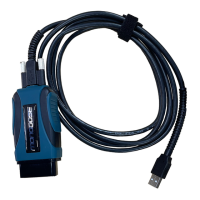

 To Next Page