1312
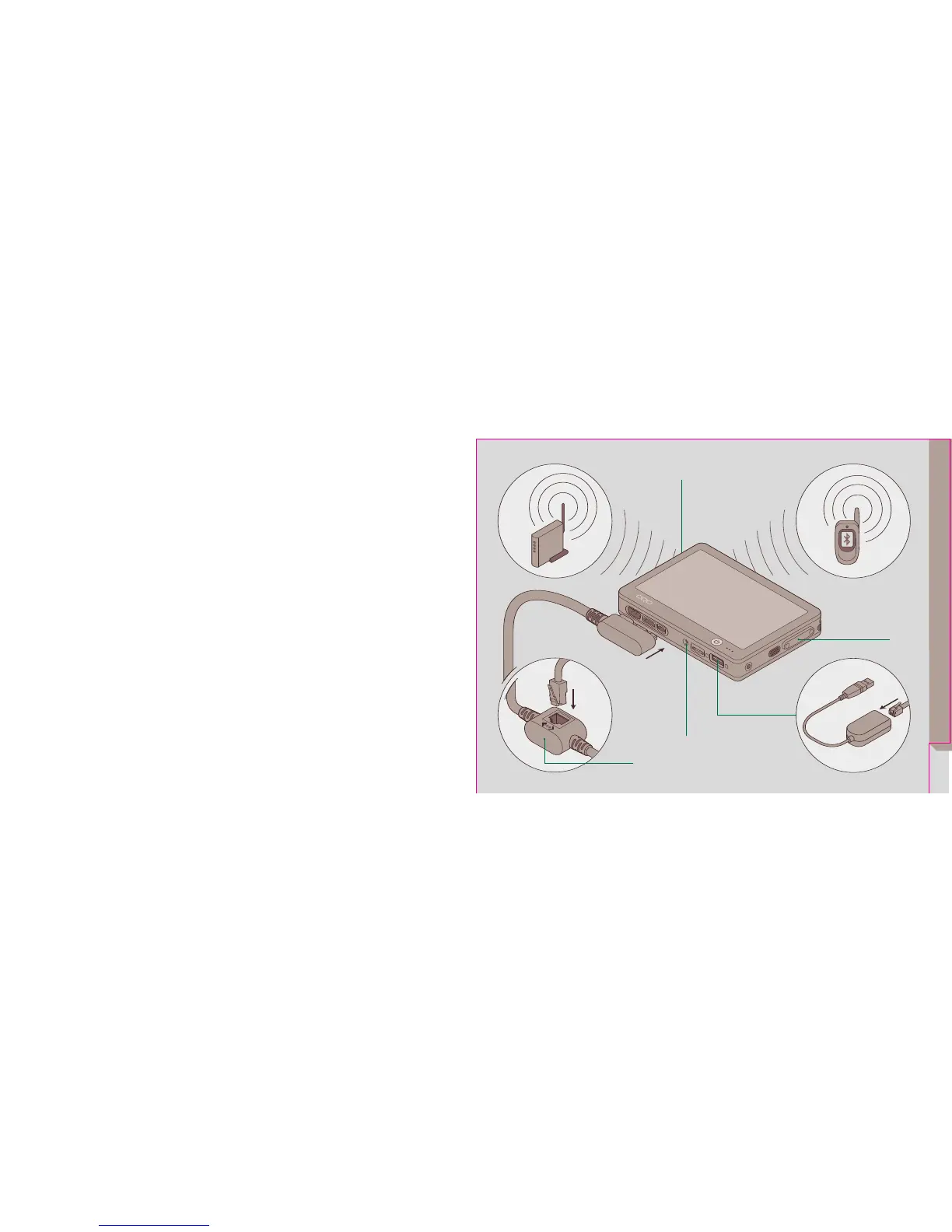
The model 01 provides several ways to
connect to a network:
• Use the integrated WiFi to connect to a
wireless network.
• Use the docking cable to attach an
Ethernet cable and connect to a Local Area
Network (LAN).
• Use the integrated Bluetooth and a
Bluetooth-enabled mobile phone to connect
to a wireless data network provider. (See
http://www.oqo.com/support/bluetooth for
more information).
• Use the USB port to attach a USB modem
and connect to a dial-up Internet Service
Provider (ISP).
part 6
connecting to a
network
For detailed information about configuring
network connections, see the Microsoft
Windows XP documentation.
a WiFi antenna
b Bluetooth antenna
c Docking cable Ethernet port
d USB port
e External WiFi antenna connector
(non-standard)
networking


 To Next Page