
 Need help?
Do you have a question about the ORANGE CRUSH 20RT and is the answer not in the manual?
Introduction to Orange's pioneering role and commitment to guitar amplification.
Essential safety instructions for operating the amplifier, including warnings about water and heat.
Verify voltage selector and fuse rating match the mains supply before use.
Remote switching between Clean and Dirty channels using a footswitch.
Instructions for connecting the IEC power cable to the AC Mains Input.
Location and replacement guidelines for the mains fuse.
Guidance on checking voltage settings for correct regional use.
Safe procedures for switching the amplifier on and off.
Details the 1-year manufacturer's warranty and how to register for an extended period.
Recommendation to keep spare fuses due to potential voltage-related damage.
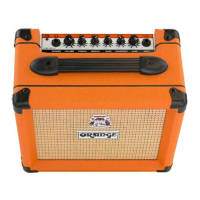
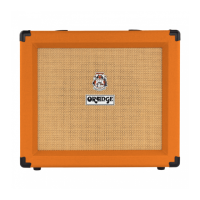
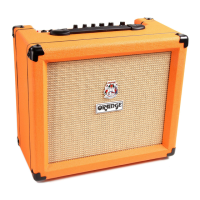
The Orange Crush 20RT is a compact and versatile guitar amplifier designed for both practice and performance, offering a range of features to shape your sound. This amplifier is a testament to Orange's long-standing commitment to quality and innovation in the guitar amplification industry, building on a legacy that began in 1968. Each unit undergoes rigorous testing to ensure durability and consistent performance, reflecting the brand's dedication to craftsmanship.
At its core, the Crush 20RT serves as a guitar amplifier, taking the signal from your instrument and amplifying it through its internal speaker. It's equipped with two distinct channels: Clean and Dirty, allowing for a wide spectrum of tones from pristine cleans to heavily distorted sounds. The amplifier also integrates a chromatic tuner and a digital reverb effect, enhancing its utility for musicians. Its compact size makes it ideal for home practice, while its robust construction ensures it can withstand the rigors of travel and live use. The inclusion of a cabinet-simulated headphone output means you can practice silently without disturbing others, and the Aux In allows you to jam along with external audio sources.
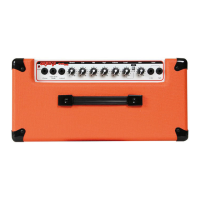
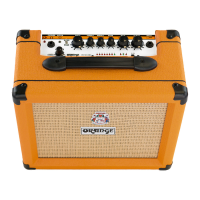
The Crush 20RT offers intuitive controls for shaping your guitar tone. The front panel features dedicated controls for each channel. For the Clean channel, you have a Volume control that adjusts the output level. Increasing this control can introduce a natural overdrive and breakup, adding character to your clean tones. The Dirty channel, on the other hand, features a Gain control that allows you to dial in a wide range of crunch and heavily distorted tones. Higher Gain settings will result in more distortion and saturation, which can be balanced with the Dirty Volume control to achieve the desired output level. It's important to note that if the Dirty channel's Gain is set to zero, no sound will be heard from that channel.
Tone shaping is further refined with a three-band EQ section, comprising Treble, Middle, and Bass controls. The Treble control adjusts the high-end response, with higher settings producing brighter tones. The Middle control influences the mid-range response; increasing it can create a "fatter" tone, particularly useful for thin-sounding pickups, while reducing it with higher Gain settings can achieve a "scooped" modern tone. The Bass control adjusts the low-end response, with higher settings yielding deeper tones.
The integrated Reverb control allows you to add a spatial effect to your sound. This control adjusts the reverb level for both channels, with higher settings producing longer trails. This feature adds depth and ambience, making your guitar sound fuller and more dynamic.
A built-in chromatic Tuner is a convenient feature for ensuring your instrument is always in tune. To engage the tuner, you simply depress the ON/OFF button. For silent tuning, it's recommended to set the amplifier's Volume to zero. The tuner display uses LEDs to indicate the note being played, with a green '#' LED illuminating for chromatic notes (e.g., F#). Arrow LEDs indicate whether the note is tuned too low ('>' arrow) or too high ('<' arrow), guiding you to adjust the string's pitch until the green 'OK' LED lights up, signifying perfect tuning.
The amplifier also includes a Clean/Dirty Selector Switch, which allows you to toggle between the two channels. This switch can be operated remotely using a latching footswitch (such as an Orange FS-1), which disengages the front panel switch when connected. An LED on the Orange FS-1 will illuminate when the Clean channel is selected, providing visual feedback.
For connectivity, the Crush 20RT features a standard 1/4" Input jack for your instrument, which should be connected using a quality shielded instrument cable. A stereo 1/4" Phones output allows for silent practice with headphones. This output also features Cabinet Simulation, making it suitable for connecting the amplifier directly to a mixer or recording console. It's advisable to avoid using headphones for extended periods at loud levels to protect your hearing. An Aux In, a 3.5mm stereo jack, enables you to connect MP3 players or other audio sources to play along with. The audio from the Aux In is summed to mono and is unaffected by the amp's controls, ensuring a consistent playback volume for your backing tracks.
Maintaining the Orange Crush 20RT involves a few key considerations to ensure its longevity and safe operation. The manual emphasizes the importance of reading and following all safety instructions, including not using the apparatus near water, cleaning it only with a dry cloth, and ensuring ventilation openings are not blocked. It also advises against installing the amplifier near heat sources.
Regarding power, the amplifier is designed with a voltage selector switch and mains fuse set at the factory for the intended country or region. Before connecting the IEC power cable, it is crucial to verify that the rated AC mains voltage on the product's rear panel matches your local AC mains voltage. If the amplifier is to be used in a different region, the voltage selector switch on the rear panel must be adjusted to the correct voltage, and the appropriate mains fuse must be fitted in the pull-out fuse tray located below the IEC mains input. The correct mains fuse rating is printed on the chassis, and only fuses of the same type and rating should be used. Different operating voltages also require different types of line cords and attachment plugs. If unsure, contacting an Orange Dealer is recommended.
The mains fuse is a critical safety component. If it blows, it must be replaced only with the exact rating specified for your region. If the mains fuse continues to blow after replacement, it indicates a potential issue, and you should contact your Orange dealer for assistance. Orange recommends that users keep a set of spare fuses, as they can fail due to inconsistent mains voltage.
Before switching on the amplifier, it is important to ensure that all volume controls are set to zero to prevent sudden loud noises. When not in use, the amplifier should be switched off. Unplugging the apparatus during lightning storms or when unused for long periods is also advised. Any servicing beyond fuse replacement should be referred to qualified service personnel, especially if the apparatus has been damaged, exposed to liquids, or is not operating normally.
Orange amplifiers come with a standard 1-year manufacturer's warranty covering manufacturing and component defects. This warranty can be extended by an additional year by registering the product online. However, the warranty is subject to the product being used for its intended purpose in suitable conditions, and misuse may void the warranty. For more information on maintenance, accessories, and spares, users are directed to the Orange Amps website.
 General
| Power Output | 20 Watts |
|---|---|
| Reverb | Yes |
| Headphone Output | Yes |
| Footswitch | Optional (for channel switching) |
| Technology | Solid State |
| Speaker | 8″ Voice of the World |
| Channels | 2 (Clean and Dirty) |
| Controls | Reverb |
| Tuner | Integrated Chromatic Tuner |


 To Next Page