5
Wi-Fi conguration
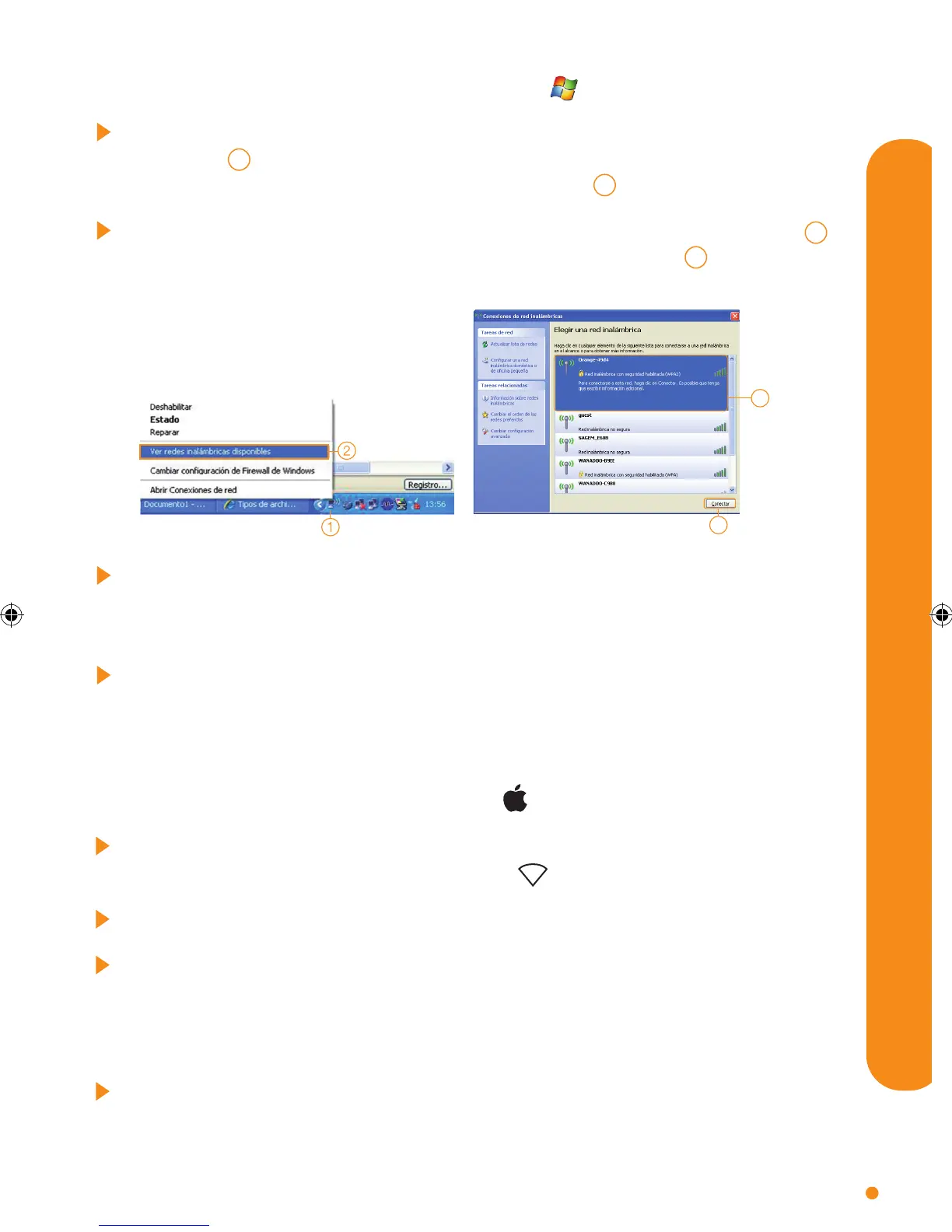
Select the wireless network that corresponds to the name “red Wi-Fi (SSID)” 3
that appears on the sticker of your router and click “Connect” 4 .
Following this, a screen appears asking for the Wi-Fi security code. Insert
the 8-digit security code (in capital letters and no spaces) which appears on
the router sticker.
After a few seconds, you will be connected via Wi-Fi to the Livebox multimedia
router. Open your Internet browser and go to orange.es/miprimerapagina.
Follow the steps and nalise your installation
2.1.- manual conguration with Windows
Place the cursor on the wireless network icon which appears in the bottom
menu bar 1 of the Desktop. Once on top of it, click with the right mouse
button and select “See available wireless networks” 2 .
4
3
2.2.- manual conguration with MAC
Click on the wireless network icon which appears in the top right menu bar of
the desktop. Then open the menu “Airport” and click on “Activate Airport”.
Open the menu “Airport” again and select the name of your router.
Following this, a screen appears asking for the Wi-Fi security code. Insert the
8-digit security code (in capital letters and no spaces) which appears on the
router sticker. Tick the box “Remember this network”, click on “OK” and when
the icon on the menu bar changes colour, you will be connected via Wi-Fi.
Open your Internet browser and go to orange.es/miprimerapagina. Follow the
steps and nalise your installation.
LIVEBOX ARCADYAN ENE ING.indd 5 22/01/14 18:37


 To Next Page