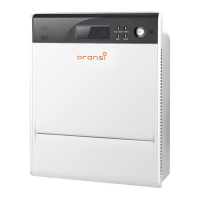
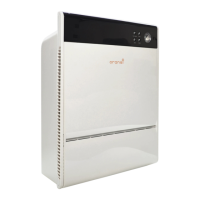
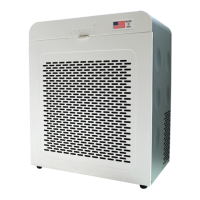
The Oransi OV200 is an air purifier designed to improve indoor air quality by removing fine air particles, gases, and odors. It is intended for use in various indoor environments such as bedrooms, living spaces, offices, and classrooms. The device operates on a 120V 60Hz power supply.
Function Description
The OV200 air purifier employs a multi-stage filtration system to clean the air. This system includes a Pre-Filter, a HEPA Filter, and an Activated Carbon Filter.
- Pre-Filter: This filter is integrated with the HEPA Filter and is designed to capture larger particles like dust, preventing them from reaching and clogging the more sensitive filters.
- HEPA Filter: The HEPA filter is crucial for removing microscopic particles. It effectively captures particles as small as 0.3 microns, including fine dust, smoke, pollen, bacteria, and mold.
- Activated Carbon Filter: This filter is composed of a vast system of highly absorbent molecular-sized pores. Its primary function is to remove gases, light odors, and Volatile Organic Compounds (VOCs) from the air.
The air purifier draws air in through its front sides and releases cleaned air from the top, allowing for flexible placement near walls without obstructing airflow.
Usage Features
The OV200 offers several user-friendly features for controlling and monitoring air quality.
- Control Panel: The device features a top-mounted user interface with touch buttons for various functions, including Filter Reset, Timer, Speed, Night Mode, and Power.
- Remote Control: A remote control is also provided for convenient operation from a distance. The remote includes buttons for On/Off, Night Mode, AUTO Mode, Kid Lock, Fan Speed, and Timer. Replacement remotes can be purchased from Oransi.com.
- Fan Speed Settings: The OV200 has three distinct fan speeds, allowing users to adjust the purification intensity based on their needs and the room size.
- Auto Mode: In Auto Mode, the unit intelligently adjusts its fan speed based on the readings from the Air Quality Sensor (AQS). The sensor requires approximately 10 minutes to warm up and reach maximum sensitivity. For individuals sensitive to allergies, it is recommended to run the air purifier on the highest acceptable fan speed.
- Night Mode: Activating Night Mode reduces the fan speed to its quietest level, ensuring minimal disturbance during sleep. This mode also turns off the air quality display, though the blue lights on the user interface remain on but are dimmed.
- Timer Function: The air purifier can be set to operate for specific durations using the timer function. Available settings are 1, 2, 4, and 8 hours, after which the unit will automatically turn off.
- Kid Lock: This feature prevents accidental changes to the settings. It can be activated by simultaneously pressing and holding the Timer and Speed buttons on the control panel. To unlock, the same action must be performed again.
- Air Quality Sensor (AQS): The AQS continuously monitors and displays the air quality using a three-color code system:
- Green: Indicates good air quality (0-75 ug/㎡ particle count).
- Yellow: Indicates moderate air quality (76-150 ug/㎡ particle count).
- Red: Indicates poor air quality (>150 ug/㎡ particle count).
This visual feedback helps users understand the current air quality in their environment.
Maintenance Features
Regular maintenance is essential to ensure the optimal performance and longevity of the Oransi OV200.
- Cover and Housing Cleaning: The unit's exterior should be cleaned only when necessary, especially in dirty environments. Dust can be wiped away with a soft, dry or damp cloth. Harsh cleaners or chemicals should not be used.
- Filter Replacement Indicator: The air purifier is equipped with a filter reset indicator that illuminates after 2,000 hours of operation. This serves as a reminder to check and potentially replace the HEPA and carbon filters. The Pre-Filter, being part of the HEPA filter, is replaced along with it.
- Filter Reset Button: After replacing the filters, the "Filter Reset" button must be pressed to reset the internal counter and turn off the indicator light. The button is described as "touchy," requiring a specific technique: pressing with the thumb and rotating it back and forth to hit the "sweet spot" for a successful reset.
- Replacing Filters: The process involves turning off and unplugging the unit, then pulling the front cover from the bottom. Two swivel tabs at the top of the filter assembly need to be slid to release the filters. The carbon filter is installed first, followed by the HEPA filter with its foam side facing the user. To reattach the cover, it should be inserted at the top into four openings, then rotated to seat it at the bottom.
- Pre-Filter Maintenance: The Pre-Filter is made of a foam material and can be wiped or lightly vacuumed to remove accumulated dust. It is designed to be replaced when the HEPA filter is replaced.
- Air Quality Sensor (AQS) Maintenance: If the AQS consistently shows poor air quality, it may indicate a dirty lens inside the sensor. The lens can be wiped with a clean cloth or cleaned using a can of air (typically used for computer keyboards) to remove accumulated dust. If the sensor provides false readings, vacuuming around the sensor's air inlet or spraying it with a can of air can help remove dust.
The OV200 is designed for indoor use on a level surface. Users are advised to place the unit where they spend most of their time and adjust the fan speed for comfort. For larger areas, a higher fan speed can be used when the room is unoccupied, then lowered upon return. It is important to ensure that curtains or other objects do not block the air intake or exit points.

 Need help?
 General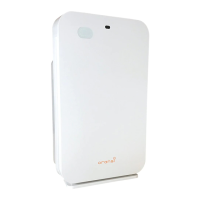

 To Next Page