This document is the user manual for the Oraolo M91 Waterproof Wireless Speaker.
The Oraolo M91 is a waterproof wireless speaker designed for portable use. It features an IPX5 water resistance rating, making it suitable for various environments where it might be exposed to splashes or light rain. The speaker is equipped with a TPU handle for ultra-portability. It delivers high-quality crystal clear sound with louder volume and enhanced bass. The M91 incorporates the latest wireless technology for connectivity and offers a long battery life, backed by a lifetime guarantee. It supports multiple playback modes including wireless, Aux-in, and TF card mode.
Important Technical Specifications:
- Model No: M91
- Speaker Driver: 4Ω
- Sensitivity: 82 ± 2dB
- Output Power: 12W x 2
- Speaker Unit Size: 3" x 2
- Charging Time: Approximately 4-5 hours
- Product Size: 278 x 119 x 125mm
Usage Features:
Controls:
The speaker features several controls for easy operation:
- Volume + / Next Track Button:
- Long press: Skips to the next track.
- Short press: Increases volume.
- Volume - / Last Track Button:
- Long press: Skips to the last track.
- Short press: Decreases volume.
- Power / Play/Pause / Answer/Refuse Calls Button (▷II):
- Long press: Turns the speaker on or off.
- Short press: Plays or pauses audio.
- Short press (during an incoming call): Answers or refuses calls.
- Wireless Pairing / Mode Switch Button (M):
- Long press: Initiates wireless pairing.
- Short press: Switches between different modes (Wireless, Aux-in, TF Card).
Ports and Indicators:
- AUX-in Jack: For connecting external audio devices via a 3.5mm cable.
- Charging LED Indicator: A red LED that indicates charging status.
- Input DC-5V: Micro USB port for charging the speaker.
- TF Card Slot: For inserting a TF card to play music directly.
Charging the Wireless Speaker:
- Ensure the speaker is turned off before charging to prevent abnormal operation. Do not charge the unit when it is powered on.
- Plug the small micro USB pin into the charger port on the rear side of the speaker.
- Connect the standard USB 2.0 plug on the other end of the cable to any standard USB port (e.g., computer or USB charger).
- The red LED indicator will turn on automatically during charging. It will turn off once the speaker is fully charged.
Wireless Mode:
- To turn on the speaker, long press and hold the "▷II" button.
- The M91 will enter pairing mode, and the LED indicator will flash white.
- On your device (phone, PC, iPad), go to "Settings" and select "M91" from the list of available devices to pair.
- Once successfully paired, the power indicator will turn blue, and a prompt sound will be heard.
- Handling Calls:
- When an incoming call is received, short press the "▷II" button to answer.
- To hang up a call, short press the "▷II" button again.
Wireless Mode Notes:
- If the speaker is in low power or a weak state, it might not connect to devices. Charge the speaker immediately before use in such cases.
- If the connected audio device exceeds a connection distance of 10 meters, the signal will be disconnected. The speaker will automatically reconnect when brought closer.
AUX-IN Mode:
- Connect a 3.5mm audio cable to the AUX-in jack on the speaker and to your external audio device.
- The LED indicator will turn red, indicating that the speaker is in Aux-in mode.
- In AUX-IN mode, you cannot answer incoming calls via the M91 speaker.
- Note: When the AUX-IN jack is connected, the speaker will automatically switch to AUX-IN mode. To switch back to wireless mode, short press the "M" button.
TF Card Mode:
- Insert a TF card into the TF card slot on the speaker. The speaker will automatically start playing music from the card.
- In TF card mode, you cannot answer incoming calls via the M91 speaker.
- Note: When a TF card is inserted, the speaker will automatically turn on TF card mode. To switch to wireless mode, short press the "M" button.
Care and Maintenance:
- To properly protect the device, long press the "▷II" button for 2 seconds to turn it off when not in use.
- Avoid exposing the speaker to high temperatures (above 40 degrees Celsius), such as inside hot cars or under direct sunlight. High temperatures can damage the surface of the speaker and reduce its battery life.
Limited Warranty:
Oraolo products are warranted for replacement or repair of any defective part (upon inspection by Oraolo) under normal use within 18 months of the original purchase date.
The warranty does not cover:
- Appearance items or accessories.
- Human damage caused by leaking batteries.
- Damage to the product or any part thereof due to misuse or negligence.
- Invalidation if the product or parts have been incorrectly installed, repaired, or altered by anyone other than the Oraolo Service department.
This warranty grants specific legal rights, and you may have other rights that vary by state. Some states do not allow the exclusion or limitation of incidental or consequential damages or limitations on the duration of an implied warranty, so these exclusions and limitations may not apply to you.
For service, warranty, or product information, please contact: oraolo_eddie@126.com.
It is recommended to save the warranty card along with the original dated proof of purchase for your records and for customer service.

 Need help?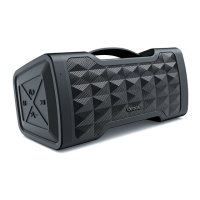

 To Next Page
 General